Associate II
April 4, 2025
Solved

How to debug STM32 MCU directly

  • April 4, 2025
  • 2 replies
  • 788 views

Hello. 

I'd like to debug STM32H723ZG Nucleo Board, connecting directly with PC. 

Instead of the basic USB-mini cable, is it possible to cut and work on the USB cable to separate it into 5V, DP, DM, and GND, and then directly connect it to the board for debugging?

In the User Manual, 
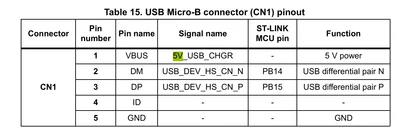
the pins for DP and DM are PB14 and PB15.

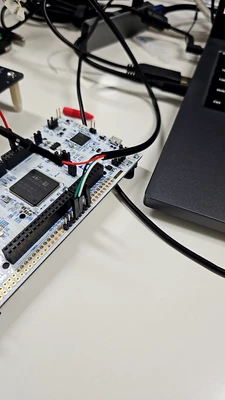
I attatched the screenshot of manual and my hardware setup. 

thanks.
adam12_1-1743735316106.png


adam12_0-1743735298841.png


Best answer by KnarfB

> Then, does the manual’s statement that CN1’s DP and DM are connected to PB14 and PB15 mean that these pins belong to the ST-link MCU rather than the STM32 MCU?

Yes, as written in the head line of that table. See also the board schematics available from NUCLEO-H723ZG - STM32 Nucleo-144 development board with STM32H723ZG MCU, supports Arduino, ST Zio and morpho connectivity - STMicroelectronics

For using USB on a STM32 MCU itself, not the ST-LINK, see 

Introduction to USB with STM32 - stm32mcu

hth

KnarfB

2 replies

KnarfB
Super User
April 4, 2025

Referring to UM2407 User manual STM32H7 Nucleo-144 boards (MB1364)

there is STLINK-V3E USB Micro-B connector (CN1) on top for the ST-LINK debugger and 

USB OTG_FS connector (CN13). You can use USB on the STM32H7 for your own purposes, but not for debugging. Debugging is via the SWD interface which is conntected to the ST-LINK debug chip on top connected to CN1. 

For firmware updates (not debugging), STM32H723ZG can use USB DFU with the help of internal ROM code (System Memory Boot).

hth

KnarfB

adam12Author
Associate II
April 7, 2025

Then, does the manual’s statement that CN1’s DP and DM are connected to PB14 and PB15 mean that these pins belong to the ST-link MCU rather than the STM32 MCU?

What I intended to do was to perform the same operation by directly connecting to the MCU’s pins instead of using CN1, after cutting the USB cable into Vcc, DP, DM, and GND.

Thanks.

KnarfB
KnarfBBest answer
Super User
April 7, 2025

> Then, does the manual’s statement that CN1’s DP and DM are connected to PB14 and PB15 mean that these pins belong to the ST-link MCU rather than the STM32 MCU?

Yes, as written in the head line of that table. See also the board schematics available from NUCLEO-H723ZG - STM32 Nucleo-144 development board with STM32H723ZG MCU, supports Arduino, ST Zio and morpho connectivity - STMicroelectronics

For using USB on a STM32 MCU itself, not the ST-LINK, see 

Introduction to USB with STM32 - stm32mcu

hth

KnarfB

AScha.3
Super User
April 4, 2025

Hi,

>I'd like to debug STM32H723ZG Nucleo Board, connecting directly with PC. 

Ok, we all do this. :)

>is it possible to cut and work on the USB cable to separate it into 5V, DP, DM, and GND, and then directly connect it to the board for debugging?

What is more "direct" than the USB cable direct to PC ?? separate 5V, gnd...change nothing, except: it might be no more a working USB connection. So how you want improve the micro-USB --- USB-A cable ?

"If you feel a post has answered your question, please click ""Accept as Solution""."
adam12Author
Associate II
April 7, 2025

What I meant by "direct" was not to utilize the USB cable’s connector, but rather to cut the cable and separate its internal wires (Vcc, DP, DM, GND) to connect each individually.


Ultimately, I wanted to verify whether the USB cable would operate properly using this method.

Thanks.