
Associate II
March 30, 2026
Solved

NUCLEO-N657X0-Q: Connection lost during ST-Link Upgrade

  • March 30, 2026
  • 2 replies
  • 134 views

Hello,

I am currently experiencing some difficulties using the NUCLEO-N657X0-Q board.

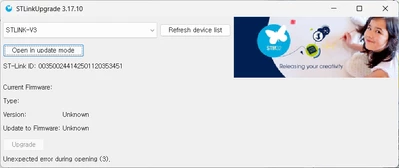
I am using STLinkUpgrade v3.17.10, and the device ID is correctly recognized as 003500244142501120353451, as shown in the attached image.

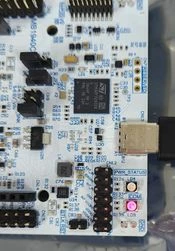
However, when I click "Open in update mode," the PWR_STATUS LED on the Nucleo board turns off and the connection is dropped.

I am not sure if this specific update is critical for operation, but I would greatly appreciate any guidance or help to resolve this issue.
스크린샷 2026-03-30 173607.pngKakaoTalk_20260330_173520271.jpg

Best answer by KDJEM.1

Hello @Student_0726  and welcome to the community;


Which STM32CubeProgrammer version are you using?

Could you please share the steps that you are flowed.


Thank you.

Kaouthar

2 replies

KDJEM.1
KDJEM.1Best answer
Technical Moderator
March 30, 2026

Hello @Student_0726  and welcome to the community;


Which STM32CubeProgrammer version are you using?

Could you please share the steps that you are flowed.


Thank you.

Kaouthar

To give better visibility on the answered topics, please click on Accept as Solution on the reply which solved your issue or answered your question.
Associate II
March 30, 2026

@KDJEM.1 Thank you for the reply.


I didn't have a standalone STM32CubeProgrammer installed. I only had v2.2.3 (included with CubeIDE) and v2.2.4 (installed via update) together within the plugins folder.


I tried it in another environment where the STM32CubeProgrammer GUI is installed, and it solved the problem!

Thank you for your help!

스크린샷 2026-03-30 231508.png