Associate II
February 11, 2026
Solved

Partly disabled conflict in RTC

  • February 11, 2026
  • 2 replies
  • 215 views

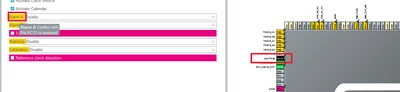
I am configuring the RTC and using the user button on NUCLEO-H563ZI, but it is not working as expected. When I check the configuration in .ioc, I see that yellow signal in the RTC section. I have checked it and do not understand what is happening.
Could someone guide me about that warning and how it affects the operation of the RTC?

Thank you in advance.
 

JEngineerHW_0-1770831494273.png


Best answer by mƎALLEm

Hello,

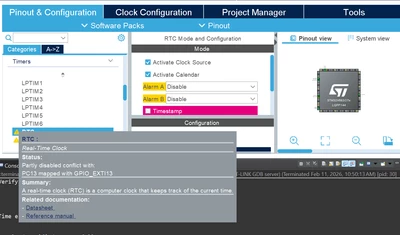
Move your mouse cursor on that Yellow part it will show you what the problem is:

mALLEm_0-1770836230185.png

For example for Alarm A output it conflicts with PC13 used for the user button. If you won't use ALARM A nor ALARM B outputs, go ahead there will no issue with your application.

Hope that helps.

2 replies

Explorer II
February 11, 2026

PC13 is an output from the RTC for various purposes [Ref RM0481 Sec 46.3.3]. It's configurable, but it you might be enabling it with one of your RTC options ["Activate Clock Source" maybe?].

The Nucleo allows the B1 button to be re-assigned to PA0 via solder-bridges [Ref UM3115 Sec 11.2], which might be the least-resistance path here.

Associate II
February 12, 2026

Thank you very much for the information.
It helps me a lot to know that I can configure the user button to another GPIO.

mƎALLEm
mƎALLEmBest answer
Technical Moderator
February 11, 2026

Hello,

Move your mouse cursor on that Yellow part it will show you what the problem is:

mALLEm_0-1770836230185.png

For example for Alarm A output it conflicts with PC13 used for the user button. If you won't use ALARM A nor ALARM B outputs, go ahead there will no issue with your application.

Hope that helps.

"To give better visibility on the answered topics, please click on ""Accept as Solution"" on the reply which solved your issue or answered your question."
Associate II
February 12, 2026

Thank you very much for the information.
As you mentioned, I agree with you. By not using alarms, the PC13 pin IS NOT AFFECTED. I have checked the configuration and had to activate the 32.768 KHz external clock source (as shown in the image). I have now tested it and NOTICED THAT IT WORKS VERY WELL.

Thanks for your help.

JEngineerHW_0-1770855158486.png