
Associate II
August 1, 2024
Question

Setting up the LSE clock in STM32L431RCTX

  • August 1, 2024
  • 2 replies
  • 1428 views

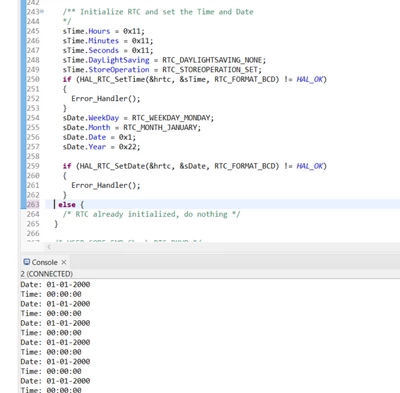
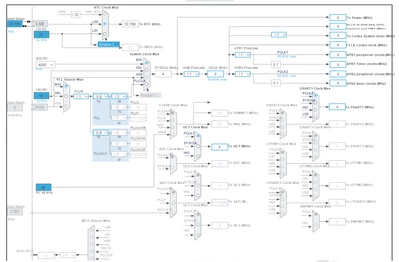
I have setup the RTC LSI on the board and got the serial print date and time. and now i wanted to get the RTC LSE clock and serial print clock values. i configured the clock configuration in LSE by following the same steps as i did in LSI, but it didn't work. It prints like this.
Thenuk__a_0-1722517262394.png


Thenuk__a_0-1722516066223.png


2 replies

Andrew Neil
Super User
August 1, 2024
A complex system that works is invariably found to have evolved from a simple system that worked.A complex system designed from scratch never works and cannot be patched up to make it work.
Thenuk__aAuthor
Associate II
August 1, 2024

First, i will initialize the time and then the clock is set up and the count continues. It will show up on the serial monitor of the CubeIDE. This one I have done this by enabling LSI on the clock configuration. Now I wanted to do it by enabling LSE. The reason I can't use LSI is because there is a time shift in the LSI and I hope that there is no time shift it LSE. 


Here by I have attached how I did in LSI and I wanted to do similarly in LSE

Thenuk__a_0-1722518621966.png

Thenuk__a_1-1722518679327.png


TDK
Super User
August 1, 2024

Is this custom hardware? Perhaps the LSE design is insufficient. Debug your code and find out if the LSE gets successfully started.

"If you feel a post has answered your question, please click ""Accept as Solution""."
Thenuk__aAuthor
Associate II
August 1, 2024

Yes it's custom. can i know what u mean by LSE design insufficient ? 

TDK
Super User
August 1, 2024

Incorrect load caps. Traces too long. That sort of thing.

Perhaps take a look at

cd00221665-oscillator-design-guide-for-stm8af-al-s-stm32-mcus-and-mpus-stmicroelectronics.pdf

"If you feel a post has answered your question, please click ""Accept as Solution""."