
Associate
May 13, 2025
Solved

STM32F070F6P6 is not connecting to st-link

  • May 13, 2025
  • 6 replies
  • 809 views

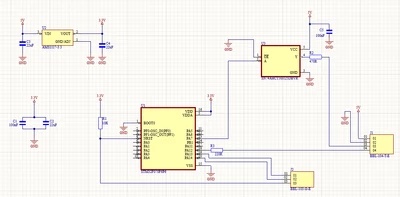
I have recently ordered my custom board from JLCPCB with STM32F070F6P6. When the board arrived to me, I tried to connect the CPU to ST-LINK V2, but it would not connect. I have checked all the connections on the board and everything seems to be good. I have also checked the voltage with an oscilloscope, and again it seems to be good - the voltage is stable 3.3V. I have completely no idea why it can not connect to ST-LINK. I am attaching below the picture of the schematic of my board. I am connecting SWDIO (PA13) and SWCLK (PA14) via J2 01 and 02 pins. The power comes from ST-LINK (3.3V from the voltage regulator). I tried with and without RESET and nothing changed. Am I doing something wrong?
 

KarolW_0-1747164575309.png


Best answer by Tesla DeLorean

>> The only idea that I have for now is that the ICs were somehow damaged during an assembly in JLCPCB, but I am not sure about that.

That's probably harder than you'd imagine. More likely a board or electrical issue. Double check orientation and wiring

Perhaps a high resolution, large, in-focus, picture of the board. Show connectivity with ST-LINK

6 replies

STTwo-32
Technical Moderator
May 13, 2025

Hello @KarolW and welcome to the ST Community.

Could you please give a picture of your ST-LINK V2.

Best Regards.

STTwo-32

Peter BENSCH
Technical Moderator
May 13, 2025

In addition to the request of @STTwo-32: the original ST-LINK/V2 do not output a voltage of 3.3V to supply a target, but only check whether the target voltage is correct.

But first of all, to assess your problem, you need the image of at least the back of the ST-LINK/V2.

Regards
/Peter

Tesla DeLorean
Guru
May 13, 2025

The 3.3V needs to go to Pin 1 or 2 (VTarget) of the ST-LINK/V2 20-pin Header

This is in addition to the SWDIO, SWCLK, and GND you have from your header

STM32 Cube Programmer should be reporting this 3.3V being present.

If you have a counterfeit ST-LINK (gum stick), then ST is unlikely to support.

The NRST pin needs to be connected for "Connect Under Reset" to be viable.

Tips, Buy me a coffee, or three.. PayPal VenmoUp vote any posts that you find helpful, it shows what's working..
KnarfB
Super User
May 13, 2025

NRST is poorly connected. See for reference schematics:

AN4325
Application note
Getting started with STM32F030xx and STM32F070xx series hardware development

hth

KnarfB

KarolWAuthor
Associate
May 17, 2025

Here is my ST-LINK V2 (the first picture), but I guess it is a counterfeit ST-LINK, but according to that I ordered a new ST-LINK. It is STLINK-V3MINIE (the second picture) and this is the original one. I connected that in the same way, and I am facing the same issue. The microcontroller on my board connected via STLINK-V3MINIE is not responding. It is really strange, because I have another board from my previous project, where I have a very similar circuit and there is STM32F030F4P6 and there everything is good - the microcontroller responds via these STLINKs. The only idea that I have for now is that the ICs were somehow damaged during an assembly in JLCPCB, but I am not sure about that.

20250518_000937.jpg

20250518_001008.jpg

Tesla DeLorean
Tesla DeLoreanBest answer
Guru
May 18, 2025

>> The only idea that I have for now is that the ICs were somehow damaged during an assembly in JLCPCB, but I am not sure about that.

That's probably harder than you'd imagine. More likely a board or electrical issue. Double check orientation and wiring

Perhaps a high resolution, large, in-focus, picture of the board. Show connectivity with ST-LINK

Tips, Buy me a coffee, or three.. PayPal VenmoUp vote any posts that you find helpful, it shows what's working..
KarolWAuthor
Associate
June 13, 2025

Sorry for the late response. After many re-checks of almost everything that could cause the problem, I have finally solved it. As @Tesla DeLorean mentioned, it was an electrical issue. I made a very *** connection. It was due to too long and too weak wires between my PCB and ST-LINK. I used shorter wires. The second reason was that counterfeit ST-LINK was disconnecting at totally random moments. Now I know that buying any counterfeits is a bad idea.
Thank you all.