
Associate
November 4, 2024
Solved

STM32L1 Disco: Can't update ST-Link - unknown firmware version

  • November 4, 2024
  • 2 replies
  • 1579 views

Hello community,

I can't debug my program on my STM32L1 Disco because of the attached message.
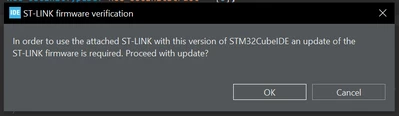
JohannesM_1-1730719569809.png

This in itself is not the problem, the problem is that I can't auto-update because it doesn't know what firmware is installed on the board itself!
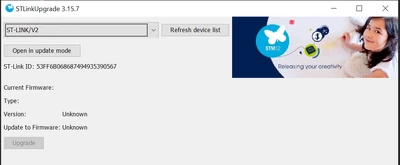
JohannesM_0-1730719553965.png

What can I do or what am I doing wrong?

I am using the latest CubeIDE (1.16.1).


Thanks in advance, you are my last hope.


Best regards.

Johannes


Best answer by Andrew Neil

What happens if you click 'Open in Update Mode' ?


Does STM32CubeProgrammer do the same?

2 replies

Andrew Neil
Andrew NeilBest answer
Super User
November 4, 2024

What happens if you click 'Open in Update Mode' ?


Does STM32CubeProgrammer do the same?

A complex system that works is invariably found to have evolved from a simple system that worked.A complex system designed from scratch never works and cannot be patched up to make it work.
JohannesMAuthor
Associate
November 6, 2024

It used to say that the card was not in configuration mode. I reset it and rebooted, but did not unplug it. When I unplugged it, it worked. I did the upgrade, wrote a little test program and it works.

Thank you very much.

Andrew Neil
Super User
November 6, 2024

You're welcome.

Note that everyone can see all posts - there's no need to repeat a post.

You can mention multiple people in a post using 

A complex system that works is invariably found to have evolved from a simple system that worked.A complex system designed from scratch never works and cannot be patched up to make it work.
mƎALLEm
Technical Moderator
November 4, 2024

Hello,

Disconnect and reconnect your USB cable and try again.

Did you try with ST-LINK firmware upgrade tool?


"To give better visibility on the answered topics, please click on ""Accept as Solution"" on the reply which solved your issue or answered your question."
JohannesMAuthor
Associate
November 6, 2024

It used to say that the card was not in configuration mode. I reset it and rebooted, but did not unplug it. When I unplugged it, it worked. I did the upgrade, wrote a little test program and it works.

Thank you very much.