
Associate III
October 10, 2024
Solved

STM32L552 Nucleo board: HSE error

  • October 10, 2024
  • 6 replies
  • 8997 views

Hi, I am trying to program a STM32L552ZEQ to use HSE instead of the default clock, but I am doing something wrong.

I attach the reference manual, as well as the user manual for my specific board. In the user manual, on page 24, it is stated that there is a HSE with 16 MHz clock frequency. I try to enable this by setting the HSEBYP and HSEON bits in `RCC->CR`, like so

```

RCC->CR |= RCC_CR_HSEBYP_Msk | RCC_CR_HSEON_Msk;
while(!(RCC->CR & RCC_CR_HSERDY_Msk));

```

Using GDB I observe the change to the register value happening as expected. After setting it, I am waiting for the hardware to set the HSERDY bit, indicating that everything went OK. But this bit is never set. I never seem to get out of this while-loop. I observe the bit not being set using e.g. GDB.

I looked at the reference manual and saw that MCO is fed to OSC_IN, which seems correct.

diagr.png

I then thought that it appears as if the MCO can be connected to several different sources, one of which being the HSE. I look at the reference manual, and find this

Screenshot from 2024-10-10 16-02-41.pngScreenshot from 2024-10-10 16-02-28.png

I modify my code to configure MCOSEL to have the value `0100`, to indicate that we should output the HSE to the MCO pin. I am using the CMSIS header files to access the correct addresses, and it seems as if the define for MCOSEL_2 carries the right value (4).

```

// the define is in the CMSIS header-file, but I paste it here for clarity
#define RCC_CFGR_MCOSEL_2 (0x4UL << RCC_CFGR_MCOSEL_Pos) /*!< 0x04000000 */
RCC->CFGR |= RCC_CFGR_MCOSEL_2;
```
This seems to make no difference at all, and I am now a bit unsure of how to progress.
 
Thanks in advance for any tips that might make me able to figure this out.
Best answer by Chris21

It looks like you have done the correct things with the hardware and software.

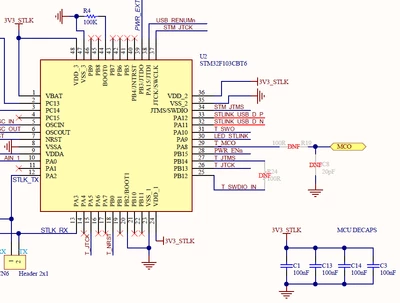
I wonder about R19 on the ST-LINK:

Chris21_0-1728661162724.png

It looks like that would need to be present.


6 replies

krookAuthor
Associate III
October 10, 2024

I should add that these clock configurations are the first things that are happening inside my main function.

Andrew Neil
Super User
October 10, 2024

I suggest that you start by doing this with CubeMX.

Even if you don't want to go forward with CubeMX, it should give you a starting point to work from ...

A complex system that works is invariably found to have evolved from a simple system that worked.A complex system designed from scratch never works and cannot be patched up to make it work.
krookAuthor
Associate III
October 10, 2024

I am not sure how to do it with CubeMX either, and I've failed to install CubeMX when I've tried. I'd rather understand why my code doesn't work. I don't think there is a lot missing, I've just misunderstood some minor detail.

Andrew Neil
Super User
October 10, 2024

@krook wrote:

In the user manual, on page 24, it is stated that there is a HSE with 16 MHz clock frequency. .


It also states that, by default, this is not implemented:

AndrewNeil_0-1728569939656.png

AndrewNeil_1-1728570015518.png


So have you made the necessary hardware changes?

A complex system that works is invariably found to have evolved from a simple system that worked.A complex system designed from scratch never works and cannot be patched up to make it work.
krookAuthor
Associate III
October 10, 2024

I am not sure that I have. I've ever made modifications like this, where can I read more about that? I thought I could implement it in software.

Chris21
Associate II
October 10, 2024

I would connect the solder bridges to use the 8 MHz MCO from the ST-LINK.

Andrew Neil
Super User
October 10, 2024

I think the default hardware configuration should be that the solder bridges are set for the 8MHz MCO from the ST-Link?

Correction: UM says it isn't (credit @Chris21 )

A complex system that works is invariably found to have evolved from a simple system that worked.A complex system designed from scratch never works and cannot be patched up to make it work.
Chris21
Associate II
October 10, 2024

Chris21_0-1728573444753.png


Chris21
Chris21Best answer
Associate II
October 11, 2024

It looks like you have done the correct things with the hardware and software.

I wonder about R19 on the ST-LINK:

Chris21_0-1728661162724.png

It looks like that would need to be present.


krookAuthor
Associate III
October 12, 2024

@Chris21, that does indeed seem relevant. May I ask where you found this diagram? For my own future reference in trying to figure these things out.


When I look at my board, there is indeed what I interpret as an OFF solder bridge there. I believe that I should put another 0-Ohm resistor there to make the current be able to pass. This was less obvious to me as R19 was not mentioned in the two documents I looked in. It makes sense that this detail should be found in the ST-LINK documentation, but I only considered that my STM-board was misconfigured.

sb4.png

Thanks,

Robert

krookAuthor
Associate III
October 12, 2024

I misclicked and accepted an answer while I was trying to figure out how to edit my comment above (let's hope that R19 is the only missing piece of this puzzle, and that that answer is indeed the correct one!).


I was going to add a question, what does 100R mean? It is stated next to R19 in the diagram @Chris21 

Chris21
Associate II
October 14, 2024

The schematic for the board is on ST's web site: https://www.st.com/en/evaluation-tools/nucleo-l552ze-q.html, click on the CAD resources tab.

100R denotes a 100 ohm resistor, but 0 ohms (or a bit of solder) should work.

Did you check with an oscilloscope to see if there's a clock signal at SB143?


krookAuthor
Associate III
October 17, 2024

I will have to return to this thread when I've gotten my hands on those components. Thanks for your help so far!

mƎALLEm
Technical Moderator
October 17, 2024

Hello @krook ,

Just to remind you that even with STLINK-V3 (the version on STM32L552ZEQ Nucleo board), the MCO is configurable and the default config is generated from HSI (HSI/2 = 8MHz) not the HSE crystal of the STLINK.

So if you are looking for an accurate clock source, you need to configure your STLINK. Please read this article.

"To give better visibility on the answered topics, please click on ""Accept as Solution"" on the reply which solved your issue or answered your question."