Associate
December 6, 2024
Solved

SVW not working correctly on NUCLEO-H7S3L8 when correct CPUCLK is set

  • December 6, 2024
  • 1 reply
  • 701 views

Hello,

we wanted to run some timing tests with USB on the NUCLEO-H7S3L8 together with the SVW (Serial Wire Viewer).

CPUCLK is set to 600 MHz from the CDC_Standalone example, Trace and Debug is enabled.

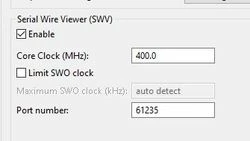
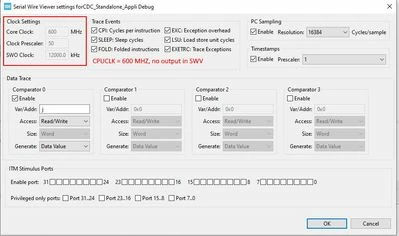
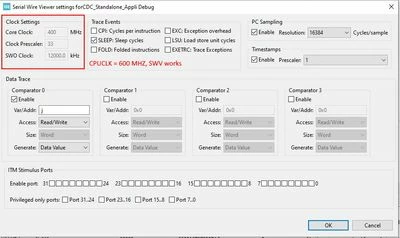
SWV always fails if the 600 MHz are set in the Debugger configuration but works if set to 400 MHz, see attachments below.

Breakpoins and reading variables works with both settings, but SWV fails to give any output is set to the correct frequency of 600 MHz CPU Clock.

IDE: 1.161.
CubeMX: 6.12.1
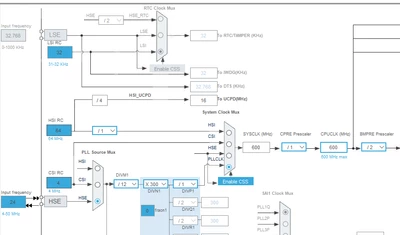
 

Basti__0-1733491270480.png

Basti__1-1733491312180.jpeg

Core Clock set to 600 MHz, SWV Core Clock set to 600 MHz ; no entries.JPG

Core Clock set to 600 MHz, SWV Core Clock set to 400 MHz ; works.JPG


Best answer by Basti_

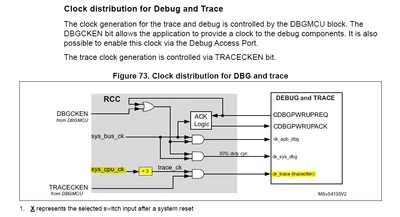
To answer my own question: We figured it out.
The MHZ in the debugger are not the CPUCLK, but the clock speed of the debug interface: trace_ck.
The information can be found in the clock tree or on description of the clock distribution for Debug and Trace.

Basti__1-1733496162736.png


Basti__0-1733496144119.png


1 reply

Basti_AuthorBest answer
Associate
December 6, 2024

To answer my own question: We figured it out.
The MHZ in the debugger are not the CPUCLK, but the clock speed of the debug interface: trace_ck.
The information can be found in the clock tree or on description of the clock distribution for Debug and Trace.

Basti__1-1733496162736.png


Basti__0-1733496144119.png