Associate III
January 30, 2025
Solved

Two NUCLEO-H755ZI-Q boards acting differently

  • January 30, 2025
  • 1 reply
  • 1378 views

I have two NUCLEO-H755ZI-Q boards and I’m trying to run the SPI_FullDuplex_ComIT example on both.

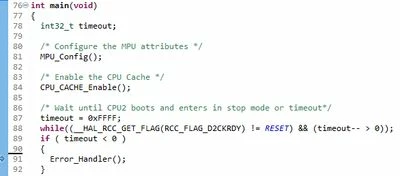
One board breaks here (whether the software is built for master or slave):

snap03740.jpg

The other board has no problem (whether the software is built for master or slave).

Any ideas?

Best answer by mƎALLEm

@SoCalJim wrote:

Should CM4 be enabled? Should CM7 be enabled as well? Both are enabled on the working board.


Your log shows that CM4 is disabled. Both CM7 and CM4 should be enabled.

Of course CM4 needs to be activated as there is a synchronization mechanism implemented in the example:


 /* Wait until CPU2 boots and enters in stop mode or timeout*/
 timeout = 0xFFFF;
 while((__HAL_RCC_GET_FLAG(RCC_FLAG_D2CKRDY) != RESET) && (timeout-- > 0));
 if ( timeout < 0 )
 {
 Error_Handler();
 }


If CM4 is disabled you will be infinitely looped in this while loop as CM7 is waiting for a signal from CM4 that never generated.

So please confim that by enabling CM4 (as I showed previously) the issue is solved. Or comment out that while loop.

1 reply

mƎALLEm
Technical Moderator
January 30, 2025

Hello,

Check if you have disabled CM4 in the option byte.

"To give better visibility on the answered topics, please click on ""Accept as Solution"" on the reply which solved your issue or answered your question."
SoCalJimAuthor
Associate III
January 30, 2025

BCM4 was set. I cleared it using:

./STM32_Programmer_CLI -c port=SWD -ob BCM4=0x0

I verified it’s clear. Unfortunately, the problem persists.


I looked at the working board and found both BCM4 and BCM7 are set, just like non-working board. The command

STM32_Programmer_CLI -c port=SWD -ob displ

showed no differences between the boards.

mƎALLEm
Technical Moderator
January 30, 2025

Try to use STM32CubeProgrammer and check if the CM4 is enabled in the option byte.

"To give better visibility on the answered topics, please click on ""Accept as Solution"" on the reply which solved your issue or answered your question."