Associate
November 26, 2025
Question

UART stops printing when using 25 MHz external clock on NUCLEO-H753ZI-$AT3

  • November 26, 2025
  • 6 replies
  • 534 views

Hello,

I am using a NUCLEO-STM32H753ZI-$AT3 development board.
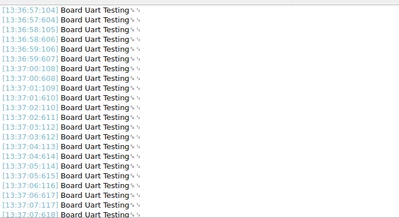
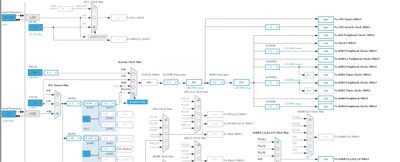
When I configure the MCU to use the internal clock (HSI), everything works correctly and my UART debug logs are printed normally.

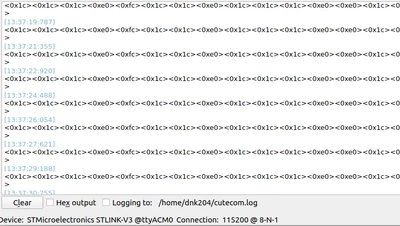
However, when I switch to using the external 25 MHz clock (HSE), no UART logs are printed. The code runs,but the UART prints garbage characters, for example:

<0x1c><0xe0><0xfc><0x1c><0xe

What I have already checked:

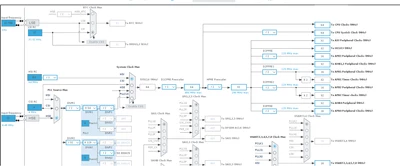
  • 25 MHz external clock is selected in CubeMX (HSE ON, Crystal/Ceramic Resonator).

  • PLL settings are unchanged except switching HSI → HSE.

  • UART baud rate is the same (115200).

  • If I go back to internal HSI, UART prints again.

External clock ioc and log
sameer_2k3_0-1764150481356.png

sameer_2k3_4-1764150853375.png

Iternal clock ioc and log

sameer_2k3_5-1764150881049.png

sameer_2k3_6-1764150964266.png


6 replies

Andrew Neil
Super User
November 26, 2025

@sameer_2k3 wrote:

The code runs,but the UART prints garbage characters, for example:

<0x1c><0xe0><0xfc><0x1c><0xe


So your baud rate is wrong.

Use an oscilloscope or logic analyser to see what rate you are actually getting.


@sameer_2k3 wrote:
  • 25 MHz external clock is selected in CubeMX (HSE ON, Crystal/Ceramic Resonator).


You mean an external Crystal - not an external clock?

Have you checked that it is actually oscillating, and actually at 25MHz?


@sameer_2k3 wrote:
  • PLL settings are unchanged except switching HSI → HSE.

But the HSI is 64MHz - changing to a 25MHz source means that you do need to change your clock settings...

A complex system that works is invariably found to have evolved from a simple system that worked.A complex system designed from scratch never works and cannot be patched up to make it work.
Associate
November 26, 2025

You mean an external Crystal - not an external clock?

yes  external Crystal  .

Have you checked that it is actually oscillating, and actually at 25MHz?

yes checked and verify

Tesla DeLorean
Guru
November 26, 2025

Check input clock is 25 MHz with scope, usually derived from ST-LINK, check options/settings there.

Check HSE_VALUE define in stm32h7xx_hal_config.h matches reality. 

Tips, Buy me a coffee, or three.. PayPal VenmoUp vote any posts that you find helpful, it shows what's working..
Andrew Neil
Super User
November 26, 2025

@Tesla DeLorean wrote:

usually derived from ST-LINK, check options/settings there.


@sameer_2k3 if it is coming from the ST-Link, then you would need 'Bypass' mode - not 'Crystal/Ceramic Resonator'

A complex system that works is invariably found to have evolved from a simple system that worked.A complex system designed from scratch never works and cannot be patched up to make it work.
Associate
November 26, 2025

after selecting bypass mode still printing garbage

ELABI.1
Technical Moderator
November 26, 2025

Hi @sameer_2k3,

Are you using an external HSE?  The NUCLEO-STM32H753 board does not have an HSE clock fitted.

ELABI1_0-1764152046077.png


 I think this may be the cause of your problem.
You can refer to this article How to use STLINK-V3 MCO output on Nucleo boards as a precise clock source for STM32 to see how to select the frequency and configure the HSE input according to your selection.

Thanks.

ELABI.1

To give better visibility on the answered topics, please click on Accept as Solution on the reply which solved your issue or answered your question.
Associate
November 26, 2025

i have connected externally 25 M

TDK
Super User
November 26, 2025

Unless you have physically modified the board, you should select HSE bypass mode and change the value to 8 MHz. That is the clock signal coming in to OSC_IN on the target chip. The ST-link chip has a 25 MHz crystal but that is not relevant here.

TDK_0-1764166053513.png


"If you feel a post has answered your question, please click ""Accept as Solution""."
Associate
November 27, 2025

sameer_2k3_0-1764220801876.png

I configured the PLL to 400 MHz, and when I select HSI as the clock source for UART, the UART logs print correctly. However, when I switch the UART clock source to the PLL in CubeMX, the UART output becomes corrupted and prints garbage characters.
Why does this happen, and how can I fix it?
What changes do I need to make to use the PLL clock for UART logging without getting garbage output?

Andrew Neil
Super User
November 27, 2025

You still have the input frequency set at 25MHz :

AndrewNeil_0-1764233154363.png


You can use the MCO output to check actual clock frequency (the output pin will need to be configured for High speed)

A complex system that works is invariably found to have evolved from a simple system that worked.A complex system designed from scratch never works and cannot be patched up to make it work.
TDK
Super User
November 27, 2025

@sameer_2k3 Are you actually reading the replies you're getting? Or just ignoring them after reading?

Multiple people have told you the problem in multiple different ways.

"If you feel a post has answered your question, please click ""Accept as Solution""."