
USB HS configuration does not work
On the STM32H7S3V8T6 custom board, I connected the DM and DP of HS USB to the JST connector, connected it with the Unified Daughterboard (JST TO C, https://github.com/Unified-Daughterboard/UDB-C-Legacy), and then connected it to the computer with USB A to C. However, on the computer, the device is not recognized at all. Am I wrong with the circuit configuration or the software configuration?
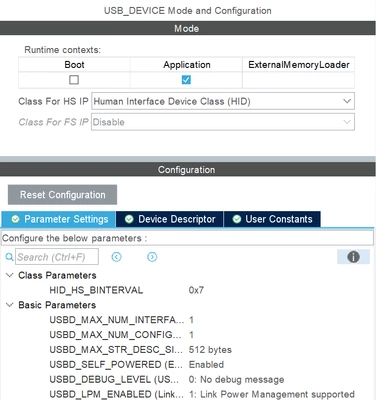
here's my settings
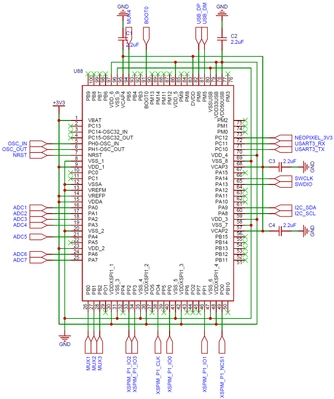
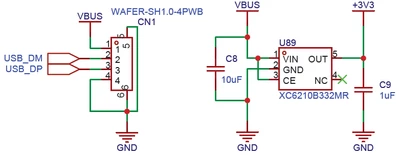
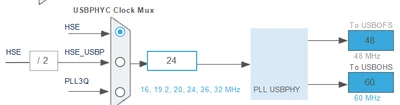
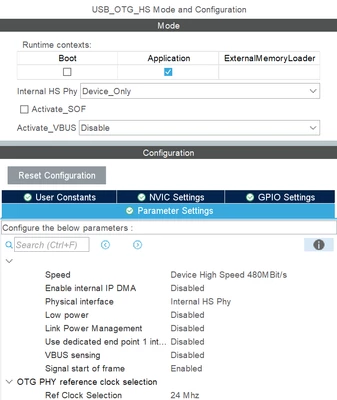
This message appears in the debug below
Program received signal SIGINT, Interrupt.
USB_CoreReset (USBx=0x40040000) at C:/Users/USER/STM32CubeIDE/workspace_1.16.0/TEST/Drivers/STM32H7RSxx_HAL_Driver/Src/stm32h7rsxx_ll_usb.c:1426
1426 if (count > HAL_USB_TIMEOUT)
Program received signal SIGINT, Interrupt.
0x080048f6 in USB_CoreReset (USBx=0x40040000) at C:/Users/USER/STM32CubeIDE/workspace_1.16.0/TEST/Drivers/STM32H7RSxx_HAL_Driver/Src/stm32h7rsxx_ll_usb.c:1430
1430 } while ((USBx->GRSTCTL & USB_OTG_GRSTCTL_CSRST) == USB_OTG_GRSTCTL_CSRST);