kb24
Senior
April 15, 2026
Question

EXTMEM_LOADER NOR_SFDP Writing Problem

  • April 15, 2026
  • 1 reply
  • 122 views

I am using STM32H7R7L8H with MX25L12833F external memory. I created a project with has bootloader, application and external memory loader.

Before starting this project I opened another to test if I can read/write/erase MX25L12833F. By using XSPI in Quad mode I could do all the operations.


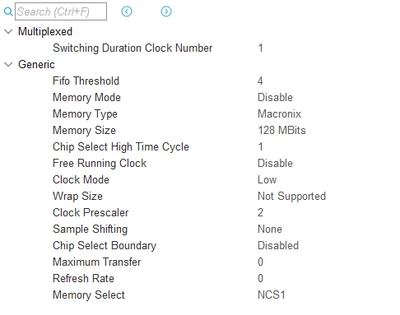
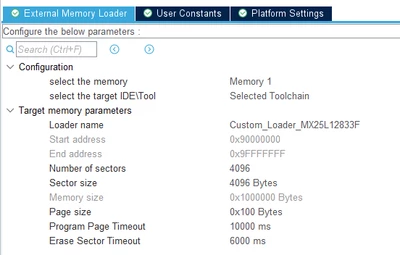
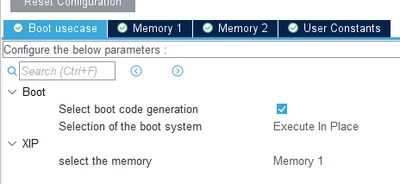
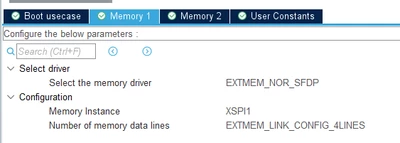
Below I shared the configuration:

XSPI1:
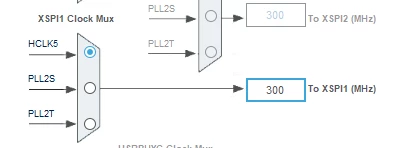
kb24_0-1776289296854.png

kb24_1-1776289365253.png


EXTMEM_LOADER:

kb24_2-1776289451987.png


EXTMEM_MANAGER:

kb24_3-1776289484041.png

kb24_4-1776289497824.png


With this configuration I built the project and it generated external loader. In STM32CubeProgrammer I can read MX25L12833F memory, it can do mass erase too but it can't do sector erase.
kb24_5-1776289725510.png

kb24_6-1776289909553.png


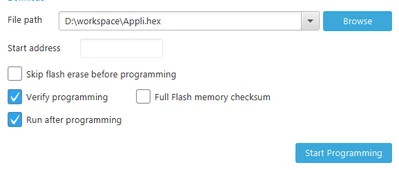
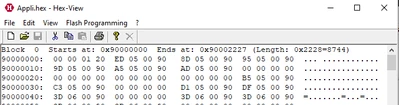
I created an application hex which is located at 0x90000000 and tried to write this file to external memory by using generated loader. Here is the result:

00:51:51 : Opening and parsing file: Appli.hex
00:51:51 : Memory Programming ...
00:51:51 :   File          : Appli.hex
00:51:51 :   Size          : 8.54 KB
00:51:51 :   Address       : 0x90000000
00:51:51 : Erasing memory corresponding to segment 0:
00:51:52 : Erasing external memory sectors [0 2]
00:51:52 : Download in Progress:
00:51:52 : File download complete
00:51:52 : Time elapsed during download operation: 00:00:00.584
00:51:52 : Verifying...
00:51:52 : Read progress:
00:51:53 : Error: Data mismatch found at address  0x90000002 (byte = 0x00 instead of 0x01)
00:51:53 : Time elapsed during verifying operation: 00:00:00.538
00:51:53 : Error: Download verification failed
00:51:53 : RUNNING Program ...
00:51:53 :   Address:      : 0x90000000
00:51:53 : Application is running, Please Hold on...
00:51:53 : Start operation achieved successfully


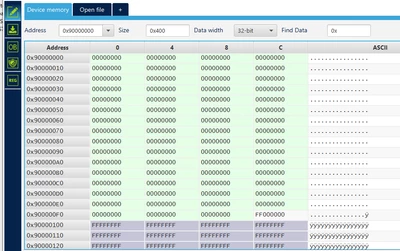
When I read the memory I see this:

kb24_7-1776290042210.png


How can I fix this problem? Thank you.

1 reply

Technical Moderator
April 16, 2026
"To give better visibility on the answered topics, please click on ""Accept as Solution"" on the reply which solved your issue or answered your question.Saket_Om"