Caan
Associate III
July 5, 2025
Solved

FMC_SDRAM example isn't Loading to STM32H750B-DK

  • July 5, 2025
  • 2 replies
  • 1047 views

The STM32H750B-dk Based Custom Board isn't entering debugging mode when using STM32CubeIDE . But QSPI Example Code is working perfectly.
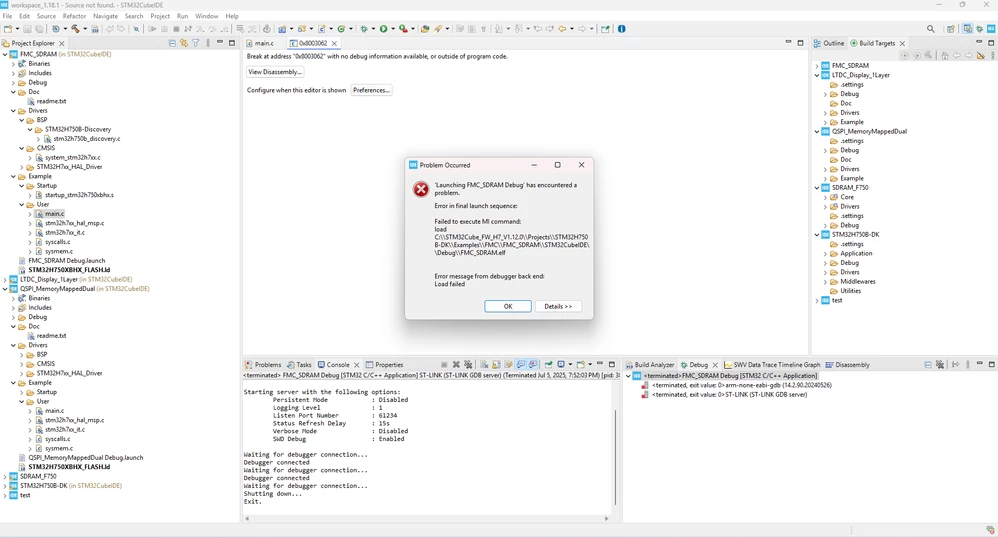
FMC_Error.png

Best answer by mƎALLEm

Hello @Caan ,

In fact, you need to follow the procedure described in the readme file.

For CubeIDE, you need to use STM32CubeProgrammer tool to handle the external QSPI flash:

From th read me file:

In order to make the program work, you must do the following:

1. Select required configuration in memory.h in Templates\ExtMem_Boot\Inc template.
The default configuration is:
- DATA_AREA set to USE_INTERNAL_SRAM
- CODE_AREA set to USE_QSPI
2. Program the internal Flash with the ExtMem_Boot (see below).
3. Program the external memory with this example (see below).
4. Start debugging user application or reset for free running.

In order to load the ExtMem_Boot code :
- Open your preferred toolchain :
- Open the Project
- Rebuild all files
- Load project image

In order to load this example to the external memory:
- Open your preferred toolchain
- Open the Project
- Use project matching ExtMem_Boot selected configuration
- Rebuild all files:
- Run & debug the program:
- For an XiP configuration (eXecute in Place from QSPI):
- Using EWARM or MDK-ARM : Load project image from the IDE: Project->Debug
- Using STM32CubeIDE :
- Open the STM32CubeProgrammer tool
- Select the QSPI external flash loader "MT25TL01G_STM32H750B-DISCO" in case of XiP from QSPI
- From Erasing & Programming menu, browse and open the output binary file relative to your application
- Load the file into the external QSPI flash using "Start Programming" at the address APPLICATION_ADDRESS (0x90000000).

Then run a debug session from CubeIDE.

Hope that helps.

2 replies

TDK
Super User
July 5, 2025

If the FMC settings are bad, the debugger won't be able to connect.

Does the program work in non-debug mode?


Consider putting in HAL_Delay(1000) prior to any FMC initialization, setting a breakpoint there, and stepping through.

"If you feel a post has answered your question, please click ""Accept as Solution""."
Caan
CaanAuthor
Associate III
July 6, 2025

When Downloading the binary directly into the Board same error Shows up.

mƎALLEm
mƎALLEmBest answer
Technical Moderator
July 16, 2025

Hello @Caan ,

In fact, you need to follow the procedure described in the readme file.

For CubeIDE, you need to use STM32CubeProgrammer tool to handle the external QSPI flash:

From th read me file:

In order to make the program work, you must do the following:

1. Select required configuration in memory.h in Templates\ExtMem_Boot\Inc template.
The default configuration is:
- DATA_AREA set to USE_INTERNAL_SRAM
- CODE_AREA set to USE_QSPI
2. Program the internal Flash with the ExtMem_Boot (see below).
3. Program the external memory with this example (see below).
4. Start debugging user application or reset for free running.

In order to load the ExtMem_Boot code :
- Open your preferred toolchain :
- Open the Project
- Rebuild all files
- Load project image

In order to load this example to the external memory:
- Open your preferred toolchain
- Open the Project
- Use project matching ExtMem_Boot selected configuration
- Rebuild all files:
- Run & debug the program:
- For an XiP configuration (eXecute in Place from QSPI):
- Using EWARM or MDK-ARM : Load project image from the IDE: Project->Debug
- Using STM32CubeIDE :
- Open the STM32CubeProgrammer tool
- Select the QSPI external flash loader "MT25TL01G_STM32H750B-DISCO" in case of XiP from QSPI
- From Erasing & Programming menu, browse and open the output binary file relative to your application
- Load the file into the external QSPI flash using "Start Programming" at the address APPLICATION_ADDRESS (0x90000000).

Then run a debug session from CubeIDE.

Hope that helps.

"To give better visibility on the answered topics, please click on ""Accept as Solution"" on the reply which solved your issue or answered your question."
