
Associate
February 19, 2026
Question

H7S SAI DMA - example?

  • February 19, 2026
  • 2 replies
  • 367 views

Hello,

I'm attempting to work with the SAI using DMA on the H7S using the NUCLEO-H7S3L8, unfortunately there is no SAI example. There is an I2S example using DMA on the STM32H7S78-DK:

https://github.com/STMicroelectronics/STM32CubeH7RS/tree/main/Projects/STM32H7S78-DK/Applications/USB_Device/Audio_Standalone

I've generated a project for the Nucleo using CubeMX, and then brought over the DMA code in the HAL_SAI_MspInit from that I2S example, and modified it for SAI. The result runs, but a user settings error is reported in the DMA interrupt:
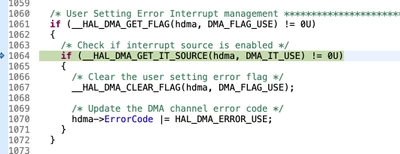
dmaSettingsError.png

Here's the complete project:

https://github.com/mojolabsdotnet/saiDmaH7S

What is the right way to setup DMA for the SAI on the H7S?

Thanks!


2 replies

Technical Moderator
February 23, 2026

Hi @mojolabs 

This example uses SAI configured to send a continuous SPDIF frame, using circular DMA.

To give better visibility on the answered topics, please click on Accept as Solution on the reply which solved your issue or answered your question.Best regards,FBL
mojolabsAuthor
Associate
February 23, 2026

Hi @FBL 

Thank you very much for pointing out that example. I've examined the DMA init in that example and there were a few differences (DMA ch 4 instead of 2, DMA_TCEM_BLOCK_TRANSFER for the transfer mode, see git diff for full changes), but unfortunately those differences did not change the behavior - I still get a DMA_FLAG_USE error. I've updated the github project showing the problem with these updates.

The SAI init was generated by CubeMX, but could there be an issue with that init code? Or is there perhaps still an issue with the DMA init when using the SAI in I2S mode instead of using it with SPDIF?

Technical Moderator
February 24, 2026

Hi @mojolabs again,

I suggest you test the example firmware provided as it is and see if the issue persists. Than you can narrow down the issue. It could be an issue in CubeMX generated code.

To give better visibility on the answered topics, please click on Accept as Solution on the reply which solved your issue or answered your question.Best regards,FBL