
Senior
March 31, 2025
Solved

STM32H7 TFTP Server

  • March 31, 2025
  • 11 replies
  • 1737 views

I am trying to implement TFTP file transfer on my STM32 module (Nucleo-H723ZG). I have taken reference from:
https://github.com/STMicroelectronics/STM32CubeF4/tree/master/Projects/STM324xG_EVAL/Applications/LwIP/LwIP_IAP
https://github.com/JoeMerten/Stm32-Tools-Evaluation/tree/master/STM32Cube_FW_F4_V1.9.0/Projects/STM324xG_EVAL/Applications/LwIP/LwIP_TFTP_Server

For file transfer I am using tftpd64 software. I used the software for PC-PC file transfer which were on the same local network and it was successful. But when I am trying to send file from PC-STM32 module I am only receiving write request from the client (PC). After that  I am suppose the get a block 0 acknowledgement from the server (STM32 module) which I am not receiving. 

I tried debugging the code but in the code the acknowledgement is being sent successfully. For more information:
- my ethernet is up

- I have successfully ping the IP address that I have assigned or configured for the module.

- Moreover, I am using UDP so I am able to send messages using Hercules software.

Until the block 0 acknowledgement is received by the client (PC), it will not send the data packets.
Best answer by jowakar122

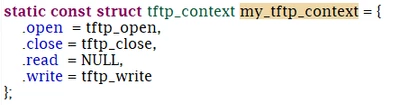
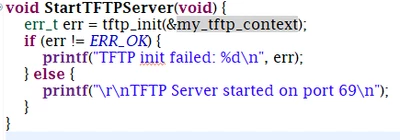
For TFTP server to work properly it is recommended to use the tftp_server source and header files in Middleware. Earlier I was referring to the GitHub code in which a different file is created for initializing TFTP server, which came with many problems like mentioned above. After creating new project and by using this autogenerated files by STM32CubeIDE, I accomplished creating a TFTP server on stm module and transfer a file. 

Some points to consider when using this file:
- To initialize TFTP server we have to define the function pointers for handling file I/O operations. This structure is used by the TFTP server to manage file transfers, including opening, writing, and closing files. 

jowakar122_0-1744017902059.png

- This functions are called from the recv function in the tftp_server.c file.

jowakar122_1-1744018125776.png


11 replies

Pavel A.
Super User
March 31, 2025

Please do a wireshark capture.


Senior
April 1, 2025

I did the wireshark capture and in that only the write request packet sent by the client is displayed.

jowakar122_0-1743487342576.png

But while debugging the code the ack is being sent successfully without generating any error. I checked the ip address and the port that it is sending the ack. and both the things are correct.


matt-crc
Senior III
April 1, 2025

Hi @jowakar122 

the app note for your project says:

mattcrc_0-1743492675069.png

I would fix your filename first... Your filename in your shark capture is invalid.... meaning no response

Pavel A.
Super User
April 1, 2025

So it appears that the ACK is not sent on the wire. When you capture from the board reset or power on, are ARPs  and ping replies from the board visible? 

Senior
April 1, 2025

Yes the ip address is listed and successfully responds when ping.

jowakar122_0-1743504903462.png


matt-crc
Senior III
April 1, 2025

its in the readme, or you can read it when selecting the example from cubemx

Senior
April 1, 2025

No, moreover I am not using a example code from cubemx.

matt-crc
Senior III
April 1, 2025

I assume you are using CubeIDE?

1- File -> New -> STM32 Project

2- On the Top, select "Example Selector"

3- in the search box, type "Tftp", a list of all example project appears on the bottom right

4- Select the row with your processor / demo board

5- Read...


mattcrc_1-1743506367389.png


Senior
April 1, 2025

I am using Nucleo-H723ZG which is not listed under the module which has LwIP_TFTP_Server.  The module I am using only has four example codes related to LwIP and none includes TFTP.

jowakar122_0-1743506949954.png


matt-crc
Senior III
April 1, 2025

lol.....

you said:


mattcrc_1-1743507288273.png

i gave you instructions how to download the project, you clearly didn't read it properly....

mattcrc_2-1743507409684.png

anyway... this is becoming a waste of my time.... lol

Senior
April 1, 2025

I used that for reference regarding ethernet and mpu configuration. In that example code SD card is used to store the file, whereas I am directly writing the file in the user flash memory which I will be receiving from the Ethernet.

Senior
April 1, 2025

jowakar122_2-1743508616653.png

My concern lies here. While debugging we can see that the local port, destination port, addr is correct and after executing the udp_sendto line I got err = 0 indicating that the acknowledgement so successfully sent. But it can be seen in wireshark nor the client proceeds to send the data packets.


Pavel A.
Super User
April 1, 2025

Have you checked for duplicate IP address? Someone else answers the ping?

Senior
April 1, 2025

I have cross checked about the duplicate IP address. When the ethernet is down ping on that same ip address has failed and it is not listed in arp. So there is not duplicate IP address.

Senior
April 2, 2025

Does anyone have any idea about this? It would be great.

jowakar122AuthorBest answer
Senior
April 7, 2025

For TFTP server to work properly it is recommended to use the tftp_server source and header files in Middleware. Earlier I was referring to the GitHub code in which a different file is created for initializing TFTP server, which came with many problems like mentioned above. After creating new project and by using this autogenerated files by STM32CubeIDE, I accomplished creating a TFTP server on stm module and transfer a file. 

Some points to consider when using this file:
- To initialize TFTP server we have to define the function pointers for handling file I/O operations. This structure is used by the TFTP server to manage file transfers, including opening, writing, and closing files. 

jowakar122_0-1744017902059.png

- This functions are called from the recv function in the tftp_server.c file.

jowakar122_1-1744018125776.png


Azelio
Visitor II
April 22, 2025

Why the .read member of the struct is NULL?

Senior
April 23, 2025

@Azelio I have kept .read NULL because my stm32 module is working as TFTP server and in my case TFTP client was sending the file in 512 bytes of data packets. So only thing you are suppose to do is write the data packets in your flash, SD card etc. Moreover, there was no need for read function in my case.