KBae.1
Associate II
March 13, 2026
Question

Troubleshooting Ping Issues on NUCLEO-H753 with LwIP

  • March 13, 2026
  • 2 replies
  • 474 views

"I am currently working on implementing Ethernet communication using a NUCLEO-H753 board.

As a first step, I attempted to perform a ping test. I followed the official tutorial videos provided by STMicroelectronics step-by-step, but unfortunately, I am not getting the expected results (the ping is failing).

I would appreciate any guidance or advice on what might be causing this issue or which specific configurations I should double-check."

"Let me share my CubeMX configuration with you first so we can review the setup."

1. System Core - CORTEX_M7
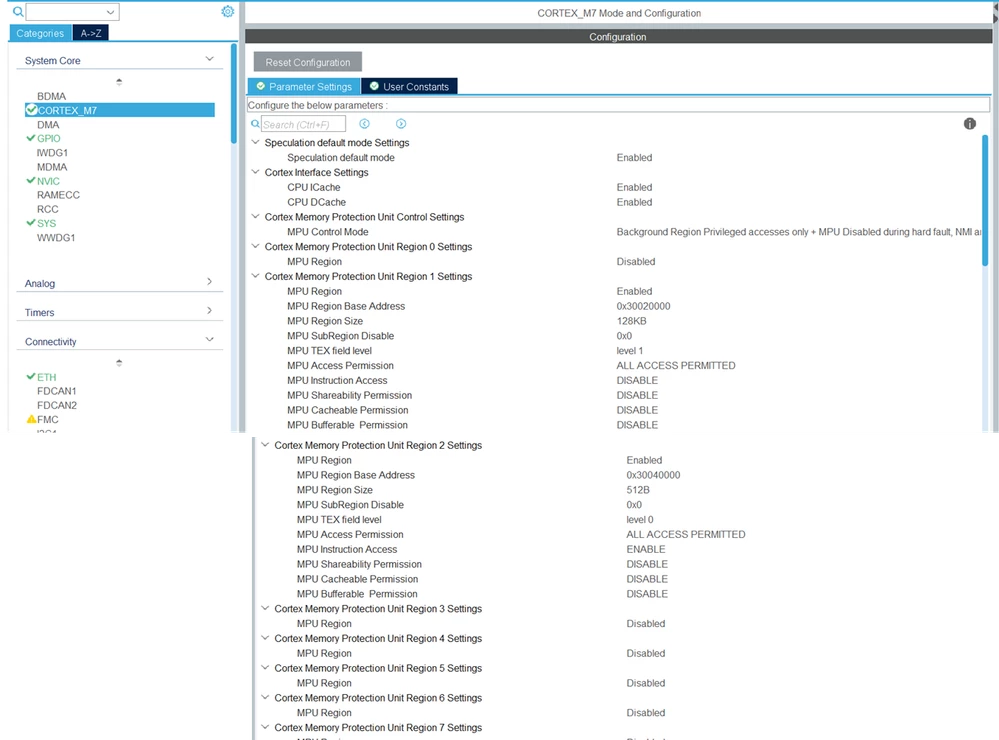
image1.png


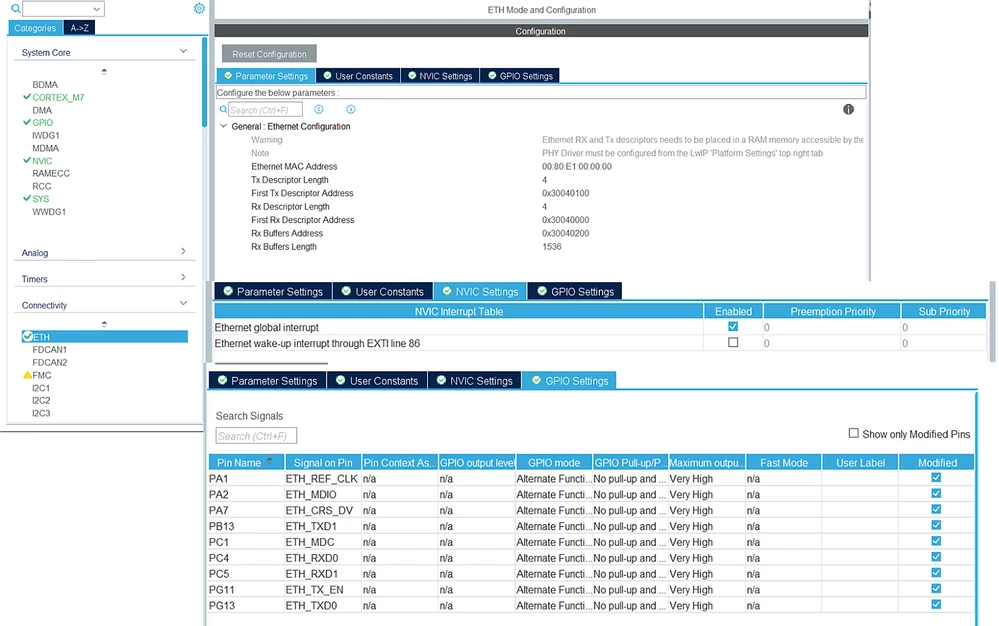
2. Connectivity - ETH

image2.png


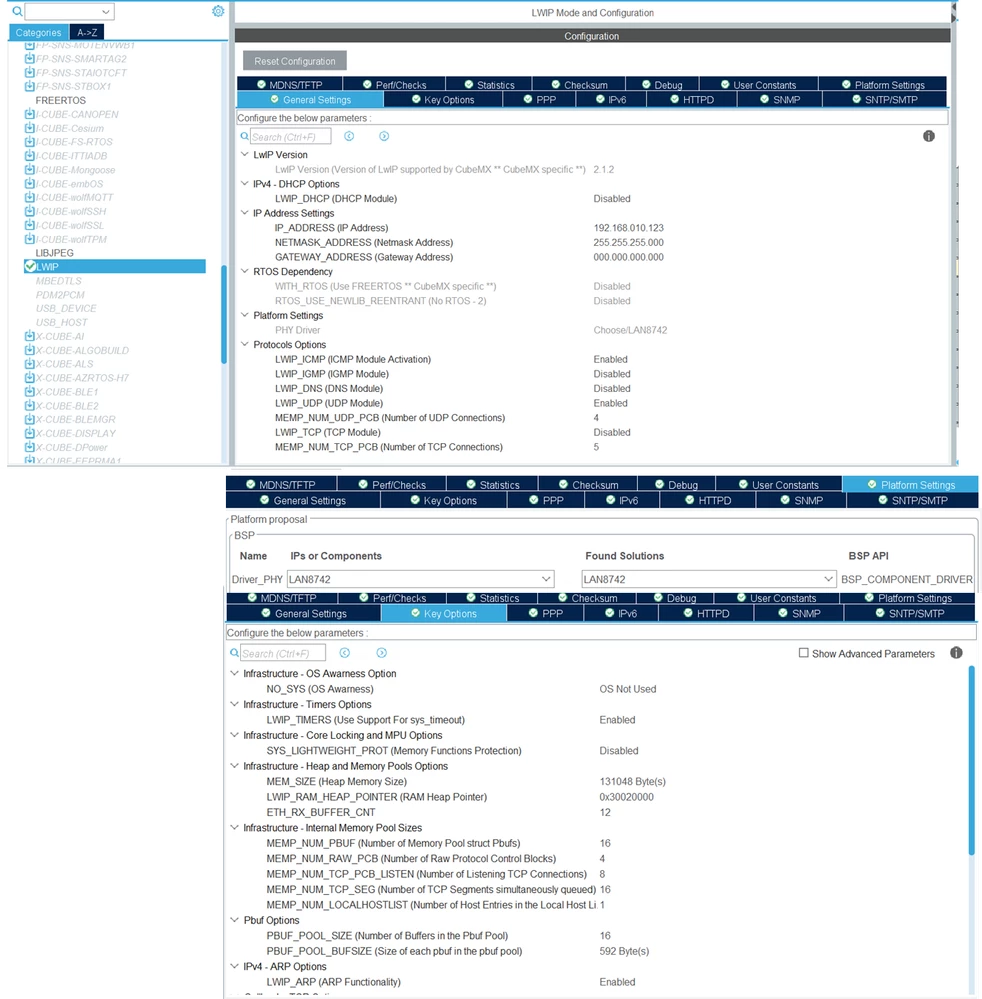
3. LwIP

image3.png


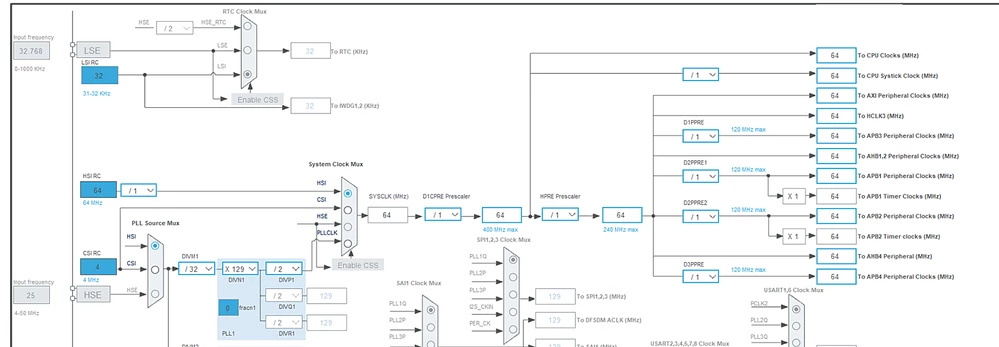
4. Clock

image4.png


I will also share the modified source code with you.


STM32H753ZITX_FLASH.ld

/* Modification start */
.lwip_sec (NOLOAD) :
{
. = ABSOLUTE(0x30040000);
*(.RxDecripSection)

. = ABSOLUTE(0x30040100);
*(.TxDecripSection)

. = ABSOLUTE(0x30040200);
*(.Rx_PoolSection)
} >RAM_D2
/* Modification end */


ethernetif.c

/* USER CODE BEGIN 2 */
#if defined ( __ICCARM__ ) /*!< IAR Compiler */
#pragma location = 0x30040200
extern u8_t memp_memory_RX_POOL_base[];
#elif defined ( __CC_ARM ) /* MDK ARM Compiler */
__attribute__((at(0x30040200)) extern u8_t memp_memory_RX_POOL_base[];
#elif defined ( __GNUC__ ) /* GNU Compiler */
__attribute__((section(".Rx_PoolSection"))) extern u8_t memp_memory_RX_POOL_base[];
#endif
/* USER CODE END 2 */


main.c

while (1)
{
 /* USER CODE END WHILE */

 /* USER CODE BEGIN 3 */
 ethernetif_input(&gnetif);
 sys_check_timeouts();
}

or

while (1)
{
 /* USER CODE END WHILE */

 /* USER CODE BEGIN 3 */
 MX_LWIP_Process();
}


I have modified the source code as shown above.


The results are shown below.
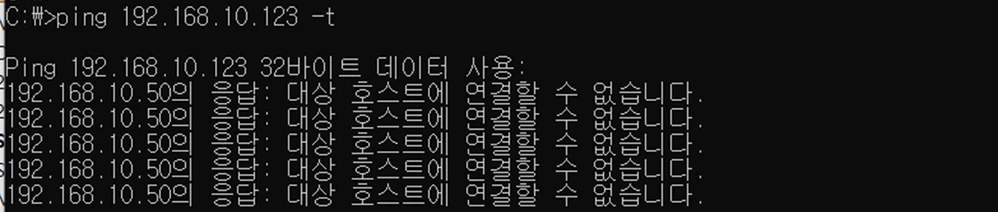
image5.png


Pinging 192.168.10.123 with 32 bytes of data:
Reply from 192.168.10.50: Destination host unreachable.


I am receiving these messages as shown in the screenshot,

and I'm reached out because I’m not sure what I might be missing in the configuration.

As you can see, I am getting 'Destination host unreachable' errors.

I would appreciate it if you could help me identify what's wrong.


Edited to apply proper source code formatting - please see How to insert source code for future reference.

2 replies

MGogr.1
Senior
March 13, 2026

Please assign proper Gateway address.

Also check the Network setting in your laptop. "Lwip_init();" seems to be missing. 

Technical Moderator
March 13, 2026

Hello @KBae.1, and welcome to ST community!

Attached is a project for the NUCLEO-H753. You can compare configurations and have a working project. Please make sure to add the proper linker file configuration to your project. Let me know if you need further assistance.

Best regards,

To improve visibility of answered topics, please click 'Accept as Solution' on the reply that resolved your issue or answered your question.
KBae.1
KBae.1Author
Associate II
March 16, 2026

Hello,

Thank you for providing the project files; I have reviewed them carefully.

In my setup, I am not using FreeRTOS and have configured the system with a static IP address. Everything else remains identical to your project. However, after compiling and downloading your project, it still did not work on my end.

I would like to share the specific modifications I made to my code to get a partial response:

  1. MPU Configuration: In the void MPU_Config(void) function, I commented out the following lines:

    • MPU_InitStruct.Number = MPU_REGION_NUMBER0;

    • MPU_InitStruct.Number = MPU_REGION_NUMBER1;

  2. Ethernetif.c: In the low_level_output function, I added the following line: SCB_CleanDCache_by_Addr((uint32_t *)((uint32_t)p->payload & ~0x1F), p->tot_len + 32);

With these changes, Ping works correctly.

However, I am aware that simply commenting out the MPU configuration is not the proper solution. I want to identify the root cause of the issue. I have consulted AI tools like ChatGPT and Gemini, which suggested adjusting the MPU regions and linker scripts, but even after applying those suggested changes, the system still fails to work correctly (it often goes into a HardFault or fails to initialize).

What could be the problem here? Any insights would be greatly appreciated.

Technical Moderator
March 16, 2026

Hello @KBae.1,

I have retested the example I attached, and it works whether FreeRTOS/DHCP is enabled or not (with minor adjustments). To transform it into a standalone application with a static IP, I made the following changes:

  1. Opened MX2 configuration.
  2. Disabled FreeRTOS.
  3. Inside the LwIP configuration tab, disabled DHCP.
  4. Set the IP Address and Netmask.
  5. Generated the project.
  6. Inside the while loop, called MX_LWIP_Process().
  7. Built and ran the project.

The only misconfiguration I found is that the allocated LwIP heap memory (16KB) is less than the one allocated and protected by the MPU (128KB), and the Rx buffer count is set to 10 instead of 12. Nonetheless, this does not affect the functionality of the project for an application that only handles pings. I suggest you re-download the attached project, apply the modifications I mentioned, and test it.

Best regards,

To improve visibility of answered topics, please click 'Accept as Solution' on the reply that resolved your issue or answered your question.