Associate II
March 18, 2026
Solved

UART is no more working after changing the clock source

  • March 18, 2026
  • 7 replies
  • 1043 views

Split from this post.

Hello,

Sorry to bother you again, but it seems that since yesterday (when I enabled the CAN bus), the UART on my Nucleo has stopped working, even though I haven’t touched anything since then.


To be precise, I’m monitoring my UART signal and I’m only getting ‘framing errors’, obviously, I’ve checked and the baud rates are the same on both sides.


Could activating the HSE clock have disrupted the operation of my UART ?


Thank you in advance for your help,
Best answer by mƎALLEm

Hello,

That doesn't make sense to me as both configuration have the same clock frequency value 32MHz for USART.

As you have the same Clock configuration in both projects and as USART is working with HSI, I'm suspicious about the clock configuration you set for the STLINK. In CubeMx HSE= 5MHz, but is it really fed by 5MHz in OSC_IN pin from STLINK?

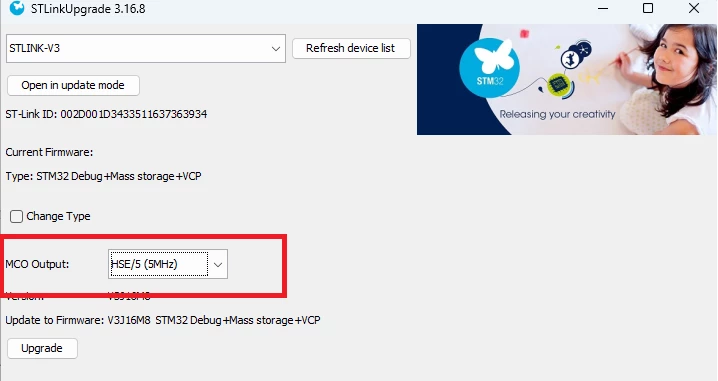
Could you please double check whether you set the correct MCO output clock (5MHz) for STLINK using CubeProgrammer? (refer to How to use STLINK-V3 MCO output on Nucleo boards as a precise clock source for STM32)

screenshot.png

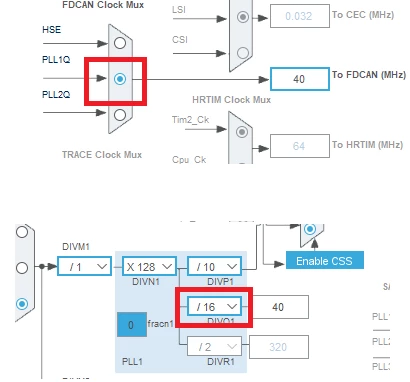
PS: for CAN, increase the Kernel clock to 40MHz as shown below


screenshot.png


7 replies

mƎALLEm
Technical Moderator
March 18, 2026

Hello,


 wrote:

Could activating the HSE clock have disrupted the operation of my UART ?


No. Better to use HSE for communication including UART.

Better to share your ioc files (with UART working and not working). What baudrate are you targeting?

"To give better visibility on the answered topics, please click on ""Accept as Solution"" on the reply which solved your issue or answered your question."
AmGoAuthor
Associate II
March 18, 2026

I'm targeting 2 MBauds. 


The first one is the .ioc file when my UART isn't working.

The second onse is when it is. 


Thank you for your time and your help.

mƎALLEm
mƎALLEmBest answer
Technical Moderator
March 18, 2026

Hello,

That doesn't make sense to me as both configuration have the same clock frequency value 32MHz for USART.

As you have the same Clock configuration in both projects and as USART is working with HSI, I'm suspicious about the clock configuration you set for the STLINK. In CubeMx HSE= 5MHz, but is it really fed by 5MHz in OSC_IN pin from STLINK?

Could you please double check whether you set the correct MCO output clock (5MHz) for STLINK using CubeProgrammer? (refer to How to use STLINK-V3 MCO output on Nucleo boards as a precise clock source for STM32)

screenshot.png

PS: for CAN, increase the Kernel clock to 40MHz as shown below


screenshot.png


"To give better visibility on the answered topics, please click on ""Accept as Solution"" on the reply which solved your issue or answered your question."
AmGoAuthor
Associate II
March 18, 2026

Right, I've applied your changes to my FD CAN clock running at 40 MHz (though I'm a bit confused: I set my PLL Source MUX to HSE, but then I select PPLL1Q as the input to my FDCAN ? Sorry if I'm missing something, but I'd appreciate some clarification if possible).

Also, when I open SM32Cube Programmer and click on ‘Firmware Upgrade’, I get this and nothing else; I don’t think that’s normal, but perhaps I’ve simply forgotten to configure something...


Thank you very much for your help,


Andrew Neil
Super User
March 18, 2026

@AmGo wrote:

I’m monitoring my UART signal and I’m only getting ‘framing errors’,


How, exactly, are you "monitoring" it?

Framing errors could indicate wrong baud rate.

Have you checked the baud rate using an oscilloscope?

A complex system that works is invariably found to have evolved from a simple system that worked.A complex system designed from scratch never works and cannot be patched up to make it work.
AmGoAuthor
Associate II
March 18, 2026

I am using a Saleae probe to monitor my frames. 

And unfortunately I don't have a "real" oscilloscope to check it 

mƎALLEm
Technical Moderator
March 18, 2026

Did you check the ST-LINK MCO output settings using CubeProgrammer as I suggested previously?

"To give better visibility on the answered topics, please click on ""Accept as Solution"" on the reply which solved your issue or answered your question."
waclawek.jan
Super User
March 18, 2026

Read out and check/compare UART and relevant RCC registers content between "working" and "non working".

JW

AmGoAuthor
Associate II
March 18, 2026

I'm trying but as shown in my previous post, I don't get the same thing as you in STM32 Cube Programmer 

AmGoAuthor
Associate II
March 18, 2026

Sorry, I was just answering to Andrew. 

I've retried the configuration and now I can see MCO Ouput. You were right, I've changed it to HSE/2 to HSE/5. 

mƎALLEm
Technical Moderator
March 18, 2026

@AmGo wrote:

I've retried the configuration and now I can see MCO Ouput. You were right, I've changed it to HSE/2 to HSE/5. 


Does it work after this change?

"To give better visibility on the answered topics, please click on ""Accept as Solution"" on the reply which solved your issue or answered your question."
AmGoAuthor
Associate II
March 18, 2026

Yes, it looks like. 

Thank you very much. 


Can you just explain to me why you chose PLL1Q and not HSE for the FDCAN Clock Mux please ? 

mƎALLEm
Technical Moderator
March 18, 2026

@AmGo wrote:

Yes, it looks like. 

Thank you very much. 


Good.


@AmGo wrote:

Can you just explain to me why you chose PLL1Q and not HSE for the FDCAN Clock Mux please ? 


Better to use high frequencies for kernel clock to get better resolution for the CAN bit time so you can fine tune TSEG1/TSEG2 bit segments.

"To give better visibility on the answered topics, please click on ""Accept as Solution"" on the reply which solved your issue or answered your question."