

Using Custom HID and BNO055
Hi Forum!
- Previous experiments, but it still could not work, I have no idea how to fix this problem:
https://community.st.com/t5/stm32-mcus-embedded-software/hmd-application-stm32f1-with-bno055-via-vcp/td-p/876235 - Therefore, I revisited the literature review. I found this paper from meta oculus, they using the HID to transfer the IMU data, so I want to imitate their steps. (using notebookLm to learn it )
https://msl.cs.illinois.edu/~lavalle/papers/LavYerKatAnt14.pdf - HID read/write tool(software)
https://github.com/benbaker76/SimpleHIDWrite - Problem: Custom HID could be detected by host, the IMU could send the data at 100Hz, host could send the data to STM32 MCU, but only the first time was successful, the second time will let the HID read/write tool(software) crash, STM32 could send data after receiving the data first time.
----------------------------------------------------------------------------------------------------------------------------------------------------------
----------------------------------------------------------------------------------------------------------------------------------------------------------
- I using BNO055 to get the quaternion value via I2C
- The quaternion value will send to host(PC or SBC) using USB cable
- I using STM32 EV-Board (NUCLEO-F412ZG)
- Using the BNO055 library from:
https://github.com/ivyknob/bno055_stm32
--------------------------------------------------------------------------------------------------------------------------------------------------------------------------------------------------------------------------------------------------------------------------------------------------------------------
- The setting is shown as below
- CubeMX *.ioc Configuration
- Select the board NUCLEO-F412ZG
- System Core
- RCC ->High Speed Clock: Crystal/Ceramic
- SYS ->Debug: Serial Wire
- Connectivity
- I2C1->i2c, change to i2c speed mode from standard mode to fast mode
- USB_OTG_FS-> mode: Device_Only
- Middleware and software
- Class for FS IP: select Custom Human Interface Device and change the PID to 22352
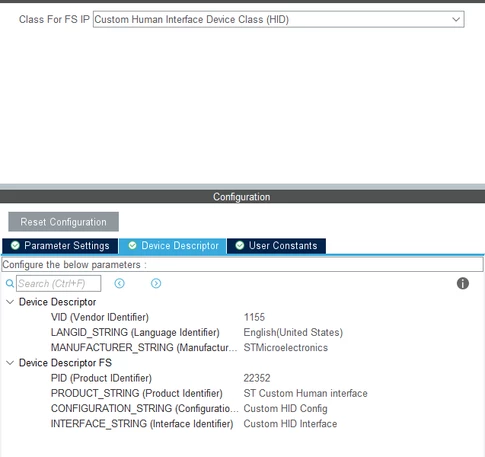
- Class for FS IP: select Custom Human Interface Device and change the PID to 22352
- Clock configuration
- HCLK:72MHz
- USB CLK: 48MHz
- Others:
- Add necessary library files as reference and in the toolchain project configuration file
- Generate peripheral initialization as pair of '.c/.h' file per peripheral
- PB0(On EV-board LED, LD1) set as GPIO output push pull, default pull down for debugging
- Keil C Configuration
- After generate code, compile and flash the hex file to the board, open the Device Administrator, and I could see the human device interface is found but driver error detect
- Modify the Report descriptor, found the usbd_custom_hid_if.c file and in function CUSTOM_HID_ReprotDesc_FS add the code as below
/** Usb HID report descriptor. */
__ALIGN_BEGIN static uint8_t CUSTOM_HID_ReportDesc_FS[USBD_CUSTOM_HID_REPORT_DESC_SIZE] __ALIGN_END =
{
 /* USER CODE BEGIN 0 */
 	0x06,0xFF,0x00, // USAGE_PAGE (Vendor Page: 0xFF00)
	0x09,0x01,			// USAGE (Vendor Usage 1)
	0xA1,0x01,			// COLLECTION (Application)
	0x15,0x00,			// LOGICAL_MINIMUM (0)
	0x26,0xFF,0x00,		// LOGICAL_MAXIMUM (255)
	0x75,0x08,			// REPORT_SIZE (8)
	0x95,0x40,			// REPORT_COUNT (64)
	0x09,0x02,			// USAGE (Vendor Usage 2)
	0x81,0x02,			// INPUT (Data,Var,Abs)
	0x09,0x03,			// USAGE (Vendor Usage 3)
	0x91,0x02,			// OUTPUT (Data,Var,Abs)
	0x0A,0x00,0xFF,	 // UsageS(0xFF00)
	0x0B1,0x02,
 /* USER CODE END 0 */
 0xC0 /* END_COLLECTION	 */
};- The number of CUSTOM_HID_ReportDesc_FS array is "30", so modify the "USBD_CUSTOM_HID_REPORT_DESC_SIZE", open the usbd_conf.h, modify these two define as shown below
#define USBD_CUSTOMHID_OUTREPORT_BUF_SIZE 64
/*---------- -----------*/
#define USBD_CUSTOM_HID_REPORT_DESC_SIZE 30- Modify the node "output" and "input" define from usbd_customhid.h, 0x40hex =64dec
#define CUSTOM_HID_EPIN_ADDR 0x81U
#endif /* CUSTOM_HID_EPIN_ADDR */

#ifndef CUSTOM_HID_EPIN_SIZE
#define CUSTOM_HID_EPIN_SIZE 0x40//0x02U
#endif /* CUSTOM_HID_EPIN_SIZE */

#ifndef CUSTOM_HID_EPOUT_ADDR
#define CUSTOM_HID_EPOUT_ADDR 0x02U//0x01U
#endif /* CUSTOM_HID_EPOUT_ADDR */

#ifndef CUSTOM_HID_EPOUT_SIZE
#define CUSTOM_HID_EPOUT_SIZE 0x40//0x02U- STM32 need to receive the data from host, add the code in CUSTOM_HID_OutEvent_FS, the function is from usbd_custom_hid_if.c file
//add variable
/* USER CODE BEGIN INCLUDE */
extern uint8_t report_buffer[64];
extern uint8_t volatile flag_rx;
/* USER CODE END INCLUDE */
//modify the custom hid outevnet fs
static int8_t CUSTOM_HID_OutEvent_FS(uint8_t event_idx, uint8_t state)
{
/* USER CODE BEGIN 6 */
USBD_CUSTOM_HID_HandleTypeDef *hhid = (USBD_CUSTOM_HID_HandleTypeDef *)hUsbDeviceFS.pClassData;
memcpy(report_buffer, hhid->Report_buf, 64);
flag_rx = 1;
return (USBD_OK);
/* USER CODE END 6 */
}
- In the main function, including the BNO055 library and confirm the input string
/* USER CODE BEGIN Includes */
#include "usbd_customhid.h"
#include "string.h"
#include "bno055_stm32.h"
/* USER CODE END Includes */
/* USER CODE BEGIN PM */
uint8_t tx_buffer[64];
uint8_t report_buffer[64];
uint8_t volatile flag_rx = 0;
extern USBD_HandleTypeDef hUsbDeviceFS;
int32_t data_to_send[4];
/* USER CODE END PM */
/* USER CODE BEGIN 2 */
HAL_Delay(2000);
bno055_assignI2C(&hi2c1);
bno055_setup();
bno055_setOperationModeNDOF();
/* USER CODE END 2 */
/* USER CODE BEGIN WHILE */
while (1)
{
/* USER CODE END WHILE */
/* USER CODE BEGIN 3 */
if(flag_rx==1)
{
report_buffer[63] = '\0';
flag_rx=0;
char cmd[10];
int duty=0;
if(sscanf((char*)report_buffer,"%s %d",cmd,&duty)==2)
{
HAL_Delay(2);
if(strcmp(cmd,"LM3435")==0)
{
sprintf((char*)tx_buffer, "OK! Duty set to %d", duty);
USBD_CUSTOM_HID_SendReport(&hUsbDeviceFS, tx_buffer, 64);
}
}
memset(report_buffer,0,64);
}
USBD_CUSTOM_HID_HandleTypeDef *hhid = (USBD_CUSTOM_HID_HandleTypeDef*)hUsbDeviceFS.pClassData;
if (hhid->state == CUSTOM_HID_IDLE)
{
bno055_vector_t v = bno055_getVectorQuaternion();
data_to_send[0] = (int32_t)(v.w * 1000000);
data_to_send[1] = (int32_t)(v.x * 1000000);
data_to_send[2] = (int32_t)(v.y * 1000000);
data_to_send[3] = (int32_t)(v.z * 1000000);
memset(tx_buffer, 0, 64);
memcpy(tx_buffer, data_to_send, sizeof(data_to_send));
USBD_CUSTOM_HID_SendReport(&hUsbDeviceFS, tx_buffer, 64);
}
HAL_Delay(10); // BNO055 100Hz,
}
/* USER CODE END 3 */
- Reserved typing space
--------------------------------------------------------------------------------------------------------------------------------------------------------------------------------------------------------------------------------------------------------------------------------------------------------------------
Result:
- BNO055 pin connection: SCL-> PB8, SDA->PB9, 3V0->VCC, GND->GND, ADR->GND
- Option for Target "myHIDBNO055", in the device->code generation, select "Use MicroLIB"
- Connect the USB power from CN1(micro A) first, and connect the User USB from CN13
- The HID device could found from host
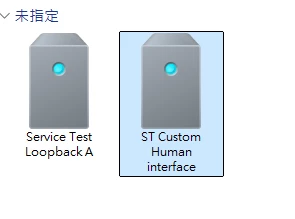
- Could read the BNO055 via I2C
- Could send the data from STM32 to host in100Hz
- Could receive the data from host to STM32 first time
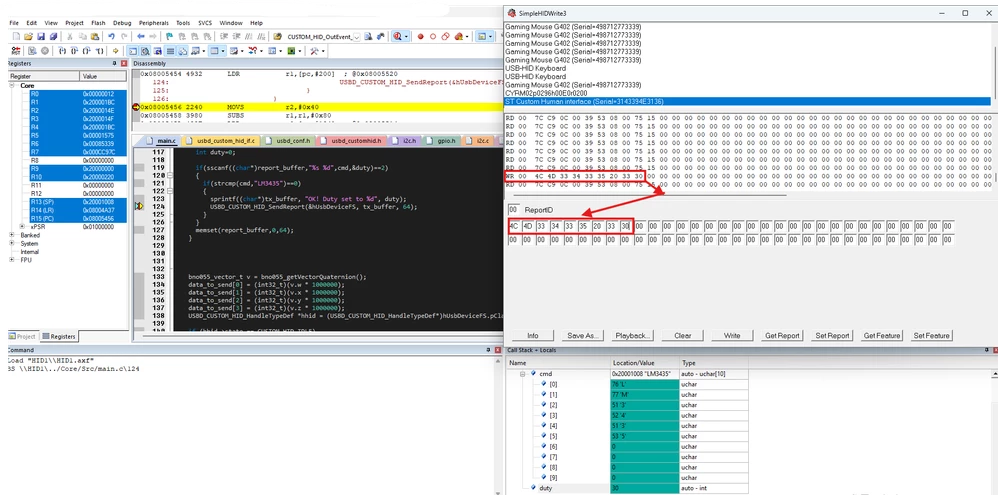
- Fail: Could not receive the data from host to STM32 second time
- modify the BNO055 speed by HAL_Delay(10 ~ 1000), the tool still crash
--------------------------------------------------------------------------------------------------------------------------------------------------------------------------------------------------------------------------------------------------------------------------------------------------------------------
Reference:
1. micro lib to solve the LDR R0, =SystemInit
https://community.st.com/t5/stm32-mcus-products/stm32f4-random-hard-faults-solved/td-p/516713
2. how to use Custom hid 1
https://blog.csdn.net/qq_36347513/article/details/127694257
3. how to use Custom hid 2
https://lungtenghsu.blogspot.com/2024/11/stm32usb-custom-hid.html
4. HID Learning
https://www.youtube.com/watch?v=umkD1piCNvc
5.BNO055 Library
https://github.com/ivyknob/bno055_stm32
6. MATA OCULUS Tracking
https://msl.cs.illinois.edu/~lavalle/papers/LavYerKatAnt14.pdf