

Kamil1
Associate II
December 28, 2025
Question

B-G431-ESC1 motor profiler connection

  • December 28, 2025
  • 10 replies
  • 1830 views

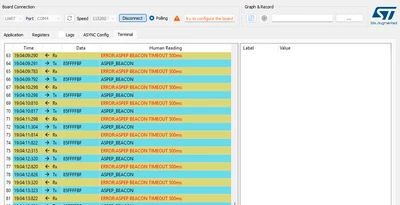
Hi, I'm trying to connect B-G431-ESC1 board, with no success. 

there is always : try to configure the board
Kamil1_0-1766945089159.png

I complile and flash a sample project successfully on the board. However still cannot connect motor profiler to make precision tuning of the motor. Any ideas why it cannot connect?


Thank you, Kamil

10 replies

Senior III
December 29, 2025

If you connected with serial port, try with different baud rates it may help sometimes. 

Kamil1
Kamil1Author
Associate II
December 30, 2025

Thank you for the tip, I have tried all of the baud rates, however it didtn't help...


When I try to connect the STM32cube programmer via ST-link, it works.

Kamil1_0-1767110950106.png

But when I try to connect via UART, I get this

Kamil1_1-1767111019750.png

Is it possible that it is the same problem? How can I change the boot mode configuration?

Thank you for any help


Senior III
December 31, 2025

I am confused when you are trying to connect to motor profiler, you need to open the Motor profiler software and then connect using the serial port. Are you trying to flash the code using serial port similar to the STLink, i am not sure what exactly you are trying to do.

Kamil1
Kamil1Author
Associate II
January 2, 2026

I have also tried to flash firmware from MC SDK 6.2.0. with the STM32CubeProgrammer

Kamil1_0-1767355301797.pngKamil1_1-1767355386809.png

however, there is still the same problem.

Kamil1_2-1767355465633.pngKamil1_3-1767355522932.png

Is there any chance to get help from ST?

Kamil1
Kamil1Author
Associate II
January 3, 2026

Thank you for tips, unfortunatelly nothing helped...

I have followed this tutorial

https://wiki.st.com/stm32mcu/wiki/STM32StepByStep:Step3_Introduction_to_the_UART

Kamil1_0-1767398723718.png


however, there is no "Hello world!!!" in the TeraTerm....

any clues?

Thank you


Senior III
January 3, 2026

What is the serial port hardware device you are using?

Have you connected the

Micro Tx -> Serial Port Rx

Micro Rx -> Serial Port Tx

Baud rate setting using code generation should match with the motor profiler baud rate.


Kamil1
Kamil1Author
Associate II
January 3, 2026

Not sure If I correctly understand your question. I'm using the B-G431-ESC1 board, with the daughter board not removed, USB cable that comes with the board, 24V 2A power supply, motor is 2810 900Kv 6s 7pole pair.

STlink V2-1, stlink 007 and 009 drivers, latest firmware upgraded via cube programmer.

Baud rate is set the same in: MCSDK, Cube MX, motor profiler, virtual com port - 115200.

IMG_20260103_083955.jpg

IMG_20260103_084102.jpg

If it will work one day I would like to use PWM to control the motor.


Kamil1
Kamil1Author
Associate II
January 3, 2026

There is no information about such an adapter needed in user manual,


also on this video there is not anything like that connected to the board.

https://www.youtube.com/watch?v=YSI_pBACLOo

Senior III
January 3, 2026

Ok, i use external serial port device. The below link will also be useful to read.

STM32 MC Motor Pilot - Start-up guide - stm32mcu


Kamil1
Kamil1Author
Associate II
January 3, 2026

Thanks, that Start-up guide is interesting and useful, however without successful connection...

Duc
Senior
January 4, 2026

Hi @Kamil1 ,

Which option are you currently using to connect to Motor Pilot?

Duc_0-1767522267206.png


You should connect the B-G431-ESC1 to the Motor Pilot via USB (1). Do not use the UART connection (2).


Kamil1
Kamil1Author
Associate II
January 4, 2026

I'm using only the micro usb (1),

I have only the PWM signal, ground and 5V soldered (2) for future use with PWM generator

IMG_20260103_084102.jpg

I think that we can use Teams for a call, I need to install it first. Thank you for your support

GMA
Technical Moderator
January 26, 2026

Hello @Kamil1,

Did you progress on this issue? 
Did you try to fully generate the project with default settings (default Baudrate) from scratch, flash the project, launch firmware on debugger, and on motor pilot, before connecting it "GUI/Reset GUI to Default/Discover Board".
It is not needed to generate code with CubeMx (step3, it has been already done on step2).


If you agree with the answer, please accept it by clicking on 'Accept as solution'.Best regards.GMA
Duc
Senior
January 4, 2026

@Kamil1 

Okay, we can use Team to continue the discussion. Please send me an email at levietduc0712@gmail.com

Kamil1
Kamil1Author
Associate II
January 30, 2026

Hello GMA, thank you for your tip. I have tried the default project with the motor profiler box checked (it is not checked in default settings), firmware is probably succesfully flashed, motor start spinning when I push the button on the board. However I still cannot connect the motor profiler. I'm still getting the same error, aspep beacon timeout, port open try to configure the board.

Also I have tried a lot of different versions of MCSDK (6.3.2, 6.1.2, 5.4.8,), instalation in different folder, everything uninstalled and installed again, as it is mentioned on other threads. I have the correct com port number, board is not connected to any other application. but nothing helped.

Would it be possible to get some test firmware that I can flash to the board and use Putty or Tera term to see if the board is sending UART signal via usb to the pc? I'm not skilled in programming to write something like that on my own.


Associate II
February 10, 2026

Hi,

I'm having the same issue with the STEVAL-PTOOL4A. I’ve tried pretty much the same things you did, and I'm wondering if you managed to resolve the problem.

Regards,
Jules

Kamil1
Kamil1Author
Associate II
February 10, 2026

Unfortunatelly, no progress at all...

Kamil

Associate II
March 6, 2026

Hi,
If it helps, the problem on my board was a missing resistor along the UART_TX line.
Regards,
Jules