
Can able to run the hall sensor based BLDC motor
Dear all,
My customized IPMSM BLDC motor have 10 pole and 12 stator slot, operating voltage 36V and nominal current 8A, hall sensors with 60 degree placement. I use the STM32G431R8T6 microcontroller for FOC operation and hardware is customized. I use the ST motor control workbench 5.Y.4 version.
I able to run the motor with sensorless method and also able to increase/decrease the speed and torque.
But, unable to run the motor with hall sensor based. I give the placement electrical angle is 180 degree based on the below calculation.
360 * pole = mechanical angle,
360 * 10 = 36 degree (mechanical angle),
electrical angle = (pole/2) * mechanical angle,
electrical angle = (10/2) * 36,
electrical angle = 180 degree.
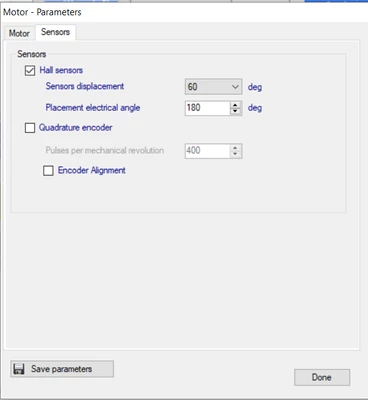
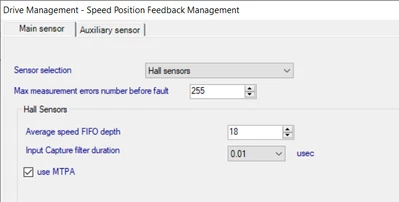
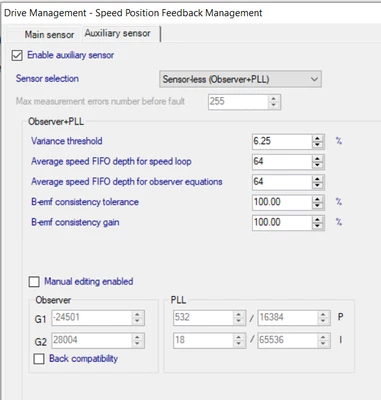
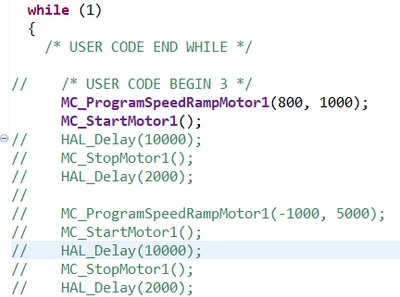
By applying the above electrical angle parameters to ST MC WB and generate the code. Then flash the firmware. Initially the rotor oscillated, and I turns the rotor manually for few steps. The rotor tried to start rotating, but after 72 degree (2 steps) the rotor was stop.
And I also watched the ST MOOC tutorial on youtube. But I didn't get any valid inputs from this video. video link https://www.youtube.com/watch?v=dt6bGpykerE&list=PLnMKNibPkDnFxzg5RExF_MNOxX6wfT95M&index=6
Please guide me to solve the issue
Thanks in Advance.