Associate II
August 21, 2023
Solved

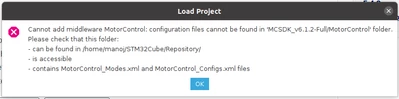
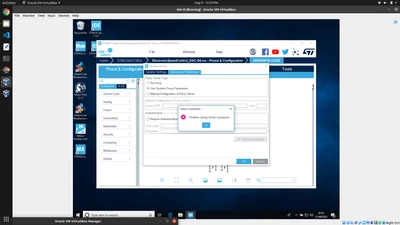
Can any one guide me How to start with STM32 Motor Control SDK ?
  • August 21, 2023
  • 2 replies
  • 1859 views

Screenshot from 2023-08-21 12-23-15.png

Screenshot from 2023-08-21 12-30-55.png

I install different versions of CubeMX, CubeIDE on Windows10 and Linux with MCSDK MCMonitor and Trying and trying to make it work but end up with only errors. I feel to make it more simple software become un usable. And there is no integrity between versions. I don't find my board in Latest CubeIDE i.e B-G431B-ESC1 board. Simple things work much better. Unable to connect with server. On every step there is error.

This topic has been closed for replies.
Best answer by Zied b.

Hello @Manoj Thakur ,

errors in red do not affect the generation of your code. Click on "Open folder" at the end of the generation. Then open the STM32CubeIde folder and open your project. Compile it and then connect your board with the MOTOR PILOT.

all documentation of MCSDK is provided in the package. The fastest way to find it is through the Motor Control Workbench:

- Open Mc Workbench
- Click top right on "About" button
- Click on "Documentation" -> "Documentation 
- Click on "User Manual"

As it is HTML documentation you can also enter this link in your browser: (replace _your_install_folder_)

file:///C:/_your_install_folder_/MC_SDK_6.1.2/Documentation/html/index.html

Regards

2 replies

RhSilicon
Lead
August 21, 2023

There are many videos on YouTube, have you seen them all? There are videos about Motor Control, about the IDE, about Advanced Debugging and much more.

STM_YT.png

https://www.youtube.com/@stmicroelectronics

Zied b.Best answer
ST Employee
August 21, 2023

Hello @Manoj Thakur ,

errors in red do not affect the generation of your code. Click on "Open folder" at the end of the generation. Then open the STM32CubeIde folder and open your project. Compile it and then connect your board with the MOTOR PILOT.

all documentation of MCSDK is provided in the package. The fastest way to find it is through the Motor Control Workbench:

- Open Mc Workbench
- Click top right on "About" button
- Click on "Documentation" -> "Documentation 
- Click on "User Manual"

As it is HTML documentation you can also enter this link in your browser: (replace _your_install_folder_)

file:///C:/_your_install_folder_/MC_SDK_6.1.2/Documentation/html/index.html

Regards