PCama.1
Associate III
February 1, 2022
Solved

MC-SDK 5.Y.4 code generation error

  • February 1, 2022
  • 5 replies
  • 5892 views

Board: Custom STSPIN32G4

Debug port: external STLINK V3

MC-SDK 5.Y.4

CubeMX 6.4

Firmware: STM32 FW V1.5.0

Drive Type: HAL

Target Toolchain: ST STM32CubeIDE 1.8.0

I designed a custom inverter using an STSPIN32G4, with the same topology of EVSPIN32G4, and so that is how I initiate the project in Motor Control Workbench.

I set it up for speed control and hall effect sensors feedback as the primary and only speed sensor. I have used this setup many times before in earlier versions with no issues.

During code generation, I get the following error:

“The ST intranet updater server is unknown: mcucrosselector.codex.cro.st.com�?
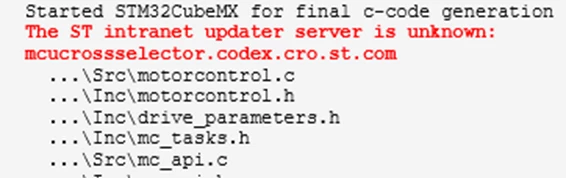
0693W00000JO2gcQAD.png 

and also,

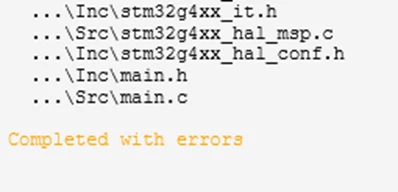
“Completed with errors�?

0693W00000JO2ewQAD.pngIn the main log, I get:

“Generation failed�?
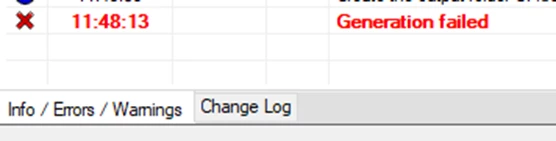
0693W00000JO2ghQAD.png 

The code seems to compile fine in CubeIDE 1.8.0 with no errors.

I run the program on the board using ST-LINK, Connect under different modes: reset, hardware reset, software reset and often I get a tab in CubeIDE saying:

“Break at address "0x1fff4bc4" with no debug information available, or outside of program code.�?

In the console, I get the normal “Download verified successfully�?

The board does connect with Motor Pilot about 50% of the times I try, but immediately I get the following errors.
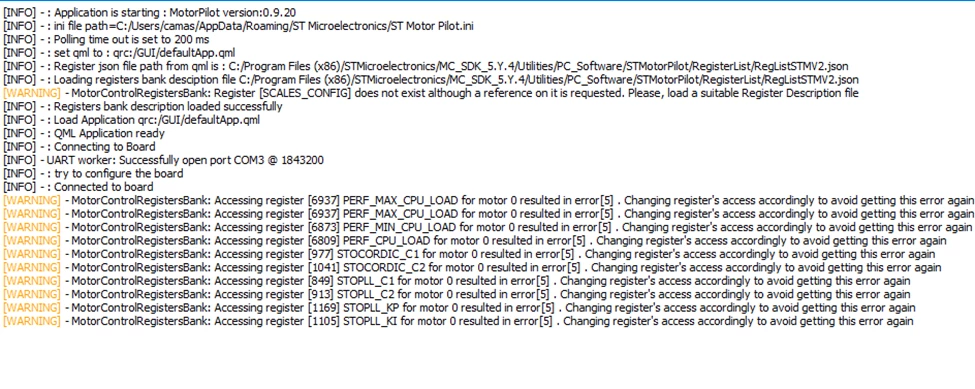
0693W00000JO2h1QAD.pngFinally, from the main dashboard I get an over current fault, but if I click on Acknowledge Fault, nothing happens.

I then run the same process with CubeMX 6.3, I don’t get any error message during code generation, but I get the same error message in Motor Pilot.

Going over the MC-SDK 5.Y.4 release notes, I go in CubeMX, MotorControl Middleware, and set DBG_MCU_LOAD_MEAS, but code will not compile with that option set.

Any suggestions, please?

This topic has been closed for replies.
Best answer by cedric H

Hello @PCama.1​ ,

Lots of things in your post.

First, the issue at generation phase does not prevent you to generate a working project. The " generation failed" status is then not relevant in your case. I reported the issue you saw to our cubeMX colleagues.

>The board does connect with Motor Pilot about 50% of the times I try, but immediately I get the following errors.

The screen shot of the Pilot you attached does not show any errors but just warnings. Those warnings are not critical but it is true we need to remove them as it brings confusion. From your attachment, I see that the Pilot is actually connected. Could you attach a screen shot of the "Terminal" window when it fails to connect ?

> Finally, from the main dashboard I get an over current fault, but if I click on Acknowledge Fault, nothing happens.

If nothing happens, it means that your error is permanent.

If I understood correctly, you have an over current fault as soon as you connect the Pilot to the board, even before you start to spin your motor. If this assumption is correct, then you have an issue with your overcurrent protection circuit. What is your topology ? Are you using external signal connected to Timer break pin or embedded comparators ?

> I go in CubeMX, MotorControl Middleware, and set DBG_MCU_LOAD_MEAS, but code will not compile with that option set.

We are aware of a compilation issue if you use both position control and DBG_MCU_LOAD_MEAS simultaneously. If it is not your case, please copy paste your compilation issue in this thread. It will help us to fix it in the next release !

Thanks & Regards

Cedric

5 replies

MK.1
Associate III
February 1, 2022

Hello. To reduce the number of communication errors, I lowered the port speed to 460800. The errors disappeared.

PCama.1
PCama.1Author
Associate III
February 1, 2022

Hi @MK.1​ Thank you so much for your suggestion, it was really helpful during the debug phase. I believe that the connection was more stable that way.

cedric H
Technical Moderator
February 2, 2022

Hi,

Just a quick information about the UART Baudrate.

There are no software or mips limitation anymore that prevent you to reach the maximum UART baudrate allowed by your STM32. The issues you may encounter are likely due to a bad quality of the RX an TX UART signals. Lowering the baudrate may help as it will increase the pulse width. One thing to try is to enable the UART RX internal pull-up. If you are designing your own board, do not hesitate to add an external pull-up on both lines RX and TX.

For your information, we did some tests at almost 10Mbps but this speed is highly dependent on the signal quality.

Last point, that is worth to know, is why do we set by default the baudrate at almost 2 Mbps. ?

The reason is exclusively for the datalog feature that allows you to view or record algorithm signals at PWM frequency without any loss.

with a PWM @20Khz, 1843200 bps will allow you to view 4 x16 bits values without any loss. Of course, if you do not need this datalog, or if you need less signals simultaneously, reducing the baudrate is a good strategy.

Hope it helps.

Regards

Cedric

cedric H
cedric HBest answer
Technical Moderator
February 1, 2022

Hello @PCama.1​ ,

Lots of things in your post.

First, the issue at generation phase does not prevent you to generate a working project. The " generation failed" status is then not relevant in your case. I reported the issue you saw to our cubeMX colleagues.

>The board does connect with Motor Pilot about 50% of the times I try, but immediately I get the following errors.

The screen shot of the Pilot you attached does not show any errors but just warnings. Those warnings are not critical but it is true we need to remove them as it brings confusion. From your attachment, I see that the Pilot is actually connected. Could you attach a screen shot of the "Terminal" window when it fails to connect ?

> Finally, from the main dashboard I get an over current fault, but if I click on Acknowledge Fault, nothing happens.

If nothing happens, it means that your error is permanent.

If I understood correctly, you have an over current fault as soon as you connect the Pilot to the board, even before you start to spin your motor. If this assumption is correct, then you have an issue with your overcurrent protection circuit. What is your topology ? Are you using external signal connected to Timer break pin or embedded comparators ?

> I go in CubeMX, MotorControl Middleware, and set DBG_MCU_LOAD_MEAS, but code will not compile with that option set.

We are aware of a compilation issue if you use both position control and DBG_MCU_LOAD_MEAS simultaneously. If it is not your case, please copy paste your compilation issue in this thread. It will help us to fix it in the next release !

Thanks & Regards

Cedric

PCama.1
PCama.1Author
Associate III
February 1, 2022

@cedric H​ Wow, thank you so much for your answer, and further questions which really led me to the solution. Knowing that I could basically ignore the error/warning messages, I felt confident to hone in the current sensor topology, and setup.

I just realized that for a long time, I was looking at the setting for an external network gain, not at the embedded over current protection topology. Once I set up the internal amplifying network gain to match my setup, which is different from the EVSPIN32G4, since my board nominal current is 5 Amps, everything worked like a charm.

Even the DBG_MCU_LOAD_MEAS and the USART1 worked fine. My setup is for speed control with Hal sensors. I am writing my own PID position control with an absolute encoder.

Good job everyone, and thank you so much for your support!

Paulo

cedric H
Technical Moderator
February 2, 2022

Hello Paulo,

Thank you very much for your feed back, and happy to read that your system works as expected.

Cedric

PCama.1
PCama.1Author
Associate III
February 1, 2022

One more question if possible. I noticed that the STSPIN32G4 seems to run hot, at around 60 Celsius and it stays at that temperature even after the motor is not running for a few minutes. I believe I have enough thermal vias under its pad.

Do you have any suggestions for me to look if any process is running continuously?

cedric H
Technical Moderator
February 2, 2022

> Do you have any suggestions for me to look if any process is running continuously?

Well, the first thing I would check is the power consumption of your system with a laboratory power supply, and check first that the consumption after a power on reset is the same than once your motor is stopped after spinning. Even if there are rooms for improvement on software side (as we do not enable any low power feature) , I will try to fight for these micro Amps once everything else has been checked.

Cedric

PCama.1
PCama.1Author
Associate III
February 4, 2022

Here is what I measured, with my power source set at 24V and spinning motor freely with no load:

At start with motor still:

0.08A -> 1.92W

Motor spinning at 570 rpm:

0.12A -> 2.88W

Motor spinning at 1002 rpm

0.15A -> 3.60W

After motor stop:

initial conditions are met

0.08A -> 1.92W

The MCU always feels very hot though, as mentioned above, around 60 or 70 Celsius. Yes, I am putting my finger on it, sorry for the ESD transgression...

I see that STSPIN32G4 work in a range of temperature up to 125 Celsius, so I is it safe to assume that I am experiencing an expected temperature for this MCU?

SE D.1
Visitor II
March 24, 2022

@PCama.1​ 

Hi,

I'm also getting same error. But my board is EVSPIN32G4NH and Cube IDE v1.9.0.

Board: EVSTSPIN32G4NH

Debug port: Internal ST link

MC-SDK 5.Y.4

CubeMX 6.4

Firmware: STM32 FW V1.5.0

Drive Type: HAL

Target Toolchain: ST STM32CubeIDE 1.9.0

I've gone through the all answers for your question. But I don't get it.

So what need to done to remove this error?

Kindly help with this.

PCama.1
PCama.1Author
Associate III
March 25, 2022

Hi SE D.1

If you are getting the same "Generation Failed" error when generating the code, that I refer to in my original post, what Cedric said is that that error could be disregarded, at least in my case given the screenshot I provided. I recommend you reading again his answer to my post.

He also mentioned that ST will probably fix it, but the code generated should work just fine. Once I realized that I could just ignore this error, I ran it and it worked for me.

Assuming that is the error you are referring to, try to run the generated code in CubeIDE and it should work for you too.

Best,

Paulo

SE D.1
Visitor II
March 27, 2022

Thank you PCama.1 for your reply, this'll help me to proceed further. I'll upload the code & test and then I'll let you know.

I've some more question, asked below:

  1. Are you using STSPIN32G4 Controller for BLDC motor or PMSM motor?
  2. What algorithm are you using FOC or 6 step trapezoidal control?
  3. For current sensing what topology are you using 1 shunt or 3 shunt?
  4. For speed sensing what topology are you using hall sensor or quadrature encoder or sensor less algorithm?
  5. Is the firmware developed by ST Motor Control workbench for your project is working perfectly without any error or malfunction during running?

Kindly, answer these questions that'll be great help for me.

Thanks and regards