
Associate II
November 19, 2024
Solved

MC Workbench 6.3.2 - "Fail to copy Extra folders"

  • November 19, 2024
  • 4 replies
  • 1498 views

Trying to update a test project from MC Workbench, I get the error "Fail to copy Extra folders" and generation fails.

Log shows:
2024-11-19 12:40:56,300 ERROR [Wb2MxProcess.copyExtraFolders] Fail to copy Extra folders
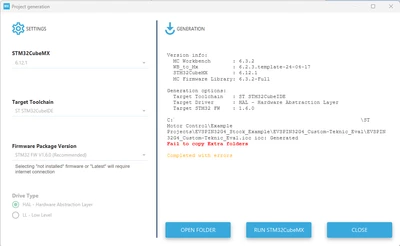
Frakk2136_2-1732038250283.png

These are the steps to reproduce:
- Create new project in MC Workbench. I used STEVAL32G4 board
- Save, Generate Project
- Optional - Open in CubeMX, Generate Code
- In CubeIDE, "Import Existing Projects into Workspace". Unchecked "Copy projects into Workspace"
- Importing seems to break it
- Go back to MC Workbench and Generate Project again
Additional:
- If I go back to CubeMX and Generate Code after MC Workbench fail, it will break the project in IDE.
"13:08:48 Build Failed. 2702 errors, 135 warnings. (took 4s.875ms)"

Am I doing something wrong with the import? 
Please advise why MC Workbench breaks my project after I import to CubeIDE.

Thank you


Best answer by Frakk2136

After much time spent trying different things, I think this is caused by the fact that my project and files are in my synchronized One Drive folder.

Is there a setting in One Drive that causes this, or blocks CubeMX from accessing these folders. The project generates fine for the first time, but breaks after trying to overwrite.

4 replies

Frakk2136AuthorBest answer
Associate II
November 20, 2024

After much time spent trying different things, I think this is caused by the fact that my project and files are in my synchronized One Drive folder.

Is there a setting in One Drive that causes this, or blocks CubeMX from accessing these folders. The project generates fine for the first time, but breaks after trying to overwrite.

ST Employee
November 21, 2024

Hi @Frakk2136 ,


could you please try to double-click on the STM32CubeIDE generated ".project" file, this will import directly your whole project without issues.

Otherwise, if you want to import your project into STM32CubeIDE GUI, you should :

- got to File menu -> Open Projects from File System

- Select your STM32CubeIDE folder as Import Source directory

- Finish


Kind regards


Frakk2136Author
Associate II
November 21, 2024

Thank you,

Unfortunately the problem still exists, it doesn't matter how I open it in the IDE.
After testing I could also reproduce it without opening in the IDE.

So far my solution is to keep my project on Desktop and work out of that folder.

This is most likely some sort of interference between One Drive and CubeMX.

Frakk2136Author
Associate II
November 27, 2024

After much frustration and trial and error I found a way to stop the fails with One-Drive.

After the first time the project is generated in MC Workbench, I navigate to the project and delete the "ftl" folder.
If I don't the generation will keep failing. By deleting it after it generates for some reason it fixes the failures.

ST Employee
November 28, 2024

Hi @Frakk2136 ,


this is a strange behavior, the ftl folder is mandatory for the project generation, this has not to be deleted.

Regards


Frakk2136Author
Associate II
November 28, 2024

The ftl folder is regenerated if it is not there. The reason this error occurs is because it "Fail to copy Extra folders", meaning the ftl folder is the extra folder.

I think initially it is generated, One-Drive then synchronizes it, when done a green checkmark appears on the folder icon. I suspect it is this synchronization process that puts some sort of lock on it that prevents MC Workbench copying over it.