

AHsu.1
Associate
July 30, 2022
Solved

Motor Profiler 5.4.8 can't connect with board (dll not found)

  • July 30, 2022
  • 2 replies
  • 1290 views

Hi there,

I use NUCLEO-F401RE and X-NUCLEO-IHM07M1

Installed "X-CUBE-MCSDK_5.4.8" and execute Motor Profiler

Pressed connect and get MSVCR100.dll MSVCP100.dll mfc100.dll not found ( Win 10)
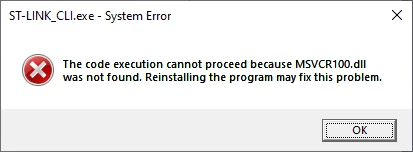
0693W00000QMWvHQAX.pngBut I check path "C:\Windows\System32" dlls are exist

If copy dlls into folder and execute, get another error as below
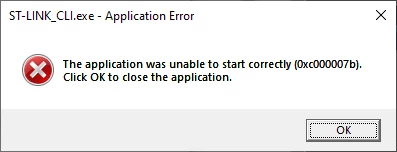
0693W00000QMWvbQAH.pngStm32cubeprogrammer can work normal

7/31. MCSDK-FUL_6.0.0 is well

7/31. X-CUBE-MCSDK_5.4.8 is aslo well at Win7

This topic has been closed for replies.
Best answer by AHsu.1

for Win10 environment user

Install MCSDK-FUL_6.0.0 and copy folder "cli"

C:\Program Files (x86)\STMicroelectronics\MC_SDK_6.0.0\Utilities\PC_Software\STMotorProfiler\resources\assets\stlink\cli

Paste and cover C:\Program Files (x86)\STMicroelectronics\MC_SDK_5.4.8\Utilities\PC_Software\STMotorProfiler\resources\assets\stlink\cli

2 replies

AHsu.1
AHsu.1AuthorBest answer
Associate
July 31, 2022

for Win10 environment user

Install MCSDK-FUL_6.0.0 and copy folder "cli"

C:\Program Files (x86)\STMicroelectronics\MC_SDK_6.0.0\Utilities\PC_Software\STMotorProfiler\resources\assets\stlink\cli

Paste and cover C:\Program Files (x86)\STMicroelectronics\MC_SDK_5.4.8\Utilities\PC_Software\STMotorProfiler\resources\assets\stlink\cli

Visitor II
August 21, 2023

The problem been resolved just by installing ST-Link-Utility.