
Associate II
November 18, 2024
Solved

Over-Voltage Protection Options - Motor Braking Resistor Output No Longer Available In MC Workbench

  • November 18, 2024
  • 2 replies
  • 1309 views

Hi,

I am developing on EVSPIN32G4, MC Workbench 6.1.2.

The only option for Over Voltage Protection is to turn on Low Side Switches. This unfortunately doesn't work as I still constantly get Over Voltage faults in position control mode, when the motor is trying to stop on position. It generates enough back current to spike it above the threshold of 32V on a 24V PSU. 

I have an older custom design with a large Braking Resistor switched by a MOSFET. The output for this option was available in earlier versions but I can no longer find it anywhere.

Are there any working solutions out of the box for over voltage protection?
Best answer by GMA

Hello @Frakk2136,

You have to create a custom board .json file based on EVSPIN32G4.json available in "MC_SDK_6.1.0\Utilities\PC_Software\STMCWB\assets\hardware\board\inverter" directory.
Brake feature is described in Motor Brake (example available in power/STEVAL-IHM023V3.json file).
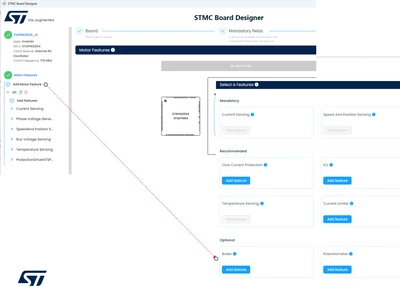
You can also take the advantage of the ST Motor Control Board Designer tool available in MCSDK6.3.2 for example. Based on EVSPIN32G4 board, create a cloned custom board and add Brake feature.

GMA_0-1732003355478.png


2 replies

GMA
GMABest answer
Technical Moderator
November 19, 2024

Hello @Frakk2136,

You have to create a custom board .json file based on EVSPIN32G4.json available in "MC_SDK_6.1.0\Utilities\PC_Software\STMCWB\assets\hardware\board\inverter" directory.
Brake feature is described in Motor Brake (example available in power/STEVAL-IHM023V3.json file).
You can also take the advantage of the ST Motor Control Board Designer tool available in MCSDK6.3.2 for example. Based on EVSPIN32G4 board, create a cloned custom board and add Brake feature.

GMA_0-1732003355478.png


If you agree with the answer, please accept it by clicking on 'Accept as solution'.Best regards.GMA
Frakk2136Author
Associate II
November 19, 2024

Hello,

Thank you for the reply. 
I updated my tools to the latest versions and went through the steps.

1. Cloned EVSPIN32G4 board in STMC Board Designer, and added Motor Brake Feature

2. Generated IOC project from MCSDK and opened in CubeMX

Unfortunately the Brake feature is not present anywhere past the Board Designer and .json (I checked and the section is created), no pins are initialized. 

Am I doing something wrong? Is it not supposed to show up in CubeMX? At least show which pin it is mapped to?

Thanks,

Adam 

GMA
Technical Moderator
November 19, 2024

Hello @Frakk2136,

Did you select "Switch on dissipative brake" on Workbench>Bus Voltage Sensing?

GMA_0-1732034918337.png


If you agree with the answer, please accept it by clicking on 'Accept as solution'.Best regards.GMA
Frakk2136Author
Associate II
November 19, 2024

Thank you, I missed that part hidden in there. I was looking for something more obvious but it checks out in CubeMX as well.

In the process I discovered another issue with MC Workbench, made a separate thread not to get off topic here:
https://community.st.com/t5/stm32-mcus-motor-control/mc-workbench-6-3-2-quot-fail-to-copy-extra-folders-quot/td-p/744941