
Associate III
June 12, 2024
Solved

P-NUCLEO-IHM03 giving startup failure

  • June 12, 2024
  • 10 replies
  • 6574 views

The P-NUCLEO-IHM03 with type selected as "FOC" has the firmware pre-installed. After pushing Blue start/stop button, the motor starts but fails to continue.

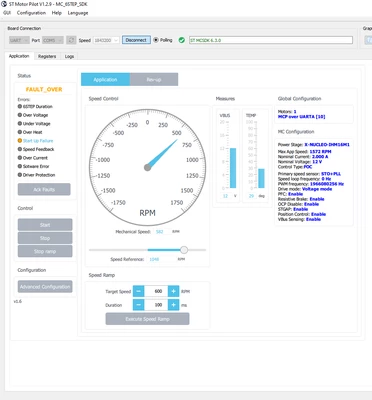
In Motor pilot, it is showing that a fault is thrown (startup failure) and the motor shuts down. The P-NUCLEO-IHM03 Black button needs to be pressed to clear the fault, but the motor still does not continue to run upon Blue button start.

Control Board: NUCLEO-G431RB  
Power Board: X-NUCLEO-IHM16M1
Motor: Gimbal GBM2804H-100Tthis.png


Best answer by Gael A

Hello tejas_amp,

The picture was taken with an Open Loop setup, however you would expect the same behavior from a Closed Loop.

Well if you have another IHM16 then it won't hurt to try. I highly doubt that a simple change of computer has made your project unfunctional. The problem lies elsewhere, though I have my opinion on its whereabouts : it is very likely to be from the IHM16.

10 replies

Gael A
ST Employee
June 12, 2024

Hello tejas_amp,

This is a weird issue. Is your motor stator fixed correctly ?
If your issue still persists, you can try tinkering with the start-up sequence via MotorPilot. Firstly I would try to reduce the target current to 1Amp, and increase the start-up ramp time (second line of the table).

If all fails, I suggest you generate a new project using the MCSDK 6.3.0 and see how it goes.

If you agree with my answer, please consider accepting it by clicking on 'Accept as solution'.Hope this will help,Gaël A.
tejas_ampAuthor
Associate III
June 12, 2024

Yes i stator is fixed correctly.
Where is the option for reducing the target current to 1Amp in Motor Pilot (see screenshot below). I tried increasing ramp time but it didn't work.

I have already tried generating new project from MCSDK 6.3.0 many times but same issue persists.

this2.png


Gael A
ST Employee
June 12, 2024

Hello tejas_amp,

You can access the revup procedure by clicking on the "revup" tab next to "Application"
I recommend modifying the start-up time using the revup table. The "Speed Ramp" square is more useful for creating speed ramp when your motor is already turning.

If you agree with my answer, please consider accepting it by clicking on 'Accept as solution'.Hope this will help,Gaël A.
tejas_ampAuthor
Associate III
June 12, 2024

It has started working better. When i feeded the table in revup section (see screen shot). But after reaching the last entry of the table, Pilot again shows Startup Failure. Whatever last value, i feed in the table it goes till it and then startup failure. Why so? this3.png


I am getting this in logs
logs.png


Gael A
ST Employee
June 12, 2024

Hello tejas_amp,

The way I see things here, you have a 6-STEP project (or you loaded the MotorPilot with the wrong GUI), which is not the default setup of the IHM16 when shipped with a P-NUCLEO-IHM03. Have you checked that your IHM16 hardware is correctly set ?

If you agree with my answer, please consider accepting it by clicking on 'Accept as solution'.Hope this will help,Gaël A.
tejas_ampAuthor
Associate III
June 12, 2024

Okay. I have loaded correct version now but still issue is same. Running till last entry and then startup failure. Please help. 


this5.png


When it reaches 900 rpm, it stops and shows startup failure.


this6.png


Gael A
ST Employee
June 12, 2024

Hello again tejas_amp,

Okay then could you try to Reset GUI to Default in the MotorPilot GUI tab, and then try the Discover Board button and then see how that goes please ?

If you agree with my answer, please consider accepting it by clicking on 'Accept as solution'.Hope this will help,Gaël A.
tejas_ampAuthor
Associate III
June 12, 2024

Done. Please see edited reply above.

Gael A
ST Employee
June 12, 2024

Dear tejas_amp,

The following setup is working fine for me, have you tried with something similar ? Don't hesitate to have a look at the Advanced Configuration.
Gimball_Setup.PNG
You could also try to reduce the target speed to 400rpm (leave the first line at 0rpm, otherwise your motor won't align)
Another idea would be to increase the duration of the 2nd phase (1164ms one in my snapshot)


If this does not work, I would advise you to generate an Open Loop project (you can find the guide in the User Manual) and have a look at your Ia and Ib currents, it will help you determine whether there is something wrong with your HW, as the project should work out of the box.
Also, could you tell me which IDE you are using please ?

If you agree with my answer, please consider accepting it by clicking on 'Accept as solution'.Hope this will help,Gaël A.
Gael A
ST Employee
June 14, 2024

Also, please provide real time currents of an Open Loop project. At first in Open Loop voltage, and if it works, then in Open Loop Currents, that will help finding the root cause of the issue.

If you agree with my answer, please consider accepting it by clicking on 'Accept as solution'.Hope this will help,Gaël A.
tejas_ampAuthor
Associate III
June 17, 2024

Hi, Can we follow up now?

Gael A
ST Employee
June 14, 2024

Yes, this is the Open Loop mode.

Concerning the User Manual of the IHM16, I am referring to this one : https://www.st.com/resource/en/user_manual/um2415-getting-started-with-the-xnucleoihm16m1-threephase-brushless-motor-driver-board-based-on-stspin830-for-stm32-nucleo-stmicroelectronics.pdf

The one you are referring to is the P-IHM03 pack User Manual.

And concerning the User Manual of the MCSDK, which contains a "How to use the Open Loop mode", I am referring to the one you can find via WorkBench by clicking on About -> Documentations -> Documentation -> in the newly open browser window, click on User Manual. Then click on Open loop description and usage.

If you agree with my answer, please consider accepting it by clicking on 'Accept as solution'.Hope this will help,Gaël A.
tejas_ampAuthor
Associate III
June 14, 2024

Okay. Connections are set correctly as per the manual. 

Open Loop Voltage Mode Ia and Ib Motor state is "RUN" but its not spinning.

tejas_amp_0-1718361380651.png


Open Loop Current Mode, Ia and Ib, same thing happening:

tejas_amp_1-1718361460266.png


Parameters:

tejas_amp_2-1718361558724.png


What does this open loop result shows?


Gael A
ST Employee
June 17, 2024

Hello tejas_amp, I hope you had a lovely weekend too,

By looking at your current curves, it seems that there is a Hardware issue. At this point it could come from anywhere in the IHM16, but please first make sure that it is configured correctly, especially JP4 and JP7 for Shunt configuration, and J5 and J6 for current sensing :

IHM16_HW_Config.PNG


If this is ok, the next step would be to have a look at the IHM16 schematics and see if any component is missing.
Maybe there is a resistor missing in the current feedback part :

IHM16_Curr_fdbk.PNG

If you agree with my answer, please consider accepting it by clicking on 'Accept as solution'.Hope this will help,Gaël A.
tejas_ampAuthor
Associate III
June 17, 2024

Can you please confirm what is meant by "Solder bridge at bottom"?, JP4 and JP7 are already Open.

For others, I have checked the connection and schematics and they are correctly present. 
"By looking at your current curves, it seems that there is a Hardware issue", In Open Loop test, since Ia (Blue) waveform was coming approx 0. Is this the reason that there is possible Hardware issue?

Actually, the kit was working fine on initially system. But when I changed the system, it is not working anywhere now.

Should I replace IHM16 with new one and then try? Or the problem can be in microcontroller or motor as well?

Gael A
ST Employee
June 17, 2024

Hello tejas_amp,

"Solder bridge at bottom" means that the solder bridges are located on the reverse side of the Power Board.

Ia and Ib currents are current phases from your motor, they should look like that :

OL_Current.PNG


If you have absolutely no current on one phase, then yes, it means you have a HW issue, because nothing is received from the motor, even in Open Loop.

I am happy to learn that the system you bought was initially functional. However, if you made some modifications that proved to be unfortunate, that is out of the scope of the support we can provide. I can only advise you to revert those changes in order to recover your setup. However, depending on the modifications, be aware that you might have permanently damaged your hardware.

If you agree with my answer, please consider accepting it by clicking on 'Accept as solution'.Hope this will help,Gaël A.
tejas_ampAuthor
Associate III
June 17, 2024

The image you have shown is of Open Loop or Closed Loop?

I haven't modified any thing just changed my computer. Should I replace IHM16 with new one and then try? Or the problem can be in microcontroller/motor as well? 

Thanks for all your support.

Gael A
Gael ABest answer
ST Employee
June 17, 2024

Hello tejas_amp,

The picture was taken with an Open Loop setup, however you would expect the same behavior from a Closed Loop.

Well if you have another IHM16 then it won't hurt to try. I highly doubt that a simple change of computer has made your project unfunctional. The problem lies elsewhere, though I have my opinion on its whereabouts : it is very likely to be from the IHM16.

If you agree with my answer, please consider accepting it by clicking on 'Accept as solution'.Hope this will help,Gaël A.
tejas_ampAuthor
Associate III
June 19, 2024

Thanks for all your help!

I found the problem was in one of the windings of motor internally, rectified it and now the project is working fine. Thanks again for all your support.