

JKong.3
Associate III
May 1, 2023
Solved

ST Motor Profiler profile failed for B-G431B-ESC1 3Sh (first time connecting)

  • May 1, 2023
  • 5 replies
  • 2859 views

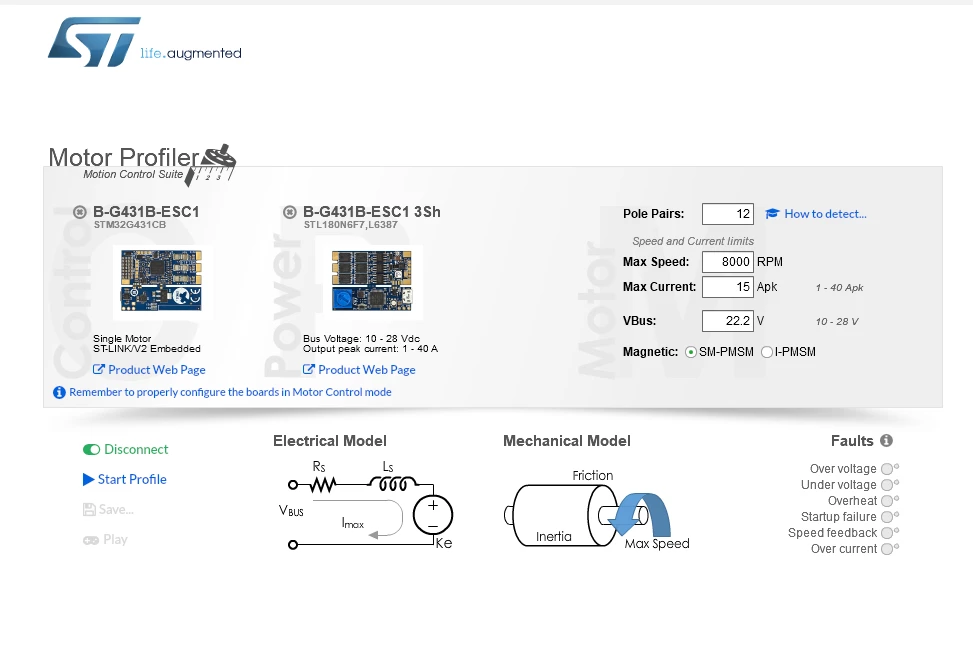
Hi, I'm trying to start a research project using B-G431B-ESC1 and some BLDC motor. I am trying to measure the models of the motor using ST Motor Profiler.

However, after connecting the esc to the PC using USB - micro USB cable, it continuously fails to profile the motor.

Any suggestions would be helpful. Here's where I'm stuck at.

_legacyfs_online_stmicro_images_0693W00000bj7zJQAQ.png 

This topic has been closed for replies.
Best answer by Gael A

Hi again,

This time it is a well known issue of the current version of the Profiler, we are working on a patch to fix it. In the meantime, you can refer to this post to see if it solves your problem.

Hope this will help,

Best Regards,

Gaël A.

5 replies

Gael A
ST Employee
May 2, 2023

Hello JKong.3,

I will gladly try to help you regarding the Motor Profiler, but I need you to answer a couple of questions to determine your issue.

Firstly, could you tell me which version of the Motor Profiler you are using ? You can find the information either on the top left corner of the application, or by clicking on the I symbol on the bottom right (depending on the version)

Secondly, does the Profiler show any Fault when you try to profile your motor ? If it does, which one ? If it does not, could you describe the behavior of the system ?

If you agree with my answer, please consider accepting it by clicking on 'Accept as solution'.Hope this will help,Gaël A.
JKong.3
JKong.3Author
Associate III
May 2, 2023

Hi,

the version is 1.3.2 - 18 Dec 2020 (build : 20190628)

The version specified at the name of the application is 5.4.8

After clicking the start profile button, this is what happens


_legacyfs_online_stmicro_images_0693W00000bjBX4QAM.pngafter some time, Profile failed notification appears at the upper right of the window and that's it.

Gael A
ST Employee
May 2, 2023

This is quite startling,

You are using an old version of the Motor Profiler, so I may not be able to find the solution right now. However, you can try the few following methods and see if this works :

  • Try erasing your board's firmware using CubeProgrammer and then try to flash the FW again using Motor Profiler.

  • Sometimes unplugging and re-plugging the USB cable somehow fixes it.

If none of this works, please consider upgrading to the latest version of the MCSDK : X-CUBE-MCSDK-6. Note that in this version Motor Profiler has been grouped with Motor Pilot to form a unique Motor Pilot software, combining both features.

Hope this will help,

Best Regards,

Gaël A.

If you agree with my answer, please consider accepting it by clicking on 'Accept as solution'.Hope this will help,Gaël A.
JKong.3
JKong.3Author
Associate III
May 2, 2023

I will try to use the latest version. Thank you for your help

JKong.3
JKong.3Author
Associate III
May 2, 2023

Hi, stuck again.

I downloaded the latest version, and clicked "connect" in a ST Motor pilot V1.1.5

then I clicked "accept" in the "Warning: motor profiler image required" notification

the problem is it is stuck in this stage (about 1 hour)

I am connecting to B-G431B-ESC1 via USB cable.

any advice would be helpful


_legacyfs_online_stmicro_images_0693W00000bjC8PQAU.png

Gael A
Gael ABest answer
ST Employee
May 2, 2023

Hi again,

This time it is a well known issue of the current version of the Profiler, we are working on a patch to fix it. In the meantime, you can refer to this post to see if it solves your problem.

Hope this will help,

Best Regards,

Gaël A.

If you agree with my answer, please consider accepting it by clicking on 'Accept as solution'.Hope this will help,Gaël A.
JKong.3
JKong.3Author
Associate III
May 2, 2023

It works. thank you

Marc1
Associate III
May 10, 2023

deleted