ali_dehbidi
Associate III
January 28, 2024
Solved

ST MotorControl Workbench V 5.4.8 or 6.2.1 would fail to generate

  • January 28, 2024
  • 12 replies
  • 10309 views

Hi
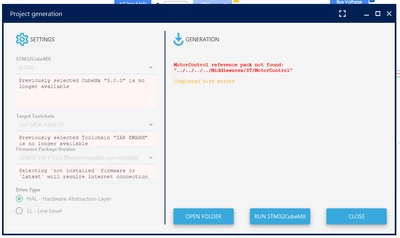
I wanted to test ST MotorControl Workbench for experimenting with brushless motors, I have installed and tested the MotorControl Workbench 6.2.1 and MotorControl Workbench 5.4.8 on win 11 and both of them would fail to generate the projects out of box with this error message,
I have set them to use keil IDE v5 and my stmcubemx version is 6.10.0


you can check the error log here

Quote
2024-01-28 18:56:58,742 DEBUG [Main.lambda$run$0] Arguments: [-ioc, C:\Users\Ali\Desktop\mc\EvalG0_SingleShunt_IHM023V3_HAL\EvalG0_SingleShunt_IHM023V3_HAL.ioc, -xdm, C:\Users\Ali\Desktop\mc\EvalG0_SingleShunt_IHM023V3_HAL\EvalG0_SingleShunt_IHM023V3_HAL.wb_def]
2024-01-28 18:56:58,745 DEBUG [ArgsValue.readPropertiesFile] [AppConfig] pack.source = "C:\Program Files (x86)\STMicroelectronics\MC_SDK_5.4.8\Middlewares\ST\MotorControl"
2024-01-28 18:56:58,745 DEBUG [ArgsValue.readPropertiesFile] [UserConfig] do not exist in "C:\Users\Ali\.st_motor_control\wb2mx.properties"
2024-01-28 18:56:58,753 DEBUG [ArgsValue.getConfigProperties] pack.source = "../../../../Middlewares/ST/MotorControl"
2024-01-28 18:56:58,758 DEBUG [ArgsValue.lambda$retrieve$2] CLI_ARG[xdm]: C:\Users\Ali\Desktop\mc\EvalG0_SingleShunt_IHM023V3_HAL\EvalG0_SingleShunt_IHM023V3_HAL.wb_def
2024-01-28 18:56:58,758 DEBUG [ArgsValue.lambda$retrieve$2] CLI_ARG[ioc]: C:\Users\Ali\Desktop\mc\EvalG0_SingleShunt_IHM023V3_HAL\EvalG0_SingleShunt_IHM023V3_HAL.ioc
2024-01-28 18:56:58,758 DEBUG [ArgsValue.retrieve] {xdm=C:\Users\Ali\Desktop\mc\EvalG0_SingleShunt_IHM023V3_HAL\EvalG0_SingleShunt_IHM023V3_HAL.wb_def, updftl=templates/wb_ioc_mc-middleware.ftl, mx_timeout=-1, exp=templates/wb-defines_where_and_what.txt, ioc=C:\Users\Ali\Desktop\mc\EvalG0_SingleShunt_IHM023V3_HAL\EvalG0_SingleShunt_IHM023V3_HAL.ioc, pack=../../../../Middlewares/ST/MotorControl, ftl=templates/wb_ioc_template.ftl}
2024-01-28 18:56:58,801 DEBUG [Main.run] Targeted MCU family = G0
2024-01-28 18:56:58,818 DEBUG [Main.run] Minimum associated CubeMx to the `G0` targeted MCU family is `4.28.0-a0`
2024-01-28 18:56:58,829 DEBUG [WindowsCubeMxFinder.lambda$findThem$2] Found 64-bit subkey HKEY_LOCAL_MACHINE\~~~\Uninstall\STM32CubeMX
2024-01-28 18:56:58,834 DEBUG [CubeMxCtx.EXE_version] Loaded path: 'C:\Program Files\STMicroelectronics\STM32Cube\STM32CubeMX\STM32CubeMX.exe'
2024-01-28 18:56:58,834 DEBUG [CubeMxCtx.EXE_version] Loaded updater jar: 'C:\Program Files\STMicroelectronics\STM32Cube\STM32CubeMX\plugins\updater.jar'
2024-01-28 18:56:58,846 DEBUG [CubeMxCtx.EXE_version] Loaded path: 'C:\Program Files\STMicroelectronics\STM32Cube\STM32CubeMX\STM32CubeMX.exe'
2024-01-28 18:56:58,846 DEBUG [CubeMxCtx.EXE_version] Loaded updater jar: 'C:\Program Files\STMicroelectronics\STM32Cube\STM32CubeMX\plugins\updater.jar'
2024-01-28 18:56:58,855 DEBUG [CubeMxCtx.EXE_version] Loaded path: 'C:\Program Files\STMicroelectronics\STM32Cube\STM32CubeMX\STM32CubeMX.exe'
2024-01-28 18:56:58,855 DEBUG [CubeMxCtx.EXE_version] Loaded updater jar: 'C:\Program Files\STMicroelectronics\STM32Cube\STM32CubeMX\plugins\updater.jar'
2024-01-28 18:57:17,327 DEBUG [CubeMxCtx.EXE_version] Loaded path: 'C:\Program Files\STMicroelectronics\STM32Cube\STM32CubeMX\STM32CubeMX.exe'
2024-01-28 18:57:17,328 DEBUG [CubeMxCtx.EXE_version] Loaded updater jar: 'C:\Program Files\STMicroelectronics\STM32Cube\STM32CubeMX\plugins\updater.jar'
2024-01-28 18:57:17,356 DEBUG [EnvironmentChecker.checkPack] STM32CubeMX.Version: 6.10.0-RC9
2024-01-28 18:57:20,083 ERROR [LineInfo_to_exitCode.manage_MCPackNotFound] MotorControl reference pack not found: "../../../../Middlewares/ST/MotorControl"


What's the problem? do you have any Idea what's wrong?
Screenshot 2024-01-28 185715.png

Screenshot 2024-01-28 185728.png

Best answer by cedric H

You home directory is in your C:\Users\ folder, It should contain a directory named as your login name.

Inside this directory you should have a .st_motor_control directory containing a wb2mx.properties file.

6.2.1 supports roughly 380 MCUs, much more than all the previous releases.

Could you tell us what is the MCU proposed in 5.4 that you do not find in 6.2 ? 

The only reason to stay on 5.4 is if your project is based on STM32F1 which has been discontinued in 6.2.1

Regards

Cedric.

12 replies

ali_dehbidi
Associate III
January 30, 2024

Is there any st personnel in here to help?

cedric H
Technical Moderator
January 30, 2024

Hello @ali_dehbidi,

Could you describe the steps you followed?

I have never seen such errors, but it looks like you tried to generate your project into a directory containing an old project. That would explain why the tool complains about previous selected item no more available.

Could you try to save your project into a fresh new directory and generate from it.

Hope it helps.

Cedric

ali_dehbidi
Associate III
January 31, 2024

Hi Cedric

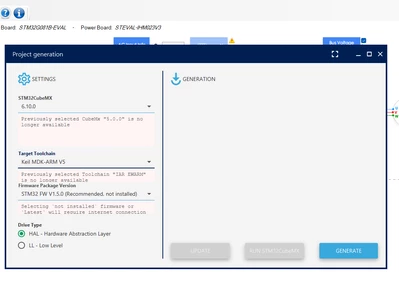
Here the steps that I have done, 

1- I opened the "MotorControl Workbench 5.4.8" and selected some random example project, in this case speed ramp with Potentiometer on P-NUCLEO-IHM001 kit-- Advanced

2- I hit save as project and saved that in an empty folder named motorControl in win11 desktop

3- from the tools menu I clicked the generate button

4- in the opened dialog, I choose target tool chain to be keil v5 and I hit Update,

5- I would get this nasty error


Please check the attached pictures,

Screenshot 2024-01-31 114339.png

Screenshot 2024-01-31 114611.png

cedric H
Technical Moderator
January 31, 2024

Hello @ali_dehbidi,

Could you check whether you have a wb2mx.properties file in your .st_motor_control folder located in your home directory ?

If it is the case, please remove it (or comment all the content) 

Last remark, I highly encourage you to switch to MCSDK 6.2.1. The potentiometer example is now a built-in feature, no need to start from a custom example.

Cedric


ali_dehbidi
Associate III
January 31, 2024

Dear Cedric

Where is home directory located in win11? what folder should I check?

Screenshot 2024-01-31 143222.png

you can see all the files that are in the .exe file of MotorControl Workbench 5.4.8


I have the same problem with MCSDK 6.2.1 too, also I see that in the MCSDK 6.2.1 the MCU selection is very limited, is there any plans for supporting more MCU's?

cedric H
cedric HBest answer
Technical Moderator
January 31, 2024

You home directory is in your C:\Users\ folder, It should contain a directory named as your login name.

Inside this directory you should have a .st_motor_control directory containing a wb2mx.properties file.

6.2.1 supports roughly 380 MCUs, much more than all the previous releases.

Could you tell us what is the MCU proposed in 5.4 that you do not find in 6.2 ? 

The only reason to stay on 5.4 is if your project is based on STM32F1 which has been discontinued in 6.2.1

Regards

Cedric.

ali_dehbidi
Associate III
February 1, 2024

Hi Cedric

thanks for the update, Please see my home folder content

Screenshot 2024-02-01 114704.png

Screenshot 2024-02-01 114712.png

There is no wb2mx.properties file, so the problem with V 5.4 remains, also v5.4 gives a lot more MCU selection, are you sure the new version would support 380 MCUs?

I have installed MCSDK v6.2 and could generate a test project successfully, But the problem with v6.2 is that It has very limited MCU selection, I can mainly see STM32G431, STM32F303 versions, I'm interested in STM32G030K6T6 or STM32F030K6T6 MCU, also I'm interested to be able to select custom board drivers And motors, it seems there is not an easy way of changing the MCU or Power stage to a custom board and selecting a custom motor, How could I do that? is there any tutorial on that?

cedric H
Technical Moderator
February 1, 2024

Hi,

also v5.4 gives a lot more MCU selection, are you sure the new version would support 380 MCUs?

Could you give me an example of a MCU present in 5.4 that you did not find in 6.2.1 ?

If you look at 5.4 STM32G0 support, only those part numbers are proposed : STM32G071RB & STM32G081RB.

The 6.2.1 supports all STM32G031, STM32G071, STM32G081. STM32G030 will be added in the next release, but I can already provide you the STM32G030 descriptions to unzip in the folder: MC_SDK_6.2.1\Utilities\PC_Software\STMCWB\assets\hardware\mcu

The recommended way to do a custom board is to start with one ST board that fulfilled your needs and clone it inside the Board manager.

The board manager will allow you to modify the board according to your schematic. The grammar and concepts are fully described here :https://wiki.st.com/stm32mcu/wiki/STM32MotorControl:Motor_Control_Boards_Description

Regards

Cedric


ali_dehbidi
Associate III
February 4, 2024

Hi Cedric

How can I change the MCU to STM32G030K6T6? the tool only shows me the eval boards, and if I choose for example a near enough devkit like  stm32g071 eval board, I can not change the MCU later in the tools.


Regards

ali_dehbidi
Associate III
February 12, 2024

Hi Cedric

Could you please help me on how to change the MCU to STM32G030K6T6? it seems it's impossible or I'm doing something ***.


Thanks

cedric H
Technical Moderator
February 13, 2024

Hello @ali_dehbidi 

Could you attach to this thread the json you wrote thanks to the board manager starting from the closest ST board ?

Regards

Cedric

cedric H
Technical Moderator
February 13, 2024

In your project, you use NUCLEO-G071RB .

You must start with the board manager :

cedricH_0-1707839771767.png

Clone your NUCLEO-G071RB board

cedricH_1-1707839989432.png

Change the name of the board and the PN (basically put the same name on both)

And most important, replace here the mcu by the one you want. It must be part of the mcu folder under Utilities\PC_Software\STMCWB\assets\hardware\mcu

cedricH_2-1707840092992.png

Last point, check that all the MCU pins described in the board description are present and properly named ( pin name reference is your mcu json file).

Once saved without error, your new control board will be part of the control board list and you will be able to use it into your new project. If it is not the case, please attach your new board description to this thread (it was actually my question in my previous answer) 

Hope it helps.

Cedric

ali_dehbidi
Associate III
February 16, 2024

Hi Cedric

Thanks for the feedback, Now I have tried to modify a cloned JSON file for the STM32G030K6Tx part as an inverter, But the tools does not allow me to generate projects, it would says hardware is not compatible with the algorithm, please check my attached JSON file,


I hope you could find the bug.


Untitled.png

ali_dehbidi
Associate III
February 19, 2024

Hi Cedric

Would you please check my modified JSON file and help me solve the problem? I do not know why I can not make any project with that.


Thanks

February 19, 2024

The board you have chosen(based on  NUCLEO-G071RB)is not compatible with 6-Step algorithm ,meaning that the proper hardware for driving motor in 6-step algorithm doesn't exist on the board(Hall sensors or BEMF feedbacks)

Choosing FOC as your algorithm would probably solve the issue.

Regards.  

cedric H
Technical Moderator
February 19, 2024

Hello @ali_dehbidi,

Your file looks Ok, I enter a ticket internally to understand what the issue is. I will let you know as soon as I have some news.

Regards

Cedric

ali_dehbidi
Associate III
February 20, 2024

Hi Cedric and mimho

mimho please note that I think the JSON file is OK, also I can not make any kind of project 6-Step algorithm or FOC algorithm.

Cedric thanks for the Update, I hope they can find a solution.


Regards


ali_dehbidi
Associate III
February 22, 2024
Hello Cedric Is there any updates or progress? Best Regards
ali_dehbidi
Associate III
February 22, 2024

Hi Cedric

Is there any Update?

Thanks

ali_dehbidi
Associate III
February 27, 2024

Hi Cedric

I have tried to change the MCU family to STM32F103RBTx to see if it would work or I can find the bug, But to my surprise it does not even show the New JSON file in the Inverter selection dialog after I have added to the inverter parts in the Board manager.


see the new changed JSON file for your reference.


Please note that I'm still interested in using the tool with STM32G030K6T6 part.

Regards