
Associate II
February 4, 2026
Solved

STEVAL-PTOOL4A : Error MC_DP_FAULT and Motor Profiler Connection Issue

  • February 4, 2026
  • 6 replies
  • 551 views

Hello,

I am attempting to run a Brushless DC-Flat motor using the STEVAL-PTOOL4A board. However, the system fails right after entering the RUN state, returning an ERROR MC_DP_FAULT (via MC_GetOccurredFaultsMotor1).

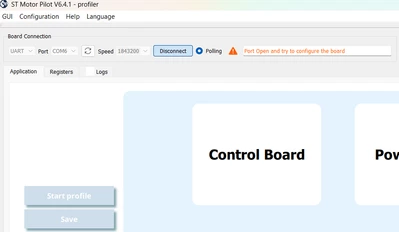
To resolve this, I tried using the Motor Profiler to identify the exact motor characteristics, but I am unable to establish a connection with the board (see attached screenshot).Capture d'écran 2026-02-04 143222.png
Motor Characteristics:

  • Nominal Voltage: 12 VDC

  • Rated Speed: 10,000 rpm

  • Starting torque: 225 mNm

  • Rated Current: 2.18 A

  • Winding Resistance (phase-phase): 0.88 Ω

  • Winding Inductance (phase-phase): 0.331 mH

  • Pole Pairs: 7

Could you please help me identify the cause of the MC_DP_FAULT error and why the Profiler fails to connect?

Best regards,

Jules

Edit 05/02: I have managed to get the motor running; however, I am still unable to establish a connection to the board via Motor Pilot.

Best answer by JulesC

Hello ,

Thank you for your answer.
Actually my colleague and I found that the JP15 link (which should be closed by default) was open. Once we added a wire, we were able to connect to Motor Pilot successfully."

Best regards,
Jules

6 replies

JulesCAuthor
Associate II
February 9, 2026

Hello,


I am still unable to establish a connection to the STEVAL-PTOOL4A board via Motor Pilot, even though the motor is now functional.

Here is a summary of the steps I have verified:

  • Hardware Interface: Using an ST-LINK/V3MINI. Drivers and firmware are up to date.

  • Firmware Flash: The code flashes successfully onto the STEVAL-PTOOL4A board (I can toggle LED_ERROR).

  • Settings: * Baudrate: Set to 1,843,200 (default) in the firmware and matched in Motor Pilot. And the "Motor Profiler" option was enabled.

    MotorPilot.png

Since the UART communication for Motor Pilot doesn't seem to initialize despite these settings, could you please help me.


Best regards,

Jules

JulesCAuthor
Associate II
February 9, 2026

Update: I tried reinstalling everything like this post suggested:
https://community.st.com/t5/stm32-mcus-motor-control/b-g431b-esc1-mcsdk-motor-pilot-profiler-failed-connection/td-p/736072
I still can't use "Discover Board" and when I connect manually I still get this message: "Port Open and try to configure the board".

GMA
Technical Moderator
February 10, 2026

Hello @JulesC,

Using Windows Device Manager, do you see the STMicroelectronics STLink Virtual COM port? Is it (COM6)?

If you agree with the answer, please accept it by clicking on 'Accept as solution'.Best regards.GMA
JulesCAuthor
Associate II
February 10, 2026

Hello @GMA,

Thanks for the response. Yes, I do:

JulesC_0-1770729612865.png

I'm able to program the STEVAL board via the STLink (LED blinking); however, I can't use Motor Pilot.

Best regards,

Jules

GMA
Technical Moderator
February 10, 2026

Hello @JulesC,

Are you using the default User Interface settings?

GMA_0-1770731269101.png


If you agree with the answer, please accept it by clicking on 'Accept as solution'.Best regards.GMA
JulesCAuthor
Associate II
February 10, 2026

Hello @GMA,


Yes I use the default settings for all the MC Workbench project, I only changed the Motor and Power Supply settings, and added the "Motor Profiler" option.


Best regards,
Jules

JulesCAuthor
Associate II
February 19, 2026


Hi,

I checked the UART pins on the board (J1). Using an oscilloscope at 1843200 baud, I captured the ASPEP handshake (Beacon packet):

  • UART1RX (Motor Pilot): 0x85FFFFBF

  • UART1TX (Board): 0x05C70114

The hardware link appears to be functional. However, it seems the capabilities in the board's response are being rejected by the software, preventing the transition to the ASPEP_CONFIGURED state.

GMA
Technical Moderator
February 23, 2026

Hello @JulesC,

When you connect the board to the MC Pilot, use a debugger to break the code.
The firmware must not remain in error handling.
The USART1_IRQHandler interrupt must be called for the MC Pilot transaction

If you agree with the answer, please accept it by clicking on 'Accept as solution'.Best regards.GMA
JulesCAuthor
Associate II
February 24, 2026

Hello @GMA,

Thank you for your answer.

Using the debugger, I have confirmed that when I click "Connect" in MC Pilot, the firmware does not get stuck in error handling and always returns to the main function.

Additionally, by using a breakpoint, I can confirm that the USART1_IRQHandler is indeed called during the connection attempt.

Best regards,

Jules

GMA
Technical Moderator
March 2, 2026

Hello @JulesC,

In the MC Pilot Logs tab, open the ST Motor Pilot.ini file shown at the line:
[INFO] - : ini file path=
In the 
ST Motor Pilot.ini file, set the following parameter:
TerminalVisible = true
Could you share the MC Pilot Terminal tab during the connection step?


If you agree with the answer, please accept it by clicking on 'Accept as solution'.Best regards.GMA
JulesCAuthor
Associate II
March 2, 2026

Hello @GMA ,

Thank you for the instructions. I have updated the .ini file as requested. Here are the logs from the MC Pilot Terminal tab during the connection step:

Capture d'écran 2026-03-02 114551.png

Best regards,

Jules

GMA
Technical Moderator
March 2, 2026

Hello @JulesC,

MC Pilot sends a beacon message. Clicking on the ASPEP_BEACON message, MC Pilot displays the decoded message. The message is correctly decoded on the microcontroller unit (MCU) side. On the universal asynchronous receiver transmitter (UART) side, a BEACON response (0x05C70114) is sent, but MC Pilot does not receive it.
Check the USB cable and the STLINK-V3MINI. Try using another PC.

If you agree with the answer, please accept it by clicking on 'Accept as solution'.Best regards.GMA