
STSPIN32G4 – Unable to Drive MOSFETs
Hello everyone,
I’m working on a project using the STSPIN32G4 and running into an issue where the MOSFETs are not switching as expected. I’d really appreciate some guidance from the community.
Setup:
MCU: STSPIN32G4 (integrated STM32G4 + gate driver)
Power stage: 3-phase inverter using N-channel MOSFETs
Power supply: 48V
Control method: Just attempting to drivethe Inverter
Firmware: Own
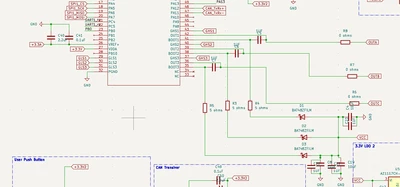
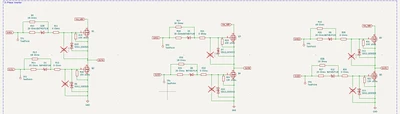
Problem:
The MCU is running and I can confirm firmware execution via debug.
The MOSFETs are not turning on — no switching on the half-bridges.
Gate driver outputs appear to stay low (no high/low drive pulses).
What I’ve Checked:
VBOOT and VCC supply rails are within spec.
EN/FAULT pins are pulled correctly(High).
PWM timer configuration looks fine in CubeMX.
Dead-time insertion is enabled.
No over-current fault is being signaled (nFAULT pin is inactive).
Questions:
Are there any common setup steps (jumpers, register settings, enable sequences) I might be missing before the gate driver will actually drive the MOSFETs?
Do I need to explicitly enable the gate driver block via firmware before it starts responding to PWM?
Could the issue be related to bootstrap capacitor sizing or incorrect wiring of high-side/low-side drivers?