Associate III
November 14, 2025
Solved

Why the detected motor parameters of ST Motor Profile in two boards are different?

  • November 14, 2025
  • 2 replies
  • 289 views

Hello Everybody,

Here are the software and boards in this case:

1. MC workbench 6.3.2
2. NUCLEO-F401RE/X-NUCLEO-IHM08M1
3.?B-G431B-ESC1

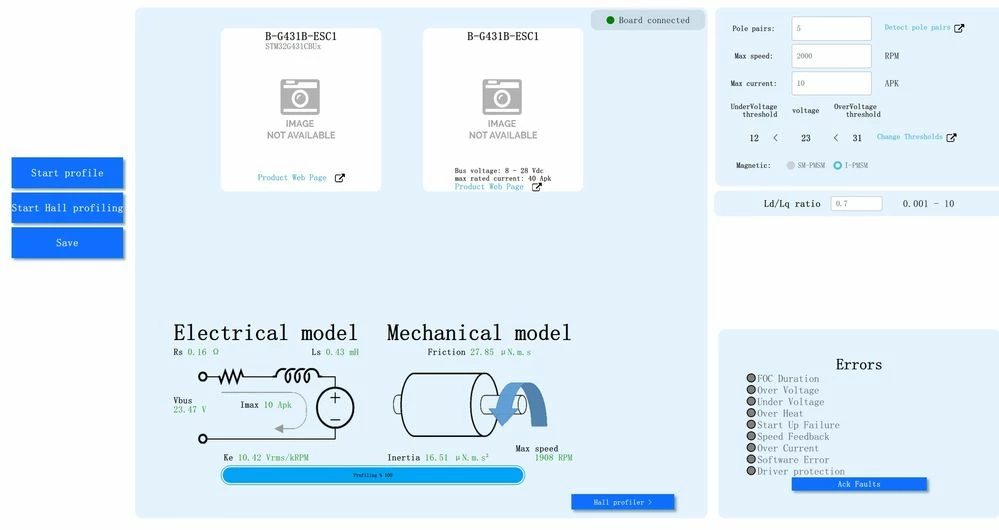
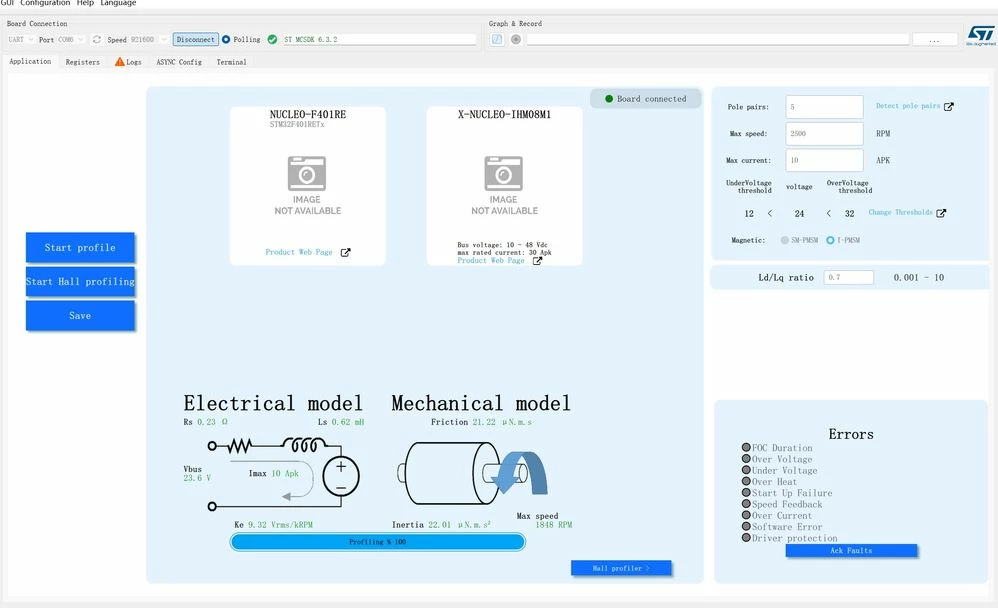
I have an I-PMSM motor, and I use two boards (one is?NUCLEO-F401RE/X-NUCLEO-IHM08M1, and the other is?B-G431B-ESC1) to run the?ST Motor Profile for detecting the motor parameters. However, the motor parameters in the two test results differ significantly. For example, the result from Board 1 (NUCLEO-F401RE/X-NUCLEO-IHM08M1) is shown in picture 1, and the result from Board 2 (B-G431B-ESC1) is shown in picture 2. We can see that the motor phase resistance is 0.23 ohms, the phase inductance is 0.62 mH, and the back EMF constant is 9.32 in picture 1. And we can see that the motor phase resistance is 0.16 ohms, the phase inductance is 0.43 mH, and the back EMF constant is 10.42 in picture 2.

Which result should I trust? Thanks!
轮椅上右电机电机参数20250929_3.jpg


motor_param_V3_3.jpg

Best answer by GMA

Hello @DF_MC,

The goal of the motor profiler is to estimate the characteristics of an unknown motor to enable its use on the MCSDK workbench.
Are you able to spin the motor using the profiler results and the associated boards?
You can also refine the results by editing the motor.json generated file with RLC meter measurement result.
Chapters 3 and 4 in How To manually configure the motor parameters also present a method to compute some parameters.


2 replies

Senior III
November 14, 2025

Just for my understanding each board gives the same value every time? i tried to run profiler for one of my motor but was not successful, So, getting another relatively small motor run the profiler and see if it succeeds.


DF_MCAuthor
Associate III
November 15, 2025

Hello, yes, each board gives almost the same value every time, and I can spin the motor using both the profiler results and the associated boards. However, when using the motor parameters obtained from the  B-G431B-ESC1 board to run the sensorless example routine, the torque output is weak at low speeds. If you grab the rotor by hand, it will return a "speed feedback error".

GMA
GMABest answer
Technical Moderator
November 14, 2025

Hello @DF_MC,

The goal of the motor profiler is to estimate the characteristics of an unknown motor to enable its use on the MCSDK workbench.
Are you able to spin the motor using the profiler results and the associated boards?
You can also refine the results by editing the motor.json generated file with RLC meter measurement result.
Chapters 3 and 4 in How To manually configure the motor parameters also present a method to compute some parameters.


If you agree with the answer, please accept it by clicking on 'Accept as solution'.Best regards.GMA
DF_MCAuthor
Associate III
November 15, 2025

Hello @GMA , 

Thank you for your guidance. I can spin the motor using both the profiler results and the associated boards. However, when using the motor parameters obtained from the  B-G431B-ESC1 board to run the sensorless example routine, the torque output is weak at low speeds. If I grab the rotor by hand, it will return a "speed feedback error".

GMA
Technical Moderator
November 17, 2025

Hello @DF_MC,

Does motor profiling result with NUCLEO-F401RE/X-NUCLEO-IHM08M1 provide better results on the B-G431B-ESC1 board?
Descriptions and management of FOC errors are available in the documentation accessible through Workbench tool > About > Documentations > Documentation > User manual tab, FOC Firmware errors link.

If you agree with the answer, please accept it by clicking on 'Accept as solution'.Best regards.GMA