pk84
Associate III
September 9, 2022
Solved

"Failed to execute MI command.... Load failed ... LTDC_Paint.elf"
  • September 9, 2022
  • 5 replies
  • 17703 views

0693W00000Sv0aoQAB.jpg

I bought the STM32H750B Discovery and wanted to program a first example "LTDC Paint" on the demo to start.


I am using the STM32Cube IDE version 1.9 (default installation, no changes made).

Procedure:

- File -> New -> STM32 Project -> Examples -> select the Discovery Board -> select the LTDC Paint example -> Run LTDC Paint 


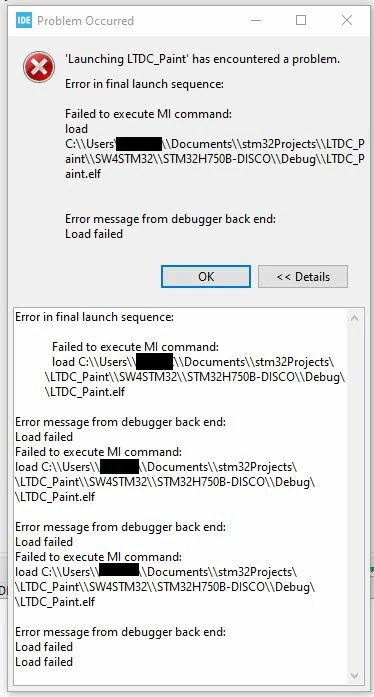
Then I get the following error message, see attachment:

"Failed to execute MI command.... Load failed ... LTDC_Paint.elf"


Which configuration did I miss?
Best answer by Semer CHERNI

Hello @pk84​ 

First let me thank you for having reported.

In fact I could reproduce the issue you have encountered.

And after further analysis I observed that the used example in this case use an external memory.

In this case you should set the Debug configuration in the CubeIDE to accommodate this.

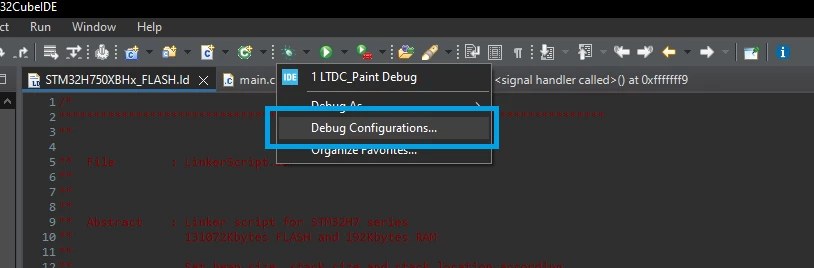
  • Go to the Debug Configuration

0693W00000SvBFrQAN.png 

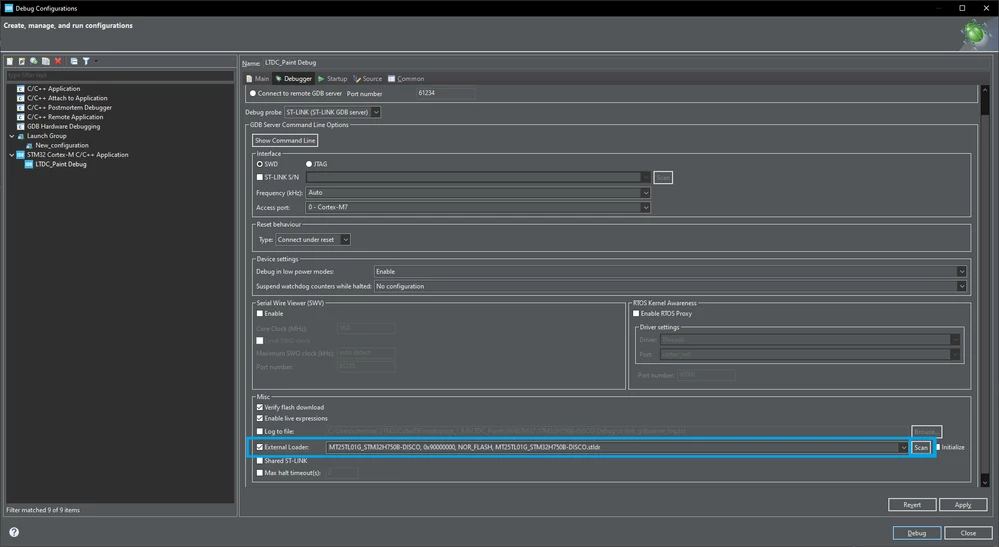
  • Click on "SCAN" button and select the adequate external loader for the "MT25TL01G_STM32H750B-DISCO, 0x90000000, NOR_FLASH, MT25TL01G_STM32H750B-DISCO.stldr"

0693W00000SvBDDQA3.png 

Feel free to repost about the efficacity of this solution.

Your feedback will be very helpful.

Kind regards,

Semer.

5 replies

pk84
pk84Author
Associate III
September 12, 2022

I would appreciate any little hint/tip?

Semer CHERNI
Semer CHERNIBest answer
ST Employee
September 12, 2022

Hello @pk84​ 

First let me thank you for having reported.

In fact I could reproduce the issue you have encountered.

And after further analysis I observed that the used example in this case use an external memory.

In this case you should set the Debug configuration in the CubeIDE to accommodate this.

  • Go to the Debug Configuration

0693W00000SvBFrQAN.png 

  • Click on "SCAN" button and select the adequate external loader for the "MT25TL01G_STM32H750B-DISCO, 0x90000000, NOR_FLASH, MT25TL01G_STM32H750B-DISCO.stldr"

0693W00000SvBDDQA3.png 

Feel free to repost about the efficacity of this solution.

Your feedback will be very helpful.

Kind regards,

Semer.

pk84
pk84Author
Associate III
September 13, 2022

Thanks, I will try this solution as soon as possible.

Still one question:

1) What if I want change the pin-configuration of the connected QSPI-Flash (in case of a customized board) ? Where can I do this? I ask because there is no QSPI driver file in the LTDC example.

Semer CHERNI
ST Employee
September 15, 2022

Hello @pk84​ 

My bad I forgot to mention this part in my reply.

In fact since the example project is stored and executed from external memory you need to flash the "ExtMem_Boot".

The boot project take care of the init of the QSPI interface.

The boot project could be found under "STM32Cube_FW_H7_V1.10.0\Projects\STM32H750B-DK\Templates".

Import the "ExtMem_Boot" to CubeIDE and build it.

Go to the debug configuration for the LTDC Paint example project and under [Startup] add the download of the ExtMem_Boot" binary. (check screenshot bellow)

0693W00000SvTpiQAF.png 

Kind regards,

Semer.

Associate
May 28, 2024

I am facing same issue but In my application external loader option is not showing , how to resolve this issue .Capture.PNG

Visitor II
July 22, 2025

The appearance is changed. It is now on top of Miscobraz.png

Zaher
Senior II
October 7, 2025

@Semer CHERNI 
Thank you for the solution. It worked flawlessly for me on the STM32H747-DISCO as well!