Associate III
July 25, 2025
Solved

Failure on GO Command of STM32G070

  • July 25, 2025
  • 3 replies
  • 345 views

I have questions on the System Memory Boot Mode of the STM32G070CB MCU

Setup:

  1. Access the System Memory Bootloader Mode every power cycle. Hence, I updated the Option Bytes as below:TesterSAM_0-1753438525495.png
  2. The MCU contains the Application image only; it does not contain a custom bootloader.
  3. Using Cube Programmer, configure the nBoot0 option bytes, able to run as System Memory Boot Mode OR Main Application

What I tried to do was exit the System Memory Boot Mode and Access the Main Application, but failed:

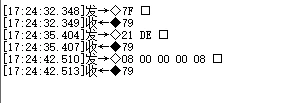
  1. Tried using the UART sending the GO Command with the Application Address 0x0800 0000, but the MCU does not work (no UART Log)TesterSAM_0-1753438716884.png


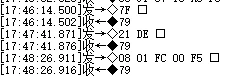
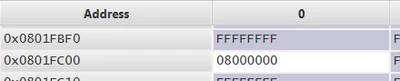
  2. Tried using the UART method to send the GO Command with the Application Address stored in the Image like below, the MCU does not work. TesterSAM_1-1753438734226.pngTesterSAM_2-1753438752242.png
  3. Tried to uncomment the “USER_VECT_TAB_ADDRESS” in system_stm32g0xx.c.
    The MCU outputs some unexpected UART log if sending the GO Command with the Application Address 0x0800 0000

               Abnormal UART Log (unknown pattern)
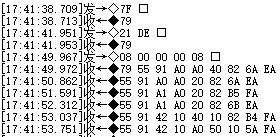
TesterSAM_3-1753438775393.png

              Normal Application Uart Log (expected)

TesterSAM_0-1753438826590.png


Question:

  1. Any other setting required for the GO command ?
  2. How to implement :
    1. Power up -> System Memory Boot Mode -> Using the GO Command to access the Main Application
  3. How the GO command operate? 
Best answer by TDK

Looks like the application is running but the clock rate is not as expected.

The time between UART bursts is about 0.7s instead of 1s and the length is similarly reduced. This indicates a bad clock speed.

Doesn't seem like a GO command problem but rather a clock initialization problem. Connect with the debugger and examine the state of the chip.

3 replies

TDK
TDKBest answer
Super User
July 25, 2025

Looks like the application is running but the clock rate is not as expected.

The time between UART bursts is about 0.7s instead of 1s and the length is similarly reduced. This indicates a bad clock speed.

Doesn't seem like a GO command problem but rather a clock initialization problem. Connect with the debugger and examine the state of the chip.

"If you feel a post has answered your question, please click ""Accept as Solution""."
TesterSAMAuthor
Associate III
July 28, 2025

@TDK Thank you for your reply. I have no experience with the clock speed issue before. How should I use the debugger to locate the clock speed problem? 

TesterSAMAuthor
Associate III
July 28, 2025

Oh, I found the problem which related to the SystemClock_Config(). Thank you for your suggestion.

Since the MCU uses 24MHz in the System Memory bootloader, and the Main Application should run as 16MHz, the SystemClock_Config() is missing in the main function. 

It could exit the System memory bootloader mode and run the Main Application normally after fixing the clock issue