Associate III
October 6, 2025
Solved

GPIOs Input detecting issue on port M

  • October 6, 2025
  • 1 reply
  • 417 views
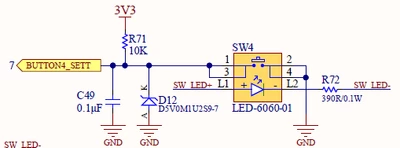
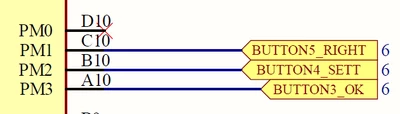
We have implemented a total of five push buttons—two connected to Port E and three connected to Port M. 
The GPIOs of Port E are functioning correctly. However, the GPIOs of the push buttons on Port M are not being detected properly by the MCU.
Even when the switches are unpressed, the MCU is detecting a Pressed condition.
PORT M GPIO Pin out: PM1, PM2, PM3.
MCU part: #STM32H7R7L8H6H
I have checked  push button from hardware side, its working fine.
Attached example schematic snapshot of push button.
 
Could you please advise if there are any specific settings or configurations required for Port M GPIO to function correctly?
@Shubham Prakashpant BOHARAPI @Shailesh Patil @Krishan Kumar SOLANKI
Push button GPIO.pngPush button logic.png
Best answer by Andrew Neil

@Kaushik1 wrote:

Where i can find UCPD_DBDIS option. Can you please know the location of that.


It tells you in the screenshot which @AScha.3 posted:

AndrewNeil_0-1759739614263.png


PS:


@Kaushik1 wrote:

I am new to use STM32.


Your starting point should always be the Product Page for the particular STM32 - in this case:

https://www.st.com/en/microcontrollers-microprocessors/stm32h7r7l8.html

As well as the datasheet, you will need the Reference Manual - that's the one which describes the operation of all the peripherals, the registers, etc.

You can find this - and lots of other documents - on the 'Documentation' tab of the Product Page:

https://www.st.com/en/microcontrollers-microprocessors/stm32h7r7l8.html#documentation 

1 reply

AScha.3
Super User
October 6, 2025

Some pins have alternative functions, see ds pin description.

So maybe you "found out" this on PMx : 

AScha3_0-1759735945664.png

---> disable it : set UCPD_DBDIS

"If you feel a post has answered your question, please click ""Accept as Solution""."
Kaushik1Author
Associate III
October 6, 2025

Thanks Ascha,

Where i can find UCPD_DBDIS option. Can you please know the location of that.

I am new to use STM32.

Andrew Neil
Andrew NeilBest answer
Super User
October 6, 2025

@Kaushik1 wrote:

Where i can find UCPD_DBDIS option. Can you please know the location of that.


It tells you in the screenshot which @AScha.3 posted:

AndrewNeil_0-1759739614263.png


PS:


@Kaushik1 wrote:

I am new to use STM32.


Your starting point should always be the Product Page for the particular STM32 - in this case:

https://www.st.com/en/microcontrollers-microprocessors/stm32h7r7l8.html

As well as the datasheet, you will need the Reference Manual - that's the one which describes the operation of all the peripherals, the registers, etc.

You can find this - and lots of other documents - on the 'Documentation' tab of the Product Page:

https://www.st.com/en/microcontrollers-microprocessors/stm32h7r7l8.html#documentation 

A complex system that works is invariably found to have evolved from a simple system that worked.A complex system designed from scratch never works and cannot be patched up to make it work.