
Associate
March 30, 2026
Question

Issue changing clock speed via internal PLL

  • March 30, 2026
  • 4 replies
  • 263 views

Hi all,

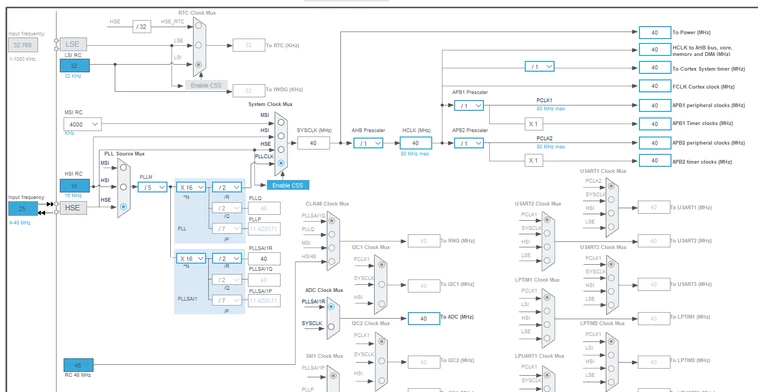
We have a product using a STM32L451CEU6. We have gone through low rate initial production and it has met requirements but the customer has requested a change. We are experimenting with increasing the system clock speed the device is running at by changing the internal PLL settings. The device is running from the HSE, a 25 MHz crystal oscillator. It works without issue in the baseline clock configure shown below.
jramsay42_0-1774910882959.png


When we try and change the N multiplication values in the PLLs to any other value, something appears to go wrong during the setup phase of our application code, and it appears to lock up. We have a custom serial bootloader but we cannot access it at this point, so we have to reflash completely using STM32 ST-LINK Utility and a STLINK-V3 programmer. This occurs whether we increase or decrease the N values e.g. N values of 15 or 17 do not work. This occurs whether we edit the N values in the code directly, or change them via CubeMX and regenerate the code. If we change the N value back to 16, either directly or via CubeMX generation, we can build the application, load it onto our hardware, and it works.

We have also tried reducing the PLL M value and the effect is the same.

Our application code toggles a particular pin multiple times once we finish all of the initialization code. We probe this on an oscilloscope. We see that if we change the PLL settings it never reaches this point in the code, but if we change them back to the default above it does reach this point and goes on to do everything else it needs to do.

We have stepped through out startup code using a debugger. Initially we found that it would hang at the code initializing ADC1, where an Error Handler was entered. This seemed to be caused by having the PLL and PLLSAI1 N values set differently. We only really want to increase SYSCLK, so initially kept the PLLSAI1 N value at 16. To fix this issue, we started changing both.

Stepping through with the debugger now we get into some code setting up our serial communications, which includes setting up DMA. We can get as far as HAL_UARTEx_ReceiveToIdle_DMA in stm32l4xx_hal_uart_ex.c which successfully returns HAL_OK when we step through it, but once it returns the application hangs.

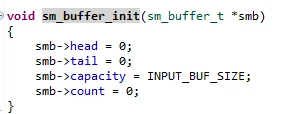
The next point in our application code is a call to a custom function for setting up a buffer for serial messages. It does not step into this function but hangs once we tell it step into it.
jramsay42_1-1774910882960.png


Some other details

No operating system is running. We are using the STM32L4 HAL libraries.

We are using the following:

  • CubeMX Version 6.17.0
  • STM32CubeIDE Version 2.0.0
  • STLINK-V3
  • STM32 ST-LINK Utility v4.6.0

The project was originally set up using CubeMX Version 6.12.1 using FW_L4 V1.18.1

When opening the .ioc file in CubeMX Version 6.17.0 to regenerate the configuration code we have been pressing “Continue” when prompted about the version difference rather than “Migrate”

Other peripherals we are using:

  • GPIO Ports A & B
  • DMA1
  • DMA2
  • ADC1
  • SPI2
  • TIM3
  • TIM15
  • TIM1
  • TIM2
  • TIM6
  • TIM16

4 replies

mƎALLEm
Technical Moderator
March 31, 2026

Hello,

Better to go step by step in that kind of situations.

Did you create a simple project (No bootloader, No DMA.. nothing) just configuring the PLL and toggling a pin after? does it work?

"To give better visibility on the answered topics, please click on ""Accept as Solution"" on the reply which solved your issue or answered your question."
jramsay42Author
Associate
April 7, 2026

Hi mƎALLEm,


Thanks for the suggestion, I have now created a simple project and run it on the same target, just configuring the system clock stuff and one GPIO pin, before toggling the GPIO pin. This works and I have verified that I can change the PLL configuration and that the frequency of the square wave, generated by toggling the GPIO pin, changes as expected when I change the system clock.


E.g. when changing the PLLN value from 15 to 20, and keeping all else the same, The frequency of the wave increased by a factor of 1.333


I will try progressively adding in more and seeing where the issue arises.


waclawek.jan
Super User
April 3, 2026

> It does not step into this function but hangs once we tell it step into it.


To me, this sounds like improperly set FLASH waitstates, or problematic power supply/ground arrangement/missing connection if some ground or supply pin. 

JW

jramsay42Author
Associate
April 8, 2026

Hi JW,


Thanks for your response. I experimented with setting up a simple project toggling a pin, and stripping out most of the rest of the application code, and I was able to change the PLL configurations I was trying to change without issue. Do you think the FLASH waitstates could still be an issue if this is able to work?


In the design all of the power supply and ground pins are definitely connected. We haven't seen any assembly issues with this microcontroller either. We haven't seen any unusual behaviour when operating with the clock configuration in the original post, I think any power supply or grounding issues would show up in that case as well.

waclawek.jan
Super User
April 8, 2026

Your initial account contains quite a variety of symptoms. That's why I suggested hardware-related issues. Other mechanism resulting in such havoc may be stack corruption - I've seen both.

At any case, if the minimal exercise works with no problems, you can "add in stuff progressively" as you've suggested above. But you can also return to the problematic "full" case, especially the problem is 100% reproducible; and working from the assumption that this is a software issue (e.g. stack corruption), debug as usually - in the fault state, observe registers, stack context, try to observe in disasm the suspected point of failure, try to breakpoint just before the suspected point of failure and single-step in disasm (i.e. instruction-by-instruction). Another strategy might be to start from the problematic "full" setup, and remove "stuff" one by one.

JW

MasterT
Lead II
April 8, 2026

Do you have this line?

 HAL_RCC_EnableCSS(); 

Not sure if L4 supported, that what I use for G4 to change PLL's N/M. 

Post your code