
Associate II
November 24, 2025
Solved

MIPI-DSI: Low Power Command Transmission

  • November 24, 2025
  • 1 reply
  • 169 views

Hello! I'm now using a STM32F469 to drive a screen with MIPI-DSI Interface. I need to send the initial codes with low power command transmission, and then drive the screen in video mode. I think LPDT it is supported by this MCU, but I'm not sure how to use it. Could anyone give me some advice or instructions?
Best answer by ELABI.1

Hi @123scy321,

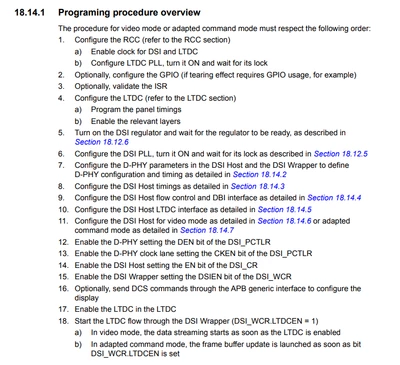
Yes, you can refer to the Reference Manual RM0386, specifically section 18.14.1 Programming procedure overview. This section explains the sequence of steps to configure the DSI Host and the LTDC, including the initialization phase in LP mode before starting the video signal.

ELABI1_0-1763993703173.png

Thanks.

ELABI.1

1 reply

ELABI.1
Technical Moderator
November 24, 2025

Hi @123scy321,

I recommend that you have a look at the Application Note AN4860 Introduction to DSI Host on STM32 MCUs and MPUs, providing guidelines and practical examples on how to configure the DSI Host depending on the operating mode.

Thanks.

ELABI.1

To give better visibility on the answered topics, please click on Accept as Solution on the reply which solved your issue or answered your question.
123scy321Author
Associate II
November 24, 2025

Thanks! One more question, the screen is required to be initialized in LP mode. And the video signal will be sent afterwards. Is it possible to halt the video signal to initialize the screen at first?

ELABI.1
ELABI.1Best answer
Technical Moderator
November 24, 2025

Hi @123scy321,

Yes, you can refer to the Reference Manual RM0386, specifically section 18.14.1 Programming procedure overview. This section explains the sequence of steps to configure the DSI Host and the LTDC, including the initialization phase in LP mode before starting the video signal.

ELABI1_0-1763993703173.png

Thanks.

ELABI.1

To give better visibility on the answered topics, please click on Accept as Solution on the reply which solved your issue or answered your question.