
Associate II
March 18, 2025
Solved

Problem with connecting STM32H755ZI-Q

  • March 18, 2025
  • 4 replies
  • 1312 views

I am new to using stm32 MCUs and I was following a youtube tutorial on how to set up a debugger for dual core MCUs. Before changing some settings I was able to start the debugger without any errors. Now when I try to run the debugger I get this error window popup:

'Launching file_CM4 Debug' has encountered a problem. 

Error in final launch sequence:

Failed to start GDB server


When I click on details I get:

Error in final launch sequence:

Failed to start GDB server
Error in initializing ST-LINK device.
Reason: (4) No device found on target.


I also noticed that when I plug the controller in the USB port and open NOD_H755ZIQ in This PC, it has 4 files (it had 3 files before). New file is called FAIL.TXT and it says: 

The interface firmware FAILED to reset/halt the target MCU


This is the youtube tutorial that I followed : https://www.youtube.com/watch?v=jI1k6p-fduE


Can anyone help me with this?

Is it possible to fix this problem or do I need to buy a new board? 

Thanks in advance.
 

Best answer by mƎALLEm

@david027 wrote:

In the meantime i have read a post where "Solution 2" solved a similar problem. The problem is that my  board doesn't have a BOOT0 button. 


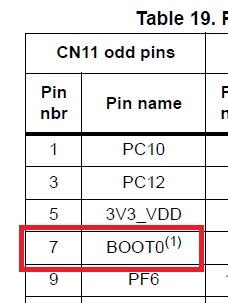
On NUCLEO-H755ZI-Q board the BOOT pin is available on CN11/Pin 7.

From UM2408 / Table 19:

mALLEm_0-1742337930810.png

How to use it:

mALLEm_1-1742337962278.png


4 replies

TDK
Super User
March 18, 2025

Connect with STM32CubeProgrammer and ensure the CM4 core is enabled in option bytes (BOOT_CM4).

"If you feel a post has answered your question, please click ""Accept as Solution""."
mƎALLEm
Technical Moderator
March 18, 2025

Hello @david027 and welcome to the community,

You've started with a relatively complex STM32 with dual core! This is not easy for someone new on STM32 MCUs.

Meanwhile, what board are you using? ST board? if yes, which one? if NUCLEO-H755 it needs to be set to DIRECT SMPS.

or custom board? If yes, what is the power configuration?

The debug is a bit tricky mainly because CM4 enters the low power mode:

mALLEm_0-1742304740005.png

I suggest you to comment out these lines on CM4:


 HAL_PWREx_ClearPendingEvent();
 HAL_PWREx_EnterSTOPMode(PWR_MAINREGULATOR_ON, PWR_STOPENTRY_WFE, PWR_D2_DOMAIN);


And for CM7 comment out these lines:


 timeout = 0xFFFF;
 while((__HAL_RCC_GET_FLAG(RCC_FLAG_D2CKRDY) != RESET) && (timeout-- > 0));
 if ( timeout < 0 )
 {
 Error_Handler();
 }


timeout = 0xFFFF;
while((__HAL_RCC_GET_FLAG(RCC_FLAG_D2CKRDY) == RESET) && (timeout-- > 0));
if ( timeout < 0 )
{
Error_Handler();
}


Please refer also to this article.

"To give better visibility on the answered topics, please click on ""Accept as Solution"" on the reply which solved your issue or answered your question."
david027Author
Associate II
March 18, 2025

Thanks for reaching out. I am using NUCLEO-H755ZI-Q. I don't think that commenting out the parts of the code will help because i have no way of uploading that code to the board. I have read the article which you provided and i think it could work because i remember changing the SupplySource in RCC Mode and Configuration from PWR_DIRECT_SMPS_SUPPLY to PWR_LDO_SUPPLY. I have also read the comments under the article where someone mentions that i need to make some modifications before running the board at 480MHz, when i started the project i set the timer in clock configuration to the maximum frequency of 480 MHz without any modifications.


I would like to try the "Solution 1" from the article but I am scared of causing permanent damage to the board.

Can you please explain the "Solution 1" in more detail, and sorry if I am being annoying

mƎALLEm
Technical Moderator
March 18, 2025

@david027 wrote:

I would like to try the "Solution 1" from the article but I am scared of causing permanent damage to the board.

Can you please explain the "Solution 1" in more detail, and sorry if I am being annoying


There is no risk on both solutions. What is not clear? I think the article described it in details.

"To give better visibility on the answered topics, please click on ""Accept as Solution"" on the reply which solved your issue or answered your question."
david027Author
Associate II
March 18, 2025

This solved the problem in about 2 minutes.

THANK YOU SO MUCH!!!! You just saved the entire project. I will name my robot mƎALLEm.

mƎALLEm
Technical Moderator
March 19, 2025

@david027 wrote:

I will name my robot mƎALLEm.


You need a copyright for that :D ...

No I'm kidding. When you finish your robot you can post the pictures here ;) .

"To give better visibility on the answered topics, please click on ""Accept as Solution"" on the reply which solved your issue or answered your question."
April 15, 2026

This usually isn’t a dead board 

The error “No device found on target” + FAIL.TXT means ST-LINK can’t connect to the MCU, often due to wrong debug settings or the chip being stuck.

Quick fix:

Enable “Connect Under Reset” in debug settings
Use STM32CubeProgrammer → Full Chip Erase
Check cable / USB port
That normally recovers it.

I’ve seen similar cases where proper setup flow makes all the difference, came across some practical insights here  https://removalistnumberone.com.au/  on handling processes smoothly.
