
Associate II
October 21, 2025
Question

Programming stm32h5 board with screen & NOR flash fails: can't erase

  • October 21, 2025
  • 2 replies
  • 394 views

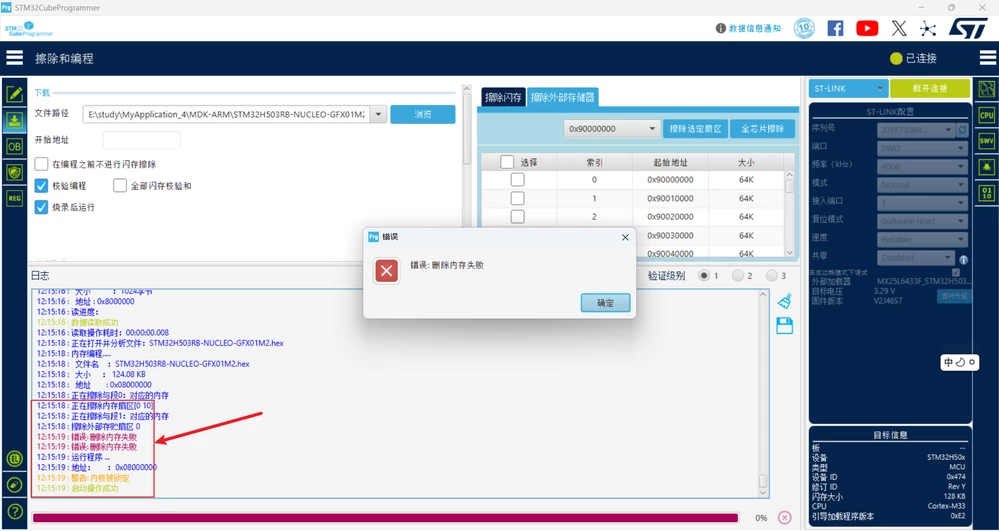
I drew a board of stm32h503rbt6, including a screen and a NOR flash. The flash model is mxl6433f. Currently, the problem I'm facing is that when I try to program the board using stprogram, I encounter an error that the programming cannot be completed. The error message shows that the memory deletion failed. I have been looking into it for a week, but still haven't been able to solve it. I hope a senior can help me with it.I'm really in a bad mood right now.
dianzijun_0-1761020139628.png


2 replies

ST Employee
October 21, 2025

Hello @dianzijun,

Have you set the external loader ? How to implement and use your own external flash l... - STMicroelectronics Community.

Br,

dianzijunAuthor
Associate II
October 22, 2025

Yes, I achieved this by integrating a touchgfx official screen board, whose name is GFX01M2. I combined its display with that of the main control board. The flash pins we

dianzijun_0-1761123744633.png


re exactly the same as those of the official version.

ST Employee
October 28, 2025

To flash the external flash on the display board, you will need to use an external loader, which is provided with the project. The easiest way to use it is to build and flash you application using the "Run Target" button in TouchGFX designer.

If you prefer to build in another environment and flash with CubeProgrammer, you will need to add the external loader.

Copy the file MX25L6433F_STM32H503B-NUCLEO.stldr from the gcc subfolder in your project into C:\Program Files\STMicroelectronics\STM32Cube\STM32CubeProgrammer\bin\ExternalLoader, or equivalent if you have installed CubeProgammer in another location than the default.

Then you need to select the loader in the CubeProgrammer interface, after which you should be able to program the board:

mathiasmarkussen_0-1761647332009.png


dianzijunAuthor
Associate II
October 28, 2025

dianzijun_1-1761652177348.png


Yes, I selected the corresponding flash burning file, but still got an error message.