Associate II
February 1, 2025
Solved

STM32 l476rg CAN not working

  • February 1, 2025
  • 2 replies
  • 1600 views

I am using STM32 Nucleo-l476rg. I am trying to use the CAN peripheral and have tried every resource I came across. I am unable to send or receive messages:

I have no filter, everything is wired correctly, what could be the issue? I even made it so that it just toggles an LED when the interrupt occurs. In case the interrupt is not set up properly, I have it polling HAL_CAN_GetRxFifoFillLevel, and if it is >0, it toggles the LED, but the LED never toggles.

Am I missing something that is not autogenerated after configuring the peripherals in the .ioc file? In all the videos I have watched, it seems quite straightforward. What am I missing?
Best answer by mƎALLEm

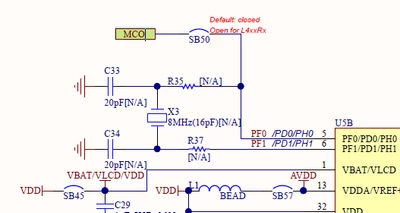
The crystal is not soldered by default on the board but you can use STLINK-MCO output as a clock source for your case: and you need to be sure the solder bridge SB50 is closed.


SofLit_1-1738439260569.png

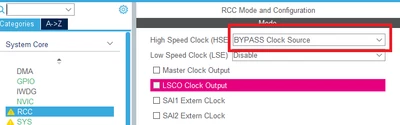
For that you need to configure the RCC/HSE in Bypass mode:

SofLit_2-1738439386673.png

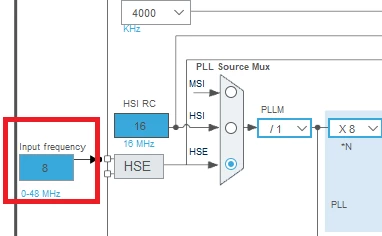
and be sure that the input frequency is set to 8MHz.

SofLit_3-1738439429853.png

Hope that helps.


2 replies

mƎALLEm
Technical Moderator
February 1, 2025

Hello @at3 and welcome to the community,

Need to provide more details:

1 - Are you using CAN in Normal mode or Loopback mode?

2 - If in Normal mode, did you establish a CAN node i.e. you connected at least another CAN node to your board using CAN tranceivers?

3 - Could you also attach your projet inclusing the ioc file?

"To give better visibility on the answered topics, please click on ""Accept as Solution"" on the reply which solved your issue or answered your question."
at3Author
Associate II
February 1, 2025

Thank you for your welcome.

1) I am using CAN in normal mode

2) Yes, the current set up is an Arduino configured to send a CAN message. We are using an mcp2562, which connects to the STM32. Using an oscilloscope, we have verified the CAN message is being transmitted properly, and so is the serial data from the transceiver to the STM32. I feel there is a root cause in the configuration for the CAN that is causing an issue, since when I try to send a message, there is no activity on the CAN_tx pin of the stm32, it just stays at 0V.

3) Yes, I will attach my code. Many blocks may be commented out, I tested and these and it did not work. There may be other tests that I did that I ended up deleting, please feel free to ask if there is additional information I can provide. The project I am attaching is just the receiving code.

mƎALLEm
Technical Moderator
February 1, 2025

Checking your ioc and main files:

I have two remarks:

1- You are using HSI as clock source for CAN wich is not recommanded. You need to use an external precise clock source like a crystal.

2- I don't see any filter configuration. You need to configure at least one filter even you don't need to filter the messages.

See this example on how to configure a pass "all ID" filter.

Regarding the hardware:

1- How you did connect STDBY pin of the tranceiver?

2- How you did connect VIO pin of the tranceiver?

3- Did you connect the terminating resistors 120ohm x 2? 

"To give better visibility on the answered topics, please click on ""Accept as Solution"" on the reply which solved your issue or answered your question."
mƎALLEm
mƎALLEmBest answer
Technical Moderator
February 1, 2025

The crystal is not soldered by default on the board but you can use STLINK-MCO output as a clock source for your case: and you need to be sure the solder bridge SB50 is closed.


SofLit_1-1738439260569.png

For that you need to configure the RCC/HSE in Bypass mode:

SofLit_2-1738439386673.png

and be sure that the input frequency is set to 8MHz.

SofLit_3-1738439429853.png

Hope that helps.


"To give better visibility on the answered topics, please click on ""Accept as Solution"" on the reply which solved your issue or answered your question."
at3Author
Associate II
February 1, 2025

Thank you so much! 

I will try these and see how it goes