
Associate III
December 9, 2025
Solved

STM32H7S7L8H6: How to connect the VDD50USB pin when USB is not in use?

  • December 9, 2025
  • 2 replies
  • 394 views

Hello Team,


One more query is there.

We are not using USB. In STM32H7S7L8H6 pin D9-VDD50USB is there. So, can we connect it with 3.3V supply?


Thanks & Regards,

Jignesh Karena
Best answer by KDJEM.1

Hello @JK1234 ;


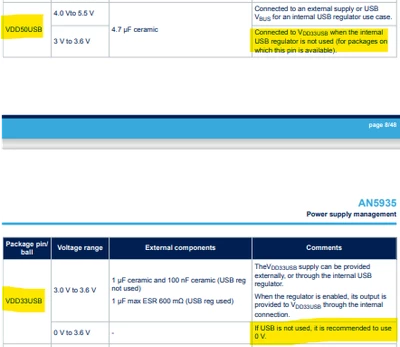
I recommend you to look at AN5935 application note Table 4. Power supply connection. 


KDJEM1_1-1765362153132.png

If USB is not used, it is recommended to VDD33USB 0V.

And when the internal USB regulator is not use , the VDD50USB must be connected to VDD33USB.

Thank you.

Kaouthar

2 replies

KDJEM.1
KDJEM.1Best answer
Technical Moderator
December 10, 2025

Hello @JK1234 ;


I recommend you to look at AN5935 application note Table 4. Power supply connection. 


KDJEM1_1-1765362153132.png

If USB is not used, it is recommended to VDD33USB 0V.

And when the internal USB regulator is not use , the VDD50USB must be connected to VDD33USB.

Thank you.

Kaouthar

To give better visibility on the answered topics, please click on Accept as Solution on the reply which solved your issue or answered your question.
JK1234Author
Associate III
December 11, 2025

Hello @KDJEM.1 ,


Thanks for the update.

We are not using USB. As per my understanding we need to connect Pin-D9(VDD50USB) & Pin-F8(VDD33USB) with GND right?


One more query related to VBAT. Please refer below capture and provide your feedback for VBAT. Diode D1 and other components are, ok? 

JK1234_0-1765428433782.png


KDJEM.1
Technical Moderator
December 11, 2025

Hello @JK1234 ;


Yes you are right.

-> One more query related to VBAT. Please refer below capture and provide your feedback for VBAT. Diode D1 and other components are, ok? 

Please don't ask many questions in the same thread. I recommend you to create a new post related to VBAT.

Thank you for your understanding.


Kaouthar

To give better visibility on the answered topics, please click on Accept as Solution on the reply which solved your issue or answered your question.