Associate II
December 23, 2025
Solved

STM32L562 FDCAN Classic Mode: PSR.ACT = 1 After Leaving INIT, No ACK Sent on Reception

  • December 23, 2025
  • 2 replies
  • 1516 views

Hi ST Team,

We are using CAN on STM32L562 in classic mode.

After configuring, we se FDCAN.PSR.ACT to be 1 as can be seen in screenshot below.

This means, node is neither receiver nor transmitter.

Why is this happening ?


We are able to receive the data, but the CAN controller does not send the ACK when a frame is received which results in retransmission of the frame from the transmitting node.

Tried configuration:

hfdcan1.Init.AutoRetransmission = ENABLE;
hfdcan1.Init.StdFiltersNbr = 1;

Yet ACT bits in FDCAN1->PSR becomes '0x1' when the instruction "CLEAR_BIT(hfdcan->Instance->CCCR, FDCAN_CCCR_INIT);" is executed (i.e. while leaving the initialization).

It can be seen in the screenshot below.


Please find the below attached screenshots.
Best answer by mƎALLEm

Hello,

According to what you shared till now:

1) It's not recommended to use any of the internal clock sources (RC based oscillators: HSI, MSI etc) for CAN communication. Please use HSE with a crystal.

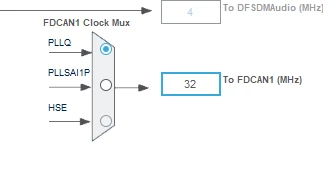
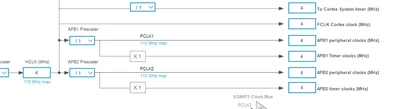
2) From your clock configuration you have APB clock = 4MHz while FDCAN kernel clock = 32MHz:

mALLEm_0-1766584409104.pngmALLEm_1-1766584419472.png

and you need to have fdcan_tq_ck  <  fdcan_pclk as stated in this knowledge base article: 

FAQ: Fixing STM32 FDCAN communication disruptions - APB bus, kernel, and time quanta clocks

Hope that helps.

2 replies

mƎALLEm
Technical Moderator
December 23, 2025

Hello,

For CAN/FDCAN you need to provide more and more details than what you have provided.

Your code + your schematic + the CAN bus configuration (showing the nodes available on the bus).

"To give better visibility on the answered topics, please click on ""Accept as Solution"" on the reply which solved your issue or answered your question."
Associate II
December 23, 2025

Post edited by ST moderator to be inline with the community rules for the code sharing. In next time please use </> button to paste your code and a linker script content. Please read this post: How to insert source code.

Hi ,

Thanks for the reply and we are using following two functions to configure FDCAN.

static void MX_FDCAN1_Init(void)

{


/* USER CODE BEGIN FDCAN1_Init 0 */


/* USER CODE END FDCAN1_Init 0 */


/* USER CODE BEGIN FDCAN1_Init 1 */


/* USER CODE END FDCAN1_Init 1 */

hfdcan1.Instance = FDCAN1;

hfdcan1.Init.ClockDivider = FDCAN_CLOCK_DIV2;

hfdcan1.Init.FrameFormat = FDCAN_FRAME_CLASSIC;

hfdcan1.Init.Mode = FDCAN_MODE_NORMAL;

hfdcan1.Init.AutoRetransmission = DISABLE;

hfdcan1.Init.TransmitPause = DISABLE;

hfdcan1.Init.ProtocolException = DISABLE;

hfdcan1.Init.NominalPrescaler = 2;

hfdcan1.Init.NominalSyncJumpWidth = 1;

hfdcan1.Init.NominalTimeSeg1 = 10;

hfdcan1.Init.NominalTimeSeg2 = 5;

hfdcan1.Init.DataPrescaler = 1;

hfdcan1.Init.DataSyncJumpWidth = 1;

hfdcan1.Init.DataTimeSeg1 = 1;

hfdcan1.Init.DataTimeSeg2 = 1;

hfdcan1.Init.StdFiltersNbr = 0;

hfdcan1.Init.ExtFiltersNbr = 0;

hfdcan1.Init.TxFifoQueueMode = FDCAN_TX_FIFO_OPERATION;

if (HAL_FDCAN_Init(&hfdcan1) != HAL_OK)

{

Error_Handler();

}

/* USER CODE BEGIN FDCAN1_Init 2 */


/* USER CODE END FDCAN1_Init 2 */


}


void FDCAN_Config(uint32_t filter_mask, uint32_t filter_id)

{

FDCAN_FilterTypeDef sFilterConfig;


/* Configure Rx filter */

sFilterConfig.IdType = FDCAN_STANDARD_ID;

sFilterConfig.FilterIndex = 0;

sFilterConfig.FilterType = FDCAN_FILTER_MASK; //FDCAN_FILTER_RANGE;

sFilterConfig.FilterConfig = FDCAN_FILTER_TO_RXFIFO0;

sFilterConfig.FilterID1 = filter_id; //FILTER_ID_1;

sFilterConfig.FilterID2 = filter_mask; //0x7FF;

if (HAL_FDCAN_ConfigFilter(&hfdcan1, &sFilterConfig) != HAL_OK)

{

Error_Handler();

}


/* Start the FDCAN module */

if (HAL_FDCAN_Start(&hfdcan1) != HAL_OK)

{

Error_Handler();

}


if (HAL_FDCAN_ActivateNotification(&hfdcan1, FDCAN_IT_RX_FIFO0_NEW_MESSAGE, 0) != HAL_OK)

{

Error_Handler();

}


/* Prepare Tx Header */

TxHeader.Identifier = FILTER_ID_1;

TxHeader.IdType = FDCAN_STANDARD_ID;

TxHeader.TxFrameType = FDCAN_DATA_FRAME;

TxHeader.DataLength = FDCAN_DLC_BYTES_2;

TxHeader.ErrorStateIndicator = FDCAN_ESI_PASSIVE;

TxHeader.BitRateSwitch = FDCAN_BRS_OFF;

TxHeader.FDFormat = FDCAN_CLASSIC_CAN;

TxHeader.TxEventFifoControl = FDCAN_NO_TX_EVENTS;

TxHeader.MessageMarker = 0;

}


These are the functions we are using to initialize CAN , can you help us to fix this issue.

mƎALLEm
Technical Moderator
December 23, 2025

Hello,

As I said previously, you need to share:

1-  A minimal project that reproduces the behavior

2- Your schematics

3- The CAN bus configuration

Otherwise, sorry, I cannot help you efficiently.

Thank you for your understanding.

"To give better visibility on the answered topics, please click on ""Accept as Solution"" on the reply which solved your issue or answered your question."
Associate II
December 24, 2025

Hi ,
Sorry for the delay , please find attached project document and let us know what is causing the issue and required modifications.

Thank you.