
Associate III
July 11, 2023
Solved

Unable to regress to RDP=0

  • July 11, 2023
  • 5 replies
  • 3293 views

I'm working on a custom STM32U5 board and I'm trying to harden the system.

I followed the AN5347 (https://www.st.com/resource/en/application_note/an5347-arm-trustzone-features-for-stm32l5-and-stm32u5-series-stmicroelectronics.pdf) in particular I followed the chapter 10 with success as I was able to raise up to RDP=2 with OEM password and back to RDP=0.

Then I tried for the second time using the STM32CubeProgrammer instead of the command line as described in the application note, but I got some issues at step 5: Set RDP level 2. The STM32CubeProgrammer did not end the process and got stuck writing RDP=0xCC in the option byte and after ten minutes I forced the termination of the GUI.

After that I was not able to recover to RDP=0.

Every time I try to send a command to the board I get some error.

If I try to follow chapter 10.6 Unlock RDP level 2 with OEM2Key with the command line:

STM32_Programmer_CLI.exe -c port=swd mode=UR -unlockrdp2 0xMYKEYLOW 0xMYKEYHI

the result is the following:

 -------------------------------------------------------------------
 STM32CubeProgrammer v2.13.0
 -------------------------------------------------------------------

ST-LINK SN : 53FF71068389505253152567
ST-LINK FW : V2J40S7
Board : --
Voltage : 3.39V
Unlock RDP2 password succefully done!
Error: ST-LINK error (DEV_TARGET_NOT_HALTED)

All other commands sent via cli or via the programmer, get some error, most of the time unable to read values.

Now I don't know what to do to recover this board.

Any idea?
Best answer by Diane POMABIA

Hello @Manuel Ferrero ,

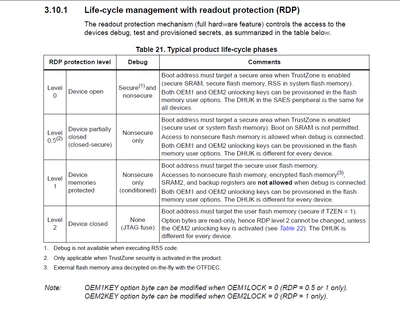
If you have activated RDP level 2 without defining the OEM2key, you have blocked your part and will no longer be able to regress, therefore erasing or reprogramming it.

You can refer to table 21 in reference Manual (RM0456) 

DianePOMABIA_0-1689583931506.png

Regards

Diane


Regards

Diane

5 replies

ST Employee
July 12, 2023

Hello @Manuel Ferrero 

Can you confrim that that you followed the same procedure as described in this article?

https://community.st.com/t5/stm32-mcus/how-to-regress-from-rpd-level-2-to-rdp-level-0-on-the-stm32u5/ta-p/568476

Regards

Diane

Associate III
July 13, 2023

Hello @Diane POMABIA 

I confirm that I followed that procedure, but at the moment I have problems at step #3, where I get the following error:

09:29:23 : UR connection mode is defined with the HWrst reset mode
09:29:24 : ST-LINK SN : REDACTED
09:29:24 : ST-LINK FW : V2J40S7
09:29:24 : Board : --
09:29:24 : Voltage : 3.39V
09:29:24 : SWD freq : 4000 KHz
09:29:24 : Connect mode: Hot Plug
09:29:24 : Reset mode : Software reset
09:29:24 : Device ID : 0x482
09:29:24 : Revision ID : Rev W
09:29:24 : Debug in Low Power mode enabled.
09:29:25 : Error: Target interface must be at chip protection Level 2
09:29:25 : UPLOADING OPTION BYTES DATA ...
09:29:25 : Bank : 0x00
09:29:25 : Address : 0x40022040
09:29:25 : Size : 36 Bytes
09:29:25 : Error: Uploading Option Bytes bank: 0 failed
09:29:25 : Error: Initializing the Option Bytes failed
09:29:25 : Disconnected from device.

And when I try to reconnect the STLINK i get the following log:

09:34:13 : UR connection mode is defined with the HWrst reset mode
 09:34:14 : ST-LINK SN : REDACTED
 09:34:14 : ST-LINK FW : V2J40S7
 09:34:14 : Board : --
 09:34:14 : Voltage : 3.39V
 09:34:14 : SWD freq : 4000 KHz
 09:34:14 : Connect mode: Hot Plug
 09:34:14 : Reset mode : Software reset
 09:34:14 : Device ID : 0x482
 09:34:14 : Revision ID : Rev W
 09:34:14 : Debug in Low Power mode enabled.
 09:34:14 : UPLOADING OPTION BYTES DATA ...
 09:34:14 : Bank : 0x00
 09:34:14 : Address : 0x40022040
 09:34:14 : Size : 36 Bytes
 09:34:14 : Error: Uploading Option Bytes bank: 0 failed
 09:34:14 : Error: Initializing the Option Bytes failed
 09:34:14 : Disconnected from device.

Is there some procedure to wipe completely the micro and restart from scratch or I have to throw it in the bin?

Diane POMABIABest answer
ST Employee
July 17, 2023

Hello @Manuel Ferrero ,

If you have activated RDP level 2 without defining the OEM2key, you have blocked your part and will no longer be able to regress, therefore erasing or reprogramming it.

You can refer to table 21 in reference Manual (RM0456) 

DianePOMABIA_0-1689583931506.png

Regards

Diane


Regards

Diane

Associate III
July 18, 2023

In RM0456 I read:

"Shifting the password key through JTAG/SWD corresponds to writing two 32-bit key words,
AUTH_KEY[31:0], then AUTH_KEY[63:32], in the DBGMCU_DBG_AUTH_HOST register."

If I launch the STM32CubeProgrammer and I write my password in the Secure programming screen does the ST-LinkV2 send the password as described?

ST Employee
July 19, 2023

Hello @Manuel Ferrero 

Yes, based on what you told me under the forum of the article, you have correctly set your password .

You are facing a tool bug, this is a workaround: 

Can you retest on your two boards by doing step 1 <<Gback to the "secure programming" menu and Click on "Unlock RDP2" and after on "Apply unlock RDP2">> 2 times before moving on to step 2?

if you have correctly defined your password, no worries, go back directly from this step, you can regress to level 0.

Internal ticket has been created to solve this bug.

Internal ticket number: 157559 (This is an internal tracking number and is not accessible or usable by customers).

Let me know if it's ok for you.

Regards

Diane

Associate III
April 15, 2024

Hello, 
I have the same problem with STM32U585. Did you manage to solve the problem? If you could tell me what you did, you could really help me out.

Thanks in advance.

Associate III
April 16, 2024

Hello @Diane POMABIA ,

Thank you for responding.

I have version 2.16.0 of CubeProgrammer.

Regards

Istillaga

nortowianski
Associate II
February 28, 2026

@Diane POMABIA 

Why didn't you response in that topic? 
I think you have a huge bug in STM32CubeProgrammer. I bricked (I suppose) two PCBs because restoring to factory settings in STM32CubeProgrammer stuck and crashed. I am not sure but I think that after setting RDP2 with OEM password, STM32CubeProgrammer tries to unlockrdp2 and then set rdp to 0xCC. 

STM32_Programmer_CLI -c port=JTAG mode=hotplug -lockrdp2 0xFACEB00C 0xDEADBABE
 -------------------------------------------------------------------
 STM32CubeProgrammer v2.20.0 
 -------------------------------------------------------------------

ST-LINK SN : 002E003A3234510836303532
ST-LINK FW : V3J16M8B5S1
Board : STLINK-V3MODS
Voltage : 3.21V
JTAG freq : 8000 KHz
Connect mode: Hot Plug
Reset mode : Software reset
Device ID : 0x482
Revision ID : Rev X
Device name : STM32U575/STM32U585
Flash size : 2 MBytes (default)
Device type : MCU
Device CPU : Cortex-M33
BL Version : 0x0
Debug in Low Power mode enabled


Lock RDP2 first password failed
Error: Cannot lock RDP level 2.
STM32_Programmer_CLI --connect port=SWD mode=hotplug --optionbytes displ

 -------------------------------------------------------------------
 STM32CubeProgrammer v2.20.0 
 -------------------------------------------------------------------

ST-LINK SN : 002E003A3234510836303532
ST-LINK FW : V3J16M8B5S1
Board : STLINK-V3MODS
Voltage : 3.15V
SWD freq : 8000 KHz
Connect mode: Hot Plug
Reset mode : Software reset
Device ID : 0x482
Revision ID : Rev X
Device name : STM32U575/STM32U585
Flash size : 2 MBytes (default)
Device type : MCU
Device CPU : Cortex-M33
BL Version : 0x0
Debug in Low Power mode enabled


UPLOADING OPTION BYTES DATA ...

 Bank : 0x00
 Address : 0x40022040
 Size : 48 Bytes


Error: Uploading Option Bytes bank: 0 failed
Error: Initializing the Option Bytes failed


Is it any chance to unblock STM?