
Associate II
August 7, 2025
Solved

Unable to use SMPS on STM32U375CGUxQ

  • August 7, 2025
  • 3 replies
  • 342 views

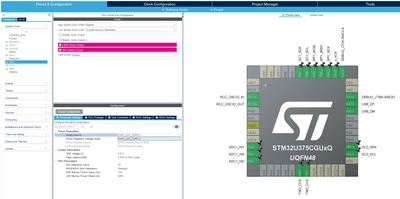
I'm currently trying to configure a project based on an STM32U375CGUxQ, but I can only "choose" the LDO, even though the package clearly shows the SMPS pins:
cjb89_0-1754564353482.png

I'm using the STM32U3 package version 1.2.0, STM32CubeIDE 1.19.0, build 25607_20250703_0907. 


Are there any prerequisites to being able to use the SMPS, and if so, what are they?


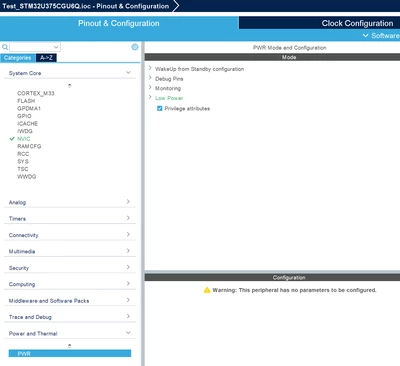
NB: There doesn't seem to be a "Power saving mode" under the PWR category:
cjb89_0-1754564803763.png


Best answer by KDJEM.1

Hello @cjb89 ,


Similar issue is reported here.

I confirm the issue. It is a STM32CubeMX issue.

I reported internally for correction.

Internal ticket number: 214214 (This is an internal tracking number and is not accessible or usable by customers).


Thank you.

Kaouthar

3 replies

KDJEM.1
KDJEM.1Best answer
Technical Moderator
August 7, 2025

Hello @cjb89 ,


Similar issue is reported here.

I confirm the issue. It is a STM32CubeMX issue.

I reported internally for correction.

Internal ticket number: 214214 (This is an internal tracking number and is not accessible or usable by customers).


Thank you.

Kaouthar

To give better visibility on the answered topics, please click on Accept as Solution on the reply which solved your issue or answered your question.
cjb89Author
Associate II
August 7, 2025

Thank you. Is there a foreseeable time until the fix is deployed or some workaround?

KDJEM.1
Technical Moderator
August 7, 2025

Hello @cjb89 ;


I will keep you up to date until the issue is solved.

Thanks


Kaouthar

To give better visibility on the answered topics, please click on Accept as Solution on the reply which solved your issue or answered your question.
KDJEM.1
Technical Moderator
December 1, 2025

Hello @cjb89 ;


The issue is fixed in STM32CubeMX 6.16.0 version.


Thank you.

Kaouthar

To give better visibility on the answered topics, please click on Accept as Solution on the reply which solved your issue or answered your question.
cjb89Author
Associate II
December 1, 2025

Thank you for the information; project is updated ;)