

hotuz.1
Associate
March 29, 2022
Solved

Compiling and flashing the original X-CUBE-SBSFU for STM32L4S5 outputs error.

  • March 29, 2022
  • 3 replies
  • 1214 views

I am using STM32CubeExpansion_SBSFU_V2.6.0 to test SBSFU on B-L4S5I-IOT01A board.

I am using the projects in the Projects/B-L4S5I-IOT01A/2_Images_KMS folder with STM32CubeIDE. I did not change or modify anything regarding the files.

I first built the SECoreBin and then the SBSFU project. Then I followed UM2262 documentation page 48 to flash the SBSFU.bin image.

I connected to the board with Tera Term but getting the following error output:
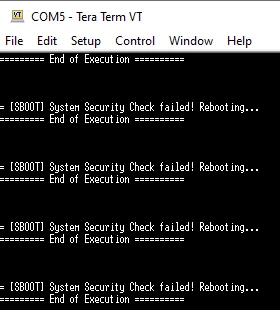
0693W00000Lw6NvQAJ.pngAm I missing something?

This topic has been closed for replies.
Best answer by Fred

Hi,

looks like the system concludes that your security protections are not activated correctly.

Maybe you can turn the security off one by one via app_sfu.h, line 156 onwards until you find the one creating the issue ?

Otherwise, you can disable RDP and DAP protection in this same file:

// #define SFU_DAP_PROTECT_ENABLE

// #define SFU_PROTECT_RDP_LEVEL (OB_RDP_LEVEL_1)

Then you can set a breakpoint in:

SFU_BOOT_CheckApplySecurityProtections()

and determine where the check fails.

3 replies

Fred
FredBest answer
ST Employee
March 29, 2022

Hi,

looks like the system concludes that your security protections are not activated correctly.

Maybe you can turn the security off one by one via app_sfu.h, line 156 onwards until you find the one creating the issue ?

Otherwise, you can disable RDP and DAP protection in this same file:

// #define SFU_DAP_PROTECT_ENABLE

// #define SFU_PROTECT_RDP_LEVEL (OB_RDP_LEVEL_1)

Then you can set a breakpoint in:

SFU_BOOT_CheckApplySecurityProtections()

and determine where the check fails.

Fred
ST Employee
March 29, 2022

Just tried with the same version, works for me:

0693W00000Lw8NcQAJ.png

hotuz.1
hotuz.1Author
Associate
April 6, 2022

I disabled User configuration- dual-bank option in option bytes using STM32CubeProgrammer and it solved it. It comes enabled by default.

Thank you for the fast response!