

Vmere.1
Associate III
August 8, 2022
Question

Include paths?

  • August 8, 2022
  • 3 replies
  • 868 views

Hello guys,

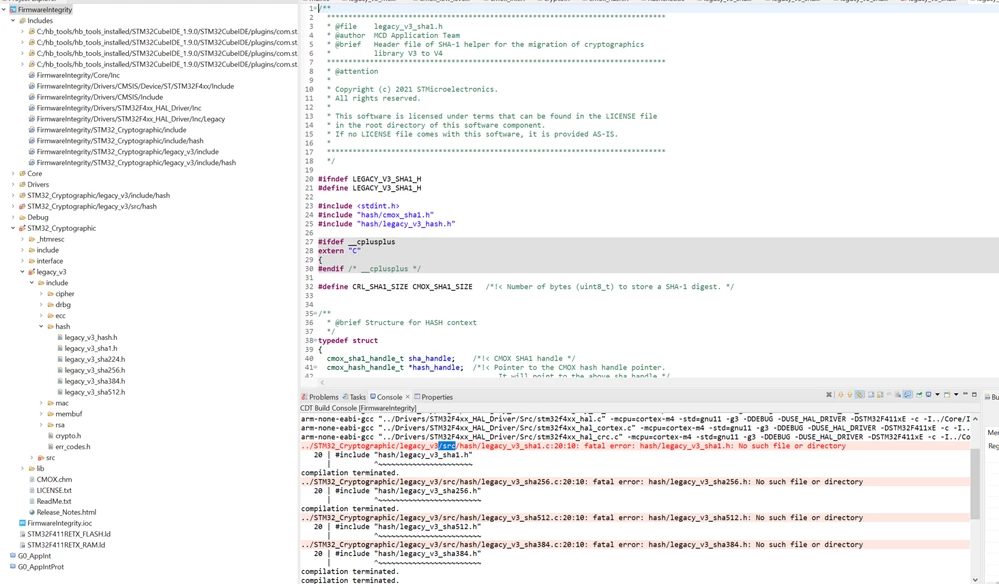
I'm trying to use the sample project given in the MOOC, and I'm getting compilation errors.
0693W00000QNC45QAH.png 

The below is the error message.

../STM32_Cryptographic/legacy_v3/src/hash/legacy_v3_sha1.c:20:10: fatal error: hash/legacy_v3_sha1.h: No such file or directory

  20 | #include "hash/legacy_v3_sha1.h"

I don't understand why I'm getting this despite adding the include path properly.

Am I missing something?

Regards,

Vmere.

This topic has been closed for replies.

3 replies

waclawek.jan
Super User
August 8, 2022

Look at the command just above the error, i.e. the gcc invocation with parameters. Is the path to hash/legacy_v3_sha1.h amongst the paths passed using -I in that line? Note, that if path is e.g. c:\aaa\bbb, then the compiler tries to open c:\aaa\bbb\hash\legacy_v3_sha1.h.

JW

Vmere.1
Vmere.1Author
Associate III
August 8, 2022

Hello, I checked as you said, and I'm able to open the folder. Frankly, I didn't type the include path. I used the options present to add the new folder.

arm-none-eabi-gcc "../Drivers/STM32F4xx_HAL_Driver/Src/stm32f4xx_hal_pwr_ex.c" -mcpu=cortex-m4 -std=gnu11 -g3 -DDEBUG -DUSE_HAL_DRIVER -DSTM32F411xE -c -I../Core/Inc -I../Drivers/STM32F4xx_HAL_Driver/Inc -I../Drivers/STM32F4xx_HAL_Driver/Inc/Legacy -I../Drivers/CMSIS/Device/ST/STM32F4xx/Include -I../Drivers/CMSIS/Include -I"C:/Users/BALAVIJ/STM32CubeIDE/workspace_1.9.0/FirmwareIntegrity/STM32_Cryptographic/include/hash" -I"C:/Users/BALAVIJ/STM32CubeIDE/workspace_1.9.0/FirmwareIntegrity/STM32_Cryptographic/include" -I"C:/Users/BALAVIJ/STM32CubeIDE/workspace_1.9.0/FirmwareIntegrity/STM32_Cryptographic/legacy_v3/include" -I"C:/Users/BALAVIJ/STM32CubeIDE/workspace_1.9.0/FirmwareIntegrity/STM32_Cryptographic/legacy_v3/include/hash" -O0 -ffunction-sections -fdata-sections -Wall -fstack-usage -MMD -MP -MF"Drivers/STM32F4xx_HAL_Driver/Src/stm32f4xx_hal_pwr_ex.d" -MT"Drivers/STM32F4xx_HAL_Driver/Src/stm32f4xx_hal_pwr_ex.o" --specs=nano.specs -mfpu=fpv4-sp-d16 -mfloat-abi=hard -mthumb -o "Drivers/STM32F4xx_HAL_Driver/Src/stm32f4xx_hal_pwr_ex.o"

../STM32_Cryptographic/legacy_v3/src/hash/legacy_v3_sha384.c:20:10: fatal error: hash/legacy_v3_sha384.h: No such file or directory

  20 | #include "hash/legacy_v3_sha384.h"

   |     ^~~~~~~~~~~~~~~~~~~~~~~~~

compilation terminated.

Vmere.1
Vmere.1Author
Associate III
August 8, 2022

Sorry, I'm unable to delete the answer.

But sometimes when I restart the workspace, it kind of rearranges it self.

0693W00000QNCYyQAP.pngcan you see the STM32_Cryptographic in the root folder twice?

mattias norlander
ST Employee
August 15, 2022

Which MOOC tutorial are you following? Let's see if we can re-produce.

Looking at your screenshot with STM32_Cryptography/legacy_v3 it looks like there is some issue with "source folders" vs normal "folders" in your project... That may not at all be related to the problem you describe though. Just pointing out anomalies from your screenshot.

Have you verified that the files actually are physically available on your harddrive where the toolchain is looking for them?