

HDevi.1
Associate II
July 13, 2022
Solved

Issue with porting SBSFU on STM32L433RC Nucleo board

  • July 13, 2022
  • 2 replies
  • 1041 views

Hello,

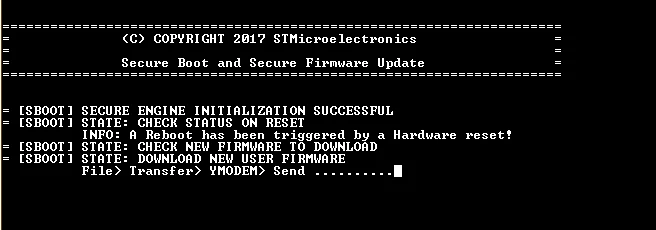
I am trying to port SBSFU example project on STM32L433RC board. I followed getting started and integration guide to integrate STM32L432KC SBSFU 1 image example project(after modification) on STM32L433RC board. Below is the image where it gets stuck and waits for New user firmware. I ran scripts from MOOC workshop. It just uses UserApp.bin to download on board. Not sure why the code is trying to ask to download new user firmware. Can anyone help in pointing out if I am doing something wrong?

Thanks!
0693W00000QL87fQAD.png

This topic has been closed for replies.
Best answer by Jocelyn RICARD

Hello @HDevi.1​,

the reason why you have this trace is that no valid firmware was found.

There can be several reasons for such status.

The firmware was not loaded at all, or loaded at a wrong address, or not properly signed...

Best regards

Jocelyn

2 replies

Jocelyn RICARD
Jocelyn RICARDBest answer
ST Employee
August 1, 2022

Hello @HDevi.1​,

the reason why you have this trace is that no valid firmware was found.

There can be several reasons for such status.

The firmware was not loaded at all, or loaded at a wrong address, or not properly signed...

Best regards

Jocelyn

ST Employee
September 15, 2022

The MCU needs to have a user application ("your" application). The secure boot is expected to have an application and confirm is a valid application. The fist time SBSFU ask to download an application.

Please take a look at a UM2262 and AN5056.

A UM2262 section 8, Step-by-step execution is mentioned the steps of our example:

...........................................

The following steps describe a dual-slot SBSFU scenario executed on the NUCLEOL476RG board with the default cryptographic scheme, further illustrated in Figure 17:

1. Download the SBSFU application

2. SBSFU is running: download UserApp #A

3. UserApp #A is installed

4. UserApp #A is running, download UserApp #B

5. UserApp #B is installed then running

...........................................

UM2262

https://www.st.com/resource/en/user_manual/um2262-getting-started-with-the-xcubesbsfu-stm32cube-expansion-package-stmicroelectronics.pdf

AN5056

https://www.st.com/resource/en/application_note/an5056-integration-guide-for-the-xcubesbsfu-stm32cube-expansion-package-stmicroelectronics.pdf