

Question
SFI : Error: RSS internal system error or License is invalid!
Device details :
ST-LINK SN : 002F003F3137510539383538
ST-LINK FW : V3J9M3B5S1
Board : STLINK-V3SET
Voltage : 3.76V
SWD freq : 24000 KHz
Connect mode: Hot Plug
Reset mode : Software reset
Device ID : 0x480
Revision ID : --
Device name : STM32H7A/B
Flash size : 2 MBytes
Device type : MCU
Device CPU : Cortex-M7
BL Version : 0x91
When trying to program SFI file to device getting below error
Error: SECURITY State Fail
Error: Invalid state after SFI install !
Error: RSS internal system error or License is invalid !
SFI creation :
on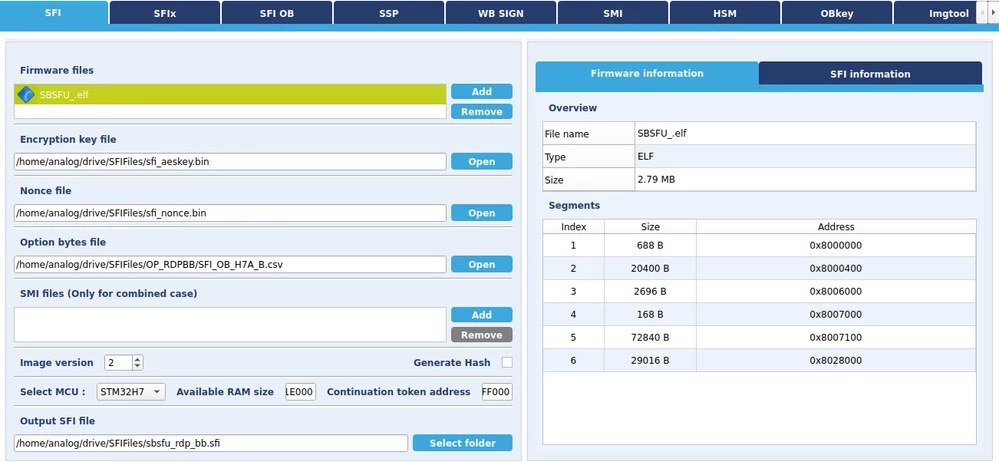 Full logs:
./STM32_Programmer_CLI -c port=swd mode=HOTPLUG -sfi protocol=static /home/analog/drive/SFIFiles/sbsfu_rdp_bb.sfi hsm=1 slot=1
 -------------------------------------------------------------------
 STM32CubeProgrammer v2.10.0
 -------------------------------------------------------------------

ST-LINK SN : 002F003F3137510539383538
ST-LINK FW : V3J9M3B5S1
Board : STLINK-V3SET
Voltage : 3.76V
SWD freq : 24000 KHz
Connect mode: Hot Plug
Reset mode : Software reset
Device ID : 0x480
Revision ID : --
Device name : STM32H7A/B
Flash size : 2 MBytes
Device type : MCU
Device CPU : Cortex-M7
BL Version : 0x91

 Protocol Information : static

 SFI File Information :

 SFI file path : /home/analog/drive/SFIFiles/sbsfu_rdp_bb.sfi
 SFI HSM slot ID : 1
 SFI header information :
 SFI protocol version : 2
 SFI total number of areas : 9
 SFI image version : 2
 SFI Areas information :

 Parsing Area 1/9 :
 Area type : F
 Area size : 688
 Area destination address : 0x8000000

 Parsing Area 2/9 :
 Area type : F
 Area size : 20400
 Area destination address : 0x8000400

 Parsing Area 3/9 :
 Area type : F
 Area size : 2704
 Area destination address : 0x8006000

 Parsing Area 4/9 :
 Area type : F
 Area size : 176
 Area destination address : 0x8007000

 Parsing Area 5/9 :
 Area type : F
 Area size : 72848
 Area destination address : 0x8007100

 Parsing Area 6/9 :
 Area type : P
 Area size : 32
 Area destination address : 0x81ff000

 Parsing Area 7/9 :
 Area type : R
 Area size : 32
 Area destination address : 0x81ff000

 Parsing Area 8/9 :
 Area type : F
 Area size : 29024
 Area destination address : 0x8028000

 Parsing Area 9/9 :
 Area type : C
 Area size : 36
 Area destination address : 0x0

Reading the chip Certificate...


Requesting Chip Certificate from device ...

Get Certificate done successfully

requesting license for the current STM32 device

Init Communication ...

ldm_LoadModule(): loading module "./libstp11_SAM.so" ...
ldm_LoadModule: OK loading library "./libstp11_SAM.so": 0x018ED970 ...
C_GetFunctionList() returned 0x00000000, g_pFunctionList=0x5F696060
P11 lib initialization Success!

Opening session with solt ID 1...

Succeed to Open session with reader solt ID 1

Succeed to generate license for the current STM32 device

Closing session with reader slot ID 1...

Session closed with reader slot ID 1

Closing communication with HSM...

Communication closed with HSM

Succeed to get License for Firmware from HSM slot ID 1

Starting Firmware Install operation...


Activating security...
Warning: Option Byte: SECURITY, value: 0x1, was not modified.
Warning: Option Bytes are unchanged, Data won't be downloaded
Time elapsed during option Bytes configuration: 00:00:00.002
Activating security Success
Setting write mode to SFI
Warning: Option Byte: SECURITY, value: 0x1, was not modified.
Warning: Option Byte: ST_RAM_SIZE, value: 0x3, was not modified.
Warning: Option Bytes are unchanged, Data won't be downloaded
Time elapsed during option Bytes configuration: 00:00:00.002
Succeed to set write mode for SFI

Starting SFI part 1

Writing license to address 0x24020800
Writing Img header to address 0x24021000
Writing areas and areas wrapper...
RSS process started...

RSS command execution OK
RSS complete Value = 0x16
Reconnecting...
ST-LINK SN : 002F003F3137510539383538
ST-LINK FW : V3J9M3B5S1
Board : STLINK-V3SET
Voltage : 3.76V
SWD freq : 24000 KHz
Connect mode: Hot Plug
Reset mode : Software reset
Device ID : 0x480
Revision ID : --
Reconnected !


Error: SECURITY State Fail
Error: Invalid state after SFI install !
Error: RSS internal system error or License is invalid !

Aborting...
Time elapsed during option Bytes configuration: 00:00:00.019
Time elapsed during option Bytes configuration: 00:00:00.028

Waiting 8s for end of regression...
Display OB after Abort for sanity check


OPTION BYTES BANK: 0

 Read Out Protection:

 RDP : 0xAA (Level 0, no protection)

 BOR Level:

 BOR_LEV : 0x0 (reset level OFF)

 User Configuration:

 IWDG1_SW : 0x1 (Independent watchdog is controlled by software)
 NRST_STOP : 0x1 (STOP mode on Domain 1 is entering without reset)
 NRST_STBY : 0x1 (STANDBY mode on Domain 1 is entering without reset)
 VDDMMC_HSLV : 0x0 (I/O speed optimization at low-voltage disabled)
 IWDG_FZ_STOP : 0x1 (Independent watchdog is running in STOP mode)
 IWDG_FZ_SDBY : 0x1 (Independent watchdog is running in STANDBY mode)
 SECURITY : 0x1 (Security feature enabled)
 VDDIO_HSLV : 0x0 (Product working in the full voltage range,I/O speed optimization at low-voltage disabled)
 SWAP_BANK_OPT: 0x0 (after boot loading, no swap for user sectors)

 Boot address Option Bytes:

 BOOT_CM7_ADD0: 0x800 (0x8000000)
 BOOT_CM7_ADD1: 0x1FF0 (0x1FF00000)

 PCROP Protection:

 PROT_AREA_START1: 0x777 (0x8077700)
 PROT_AREA_END1: 0x0 (0x80000FF)
 DMEP1 : 0x1 (Flash Bank 1 PCROP zone is erased when RDP level regression (change from level 1 to 0) occurs)
 PROT_AREA_START2: 0x777 (0x8177700)
 PROT_AREA_END2: 0x0 (0x81000FF)
 DMEP2 : 0x1 (Flash Bank 2 PCROP zone is erased when RDP level regression (change from level 1 to 0) occurs)

 Secure Protection:

 SEC_AREA_START1: 0x777 (0x8077700)
 SEC_AREA_END1: 0x0 (0x80000FF)
 DMES1 : 0x1 (Flash Bank 1 secure area is erased when RDP level regression (change from level 1 to 0) occurs)
 SEC_AREA_START2: 0x777 (0x8177700)
 SEC_AREA_END2: 0x0 (0x81000FF)
 DMES2 : 0x1 (Flash Bank 2 secure area is erased when RDP level regression (change from level 1 to 0) occurs)

 DTCM RAM Protection:

 ST_RAM_SIZE : 0x3 (16 KB)

 Write Protection:

 nWRP0 : 0x1 (Write protection not active)
 ...
 nWRP63 : 0x1 (Write protection not active)
Abort SUCCESS

Error: /home/analog/drive/SFIFiles/sbsfu_rdp_bb.sfi SFI file Install Operation Failure! Please, try again