Hi everyone, I found the answer, I think it will be useful for those who encounter this question:
INSTALLING PROTECTION:
The key is written to h503 in the OTP memory, at the address 0x08FFF000  (specify this address in DA_ConfigWithPassword.xml in the file in the <ObDestAddress> field when preparing the password), so it must be clean and never written before.
In the xml file set:
<ObDestAddress>0x08FFF000</ObDestAddress> - record address
<DoEncryption>0</DoEncryption> - no cryptography
<GlobalAlign>8</GlobalAlign> - number of characters in the password (I have 8 = 12345678 (password))
<Name>Password</Name>
<Value>12345678</Value> - set the password
then save the xml file and standardize the OBK file and password.bin files in STM32TrustedPackageCreator.
then in the Cube Programmer, PROV tab, in the Enter Password field, you enter your password, and in the Select Path field, specify the path where the generated OBK file is located and click Start Provisioning.
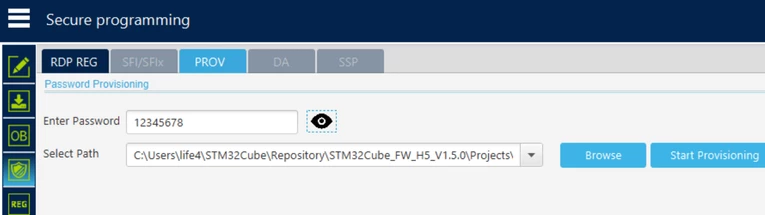
You can program a password into the processor in the ED or 17 state, it makes no difference. After programming, you can view the encrypted password at 0x08FFF000.

After that, set the Product state == 17 and press disconnect(to set the state to closed, you must first transfer it to state 17 or 2E).
Removing protection (transition to the open state == ED)
1- the processor reset pin MUST be connected to the RESET stlink pin, otherwise you will not be able to remove the protection.
2- without pressing connect, go to the Secure Programming tab, open the DA tab, press the Disk button there and a description of the state of your processor and its ID will appear.
3- press Full regression
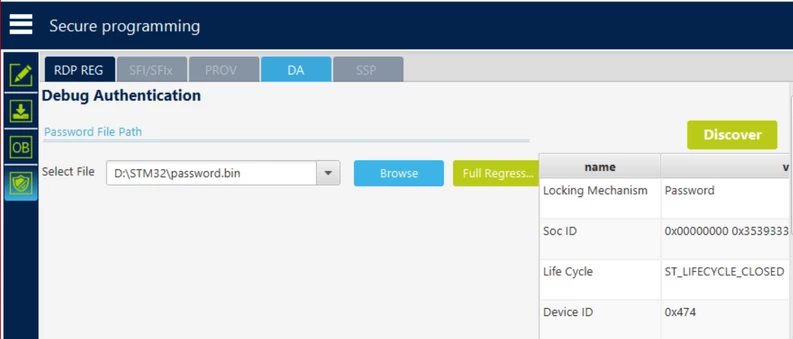
4- done, you have set the password, set and removed the protection.
SEVERAL TIPS:
1- you can use part of the OTP memory for your needs
2- I did it this way: the first time I set the password through the standard tools of the Cuba Programmer, then copied the cells responsible for the password and created a structure with these values, then on serial MK I simply write these values at one time along with programming user values in memory.
3- installing the product state from the application using standard HAL methods(MAKE SURE THAT YOU HAVE A PASSWORD INTO THE DEVICE MEMORY 0x08FFF000 ADRESS) :
/* USER CODE BEGIN PTD */
FLASH_OBProgramInitTypeDef OptionsBytesStruct;//create the OB structure
__HAL_RCC_GET_FLAG(RCC_FLAG_IWDGRST);
__HAL_RCC_CLEAR_RESET_FLAGS();
HAL_FLASHEx_OBGetConfig(&OptionsBytesStruct);
HAL_FLASH_Unlock();
HAL_FLASH_OB_Unlock();
OptionsBytesStruct.ProductState = OB_PROD_STATE_IROT_PROVISIONED; // SET THE PRODUCTION STATE
HAL_FLASHEx_OBProgram(&OptionsBytesStruct);
HAL_FLASH_OB_Launch();HAL_FLASH_OB_Lock();HAL_FLASH_Lock();
HAL_FLASH_Unlock();
HAL_FLASH_OB_Unlock();
OptionsBytesStruct.ProductState = OB_PROD_STATE_CLOSED; // SET THE CLOSED STATE
HAL_FLASHEx_OBProgram(&OptionsBytesStruct);
HAL_FLASH_OB_Launch();HAL_FLASH_OB_Lock();HAL_FLASH_Lock();
NVIC_SystemReset(); // reboot for changes to take effect
4- remove protection (product state == ED )
Attention, this will completely erase the user flash memory of the processor!
HAL_FLASHEx_OBGetConfig(&OptionsBytesStruct);
HAL_FLASH_Unlock();
HAL_FLASH_OB_Unlock();
OptionsBytesStruct.ProductState = OB_PROD_STATE_REGRESSION;// full regression
HAL_FLASHEx_OBProgram(&OptionsBytesStruct);
HAL_FLASH_OB_Launch();HAL_FLASH_OB_Lock();HAL_FLASH_Lock();
NVIC_SystemReset();
That's all, I hope my article will be useful!
