
Associate
September 13, 2024
Solved

STM32H753 SBSFU unable to transfer application firmware

  • September 13, 2024
  • 2 replies
  • 1218 views

Hello.

I'm having trouble transfer the UserApp to SBSFU. Here's the description of the issue. Any help is appreciated!

I prepared the NUCLEO-H753ZI board by disabling all the security and fully erase the board (by setting RDP level 1->0 ).

I'm using the 1-Image example code, All security feature were disabled by #define SECBOOT_DISABLE_SECURITY_IPS in app_sfu.h. I loaded SBSFU.elf onto the board and transferred the UserApp.sfb via YMODEM. At first attempt the user application transferred without issue. At later attempts, the transfer stuck at first couple of packets until it failed. This also happened to a second board.
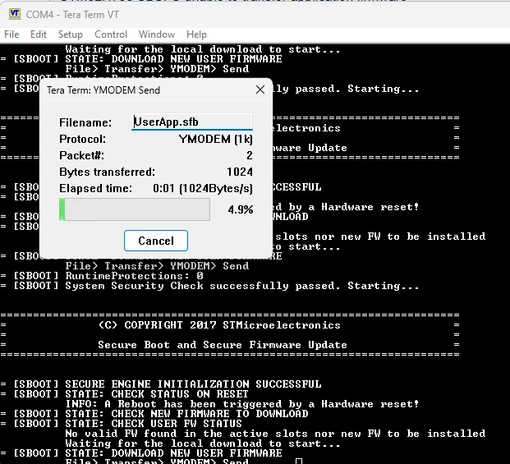
JZ_1-1726250482025.png

Using the debugger, it seems to be failing at SE_CRYPTO_ReadKey_Pub() inside the SE_CRYPTO_Authenticate_Metadata() function. I have no clue for the reason.


I tried a different approach by loading the final image "SBSFU_UserApp.bin" directly to the board and the program went into a infinite reset loop. From the debug, it failed at the same place.
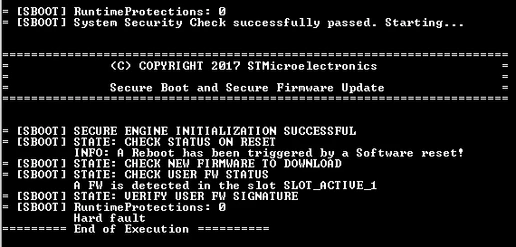
JZ_0-1726249366085.png

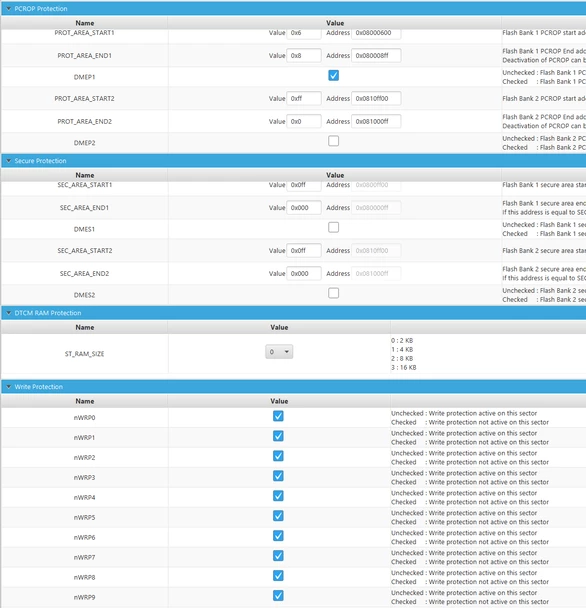
Because it used to work on the board but not later, I suspect there's something changed or misconfigured on my board. Here are the option bytes settings.
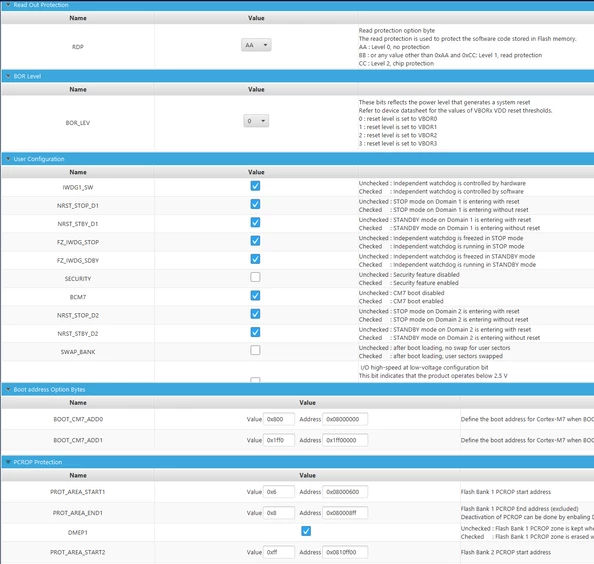
JZ_2-1726252853580.png

JZ_3-1726252911052.png


Best answer by JZ_it

Thank you @Jocelyn RICARD for finding out the root cause. I believe the PCROP protection was enabled when I loaded the SBSFU with security enabled.

Found these posts (1 ,2) that resolve my issue. Using the STM32_Programmer_CLI.exe...

1. Set RDP to level 1


STM32_Programmer_CLI.exe -c port=swd mode=UR -ob RDP=0xBB


2. Empty the PCROP and set RDP to level 0


STM32_Programmer_CLI.exe -c port=swd mode=UR -ob PROT_AREA_START1=0xFF PROT_AREA_END1=0 RDP=0xAA


2 replies

Jocelyn RICARD
ST Employee
September 16, 2024

Hello @JZ_it ,

In option bytes, PCROP region is enabled.

You said you have disabled all protections. So, something is inconsistent.

Please try to remove the PCROP protection using RDP regression. Then flash again the big image.

I hope this will solve your issue

Best regards

Jocelyn

JZ_itAuthorBest answer
Associate
September 16, 2024

Thank you @Jocelyn RICARD for finding out the root cause. I believe the PCROP protection was enabled when I loaded the SBSFU with security enabled.

Found these posts (1 ,2) that resolve my issue. Using the STM32_Programmer_CLI.exe...

1. Set RDP to level 1


STM32_Programmer_CLI.exe -c port=swd mode=UR -ob RDP=0xBB


2. Empty the PCROP and set RDP to level 0


STM32_Programmer_CLI.exe -c port=swd mode=UR -ob PROT_AREA_START1=0xFF PROT_AREA_END1=0 RDP=0xAA


Jocelyn RICARD
ST Employee
September 16, 2024

Hello @JZ_it ,

Yes these are the right commands.

Just the naming convention for RDP levels is a bit different. 0xAA is Level 0 (Open) and 0xBB is level 1.

Best regards

Jocelyn