Associate II
January 16, 2024
Solved

STM32L562QE: "Break at address "0x..." and "No source available for ()..."

  • January 16, 2024
  • 5 replies
  • 3544 views

Hello,

I have not been able to debug any of my TrustZone projects. In order to see what was happening I decided to debug and run ST examples, also with TrustZone implemented, from "STM32Cube_FW_L5_V1.5.0" with the following results:

- FreeRTOS_Secure_IOToggle_TrustZone:

Debug and run correctly only if optimization level is not "None -O0".

- UART_Trace_TrustZone_Secure:

Failed to run and debug regardless of the optimization level (Error: "Break at address "0x430027240" with no debug information or outside of program code"). However, when I commented the function "printf" and "Secure_TraceMessage" I was able to debug and run correctly.

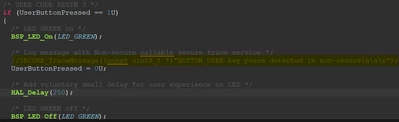
Claudia_1-1705407753234.png

UARTcoment.png

- GTZC_TZSC_MPCBB_TrustZone

Failed to run and debug regardless of the optimization level (Error: "No source available for <signal handler called>() at 0xfffffffe”). When I commented the illegal access to trigger the secure fault the application ran and debugged perfectly.
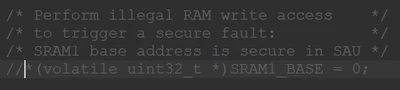
Claudia_0-1705407483970.png

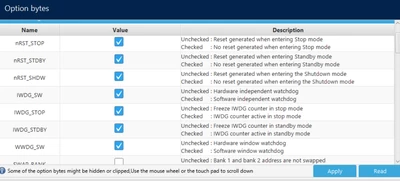
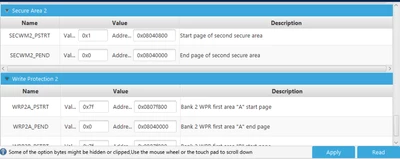
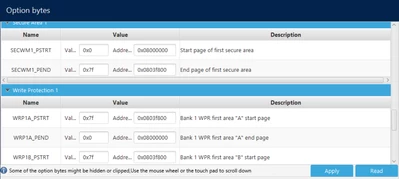
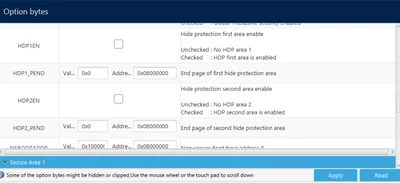
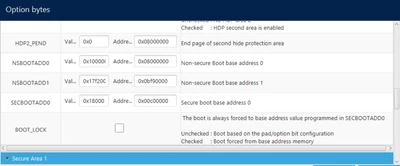
These are my Option Bytes:

OB1.png

OB5.png

OB4.png

OB3.png

OB2.png


Could it be something related with entering the secure side?

IMPORTANT NOTE: I started seeing these problems when I compiled in my board TF-M project example, also from STM32Cube_FW_L5_V1.5.0 package. 

I would like to know if there is a way to run these projects (or my projects) without commenting part of it.

Thank you in advancement for your time and effort.

    This topic has been closed for replies.
    Best answer by Jocelyn RICARD

    Hello @Claudia,

    One possible issue is that your CPU is already stalled before performing the reset.

    Please tray to have the BOOT0 connection upon power-on of the board.

    1) Connect BOOT0 to VDD

    2) Power-on the BOARD

    3) Attach to target with JTAG/SWD in hotplug.

    4) Set TZEN=0 and RDP=0xAA

    Alternatively, at step 3 you should be able to attach using USB-C connector directly to bootloader

    Select USB in STM32CubeProgrammer, check the USB1 port is available by pressing the double arrow button on the right 

    Select TZEN Regression

    Press connect => This should directly launch the regression.


    Best regards

    Jocelyn


    5 replies

    Jocelyn RICARD
    ST Employee
    January 19, 2024

    Hello @Claudia ,

    The SECBOOTADD0 is set to 0x00C00000 which is wrong. It should be 0x0C000000.

    So when you launch the debugger, debugger forces the boot address to match the one from the elf file. But as soon as a reset is triggered the MCU jumps in wrong address.

    Setting the right boot address should solve your debugging issue

    Best regards

    Jocelyn

    ClaudiaAuthor
    Associate II
    January 25, 2024

    Thank you for your reply, 

    Yes, you are right, I had a wrong SECBOOTADD0. Several weeks ago I tried with the following configuration and had the same problem:

    OBSEC.png

    However, I have a bigger problem than before. I tried disabling TrustZone and got the same as in this post:

    After trying to Disable Trustzone, no longer able ... - STMicroelectronics Community

    Is there any way to solve this?

    Thank you in advance, 

    Claudia

    Jocelyn RICARD
    ST Employee
    January 26, 2024

    Hello @Claudia ,

    If you want to disable TrustZone you need to go through a regression from RDP1 or RDP 0.5 to RDP0.

    When you do this you must have some code running in secure that jumps to non secure, otherwise you cannot connect anymore.

    One possibility to recover if you didn't check this before is to enable the system bootloader setting BOOT0 pin to VDD. If the option bytes configuration allow this, the STM32L5 should jump to non secure system bootloader and you should be able to connect in HOTPLUG mode to the target. If you manage to do this, just set TrustZone option byte to 0 and RDP to 0xAA and apply.

    Best regards

    Jocelyn

    ClaudiaAuthor
    Associate II
    February 1, 2024

    Thanks for your reply,

    I tried booting from RSS by connecting BOOT0 pin to VDD as suggested in um2617 (Chapter 6.4.2). However, I got the following message "Initializing Option Bytes failed":

    Claudia_1-1706790462868.png


    It seems that booting from RSS does not change things in my board.

    Do you have any more suggestions? Thank you very much for your interest.

    Claudia

    Jocelyn RICARD
    Jocelyn RICARDBest answer
    ST Employee
    February 1, 2024

    Hello @Claudia,

    One possible issue is that your CPU is already stalled before performing the reset.

    Please tray to have the BOOT0 connection upon power-on of the board.

    1) Connect BOOT0 to VDD

    2) Power-on the BOARD

    3) Attach to target with JTAG/SWD in hotplug.

    4) Set TZEN=0 and RDP=0xAA

    Alternatively, at step 3 you should be able to attach using USB-C connector directly to bootloader

    Select USB in STM32CubeProgrammer, check the USB1 port is available by pressing the double arrow button on the right 

    Select TZEN Regression

    Press connect => This should directly launch the regression.


    Best regards

    Jocelyn


    ClaudiaAuthor
    Associate II
    February 2, 2024

    Hi,

    I was able to connect to the board following your instructions and I was also able to debug everything perfectly. The only thing I had to do was to change the option byte SECBOOTADD0 as you advised.

    Thank you very much for your help and patience.

    Best regards,

    Claudia